
Producing reports for your Managed Funds & TDs portfolio
Once logged in there are three types of reports you can produce, for whatever period you choose:
- General Ledger Report – provides information about your portfolio returns, contributions, tax information, and more (Excel format)
- Investment Report – provides information about your portfolio returns, contributions, tax information, and more (PDF format)
- Tax Summary Report – provides detailed tax information and guidance – can be useful for completing any tax returns (Excel format)
You can create any of the above reports by following these steps:
- Click the “Documents” tab
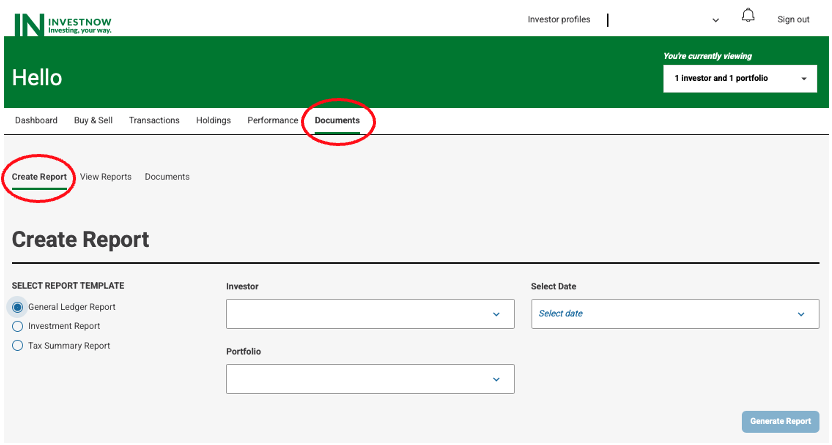
- Select the required report under “Report Template”,
- Select the Investor & Portfolio (this is only relevant when you are linked to 1+ InvestNow portfolios), and the time period under “Select Date”,
- Click “Generate Report”.
Producing reports for your KiwiSaver portfolio
Once logged in there are three types of reports you can produce, for whatever period you choose:
- General Ledger Report – provides information about your portfolio returns, contributions, tax information, and more (Excel format)
- Investment Report – provides information about your portfolio returns, contributions, tax information, and more (PDF format)
- Management Accounts Report – provides more detailed information that may be of use to you and/or your accountant (Excel format)
You can create any of the above reports by following these steps:
- Click the “Documents” tab
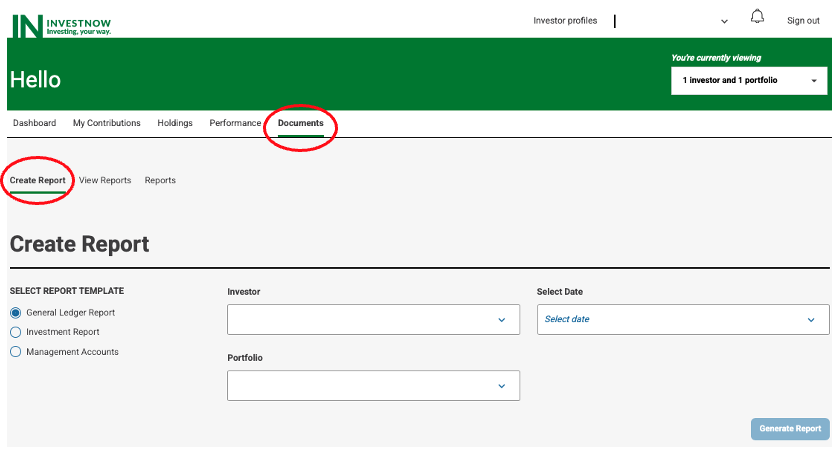
- Select the required report under “Report Template” and the time period under “Select Date”.
- Click “Generate Report”
Note: For some report types there may be other parameters you can select to further customise the report. And, depending upon the report type chosen, a copy will be downloaded to your device or available in the “View Reports” page.