

Frequently asked questions:
- Account Questions
- Anti-Money Laundering (AML)
- Investment Portfolio Management Questions
- KiwiSaver
- Product/Choosing Products Questions
- Questions about InvestNow
- Tax Questions
- Term Definitions
Cash balances in InvestNow Transaction Accounts do not accrue interest. InvestNow receives the interest on any money held within the Transaction Account, which helps to pay costs associated with offering and operating InvestNow, including bank fees (for example, a $0.15 fee for each and every deposit by a customer) which are not passed on to our customers.
The interest that InvestNow receives is the Official Cash Rate (OCR).
- A customer with an average daily cash balance of $2,000, assuming an OCR of 1.00%, the interest over a year would be approximately $20.00, before tax.
-
A customer with an average daily cash balance of $5,000, assuming an OCR of 1.00%, the interest over a year would be approximately $50.00, before tax.
- A customer with an average daily cash balance of $10,000, assuming an OCR of 1.00%, the interest over a year would be approximately $100.00, before tax.
InvestNow provides a simple and efficient way to manage portfolios of managed funds and bank term deposits – plus we have an innovative KiwiSaver scheme!
InvestNow provides you with:
- Online account registration
- Online access 24/7
- Access to a comprehensive range of selected managed funds and bank term deposits.
- The option to join our innovative KiwiSaver scheme.
- Extensive investing education guidance and help resources – articles, webinars, workshops and tools.
- You can contact us Mon-Fri 8:00am to 5:00pm (excludes national public holidays)
- A near-paperless experience with all information held online
- We handle the administration
Yes you can, there are five options available to you:
1) Do not reinvest/withdraw
When your TD matures, the principal and net interest are credited to your Transaction Account.
2) Reinvest principal only
When your TD matures, the principal is reinvested in the same TD (bank, term and interest rate available at that time) and the net interest is credited to your Transaction Account.
3) Reinvest principal and interest
When your TD matures, the principal and net interest is reinvested in the same TD (bank, term and interest rate available at that time).
4) Reinvest principal, withdraw interest
When your TD matures, the principal is reinvested in the same TD (bank, term and interest rate available at that time) and the net interest is credited directly to your Nominated Bank Account ie it leaves your InvestNow account, the same as if you had raised a withdrawl instruction.
5) Withdraw interest only
When your TD matures, the principal is credited to your Transaction Account and the net interest is credited directly to your Nominated Bank Account ie it leaves your InvestNow account, the same as if you had raised a withdrawl instruction.
You will receive a notifcation a few days before your TD is due to mature, at which point you can change your rollover preference (note – you can change the rollover option up to the day before your term deposit matures).
Can I create a direct debit from my Nominated Account to my InvestNow account from within InvestNow?
It is not possible to establish a Direct Debit (DD) for your InvestNow account.
You can transfer money into your InvestNow Transaction Account by online bill payment or direct credit from your Nominated bank account.
How often can I change the funds in my KiwiSaver portfolio?
You can change your KiwiSaver portfolio at any point and there is no limit on how many times you can change. Please note that a buy/sell transaction fee or swing price adjustment may apply when you buy/sell funds, depending upon the funds you have chosen.
Each InvestNow account has a “Transaction Account” – it’s just like a bank account for money coming in and out of your InvestNow account.
Currently no interest is paid to you on your balance within the Transaction Account. We receive the interest on any money held within the Transaction Account. This interest is used to pay Costs associated with offering and operating InvestNow.
You transfer money, from your nominated bank account, into your InvestNow Transaction Account to purchase investments. And when you sell investments, the net sale proceeds are credited to your InvestNow Transaction Account – after which you can either reinvest the monies or withdraw the money to your nominated bank account.
An Investor is the entity (Youth, Individual, Joint, Trust or NZ Company) that has an account with InvestNow – it is the beneficial owner, in whose name that the investments are held.
A client (also known as a Member) is an individual, or individuals, that have access to the Investor account i.e. they are “linked” to the account. Clients can be either authorisers of transactions or simply have view-only permissions.
Some common questions for verifying your identity using the IDScan tool from Cloudcheck
I use an iPhone, and it can’t detect my camera. What do I do?
- Go to Settings
- Find and select Safari
- Scroll towards the bottom and select Camera
- Change permission to Ask
- Reload the Safari page and you grant access when requested
I use an Android phone, and it can’t detect my camera or I accidentally rejected access to my camera.
If you are using Android 10 or below please do the following:
- Go to Settings -> Apps
- Click on the three vertical dots on the top-right of your screen and select App permissions
- Click Camera to open camera permissions
- Here you should see a list of the apps on your device. Use the slider to enable accessto the browser apps you use, e.g. Chrome, Firefox, Samsung Internet
If you are using Android 11 or above please do the following:
- Go to Settings -> Privacy -> Permission Manager
- Click Camera to open camera permissions
- Look for your browser app in one of the categories listed and click on it to change the permissions for this browser app, e.g. Chrome, Firefox, Samsung Internet
You can also view an app’s permissions in Android 11:
- Go to Settings -> Apps & Notifications
- Tap “See All x Apps” (where x is the number of apps you have installed)
- Tap the app from this list and then tap Permissions
- You should see the permissions your app has on the resulting screen
Depending on the browser you use, you may have to also enable access to the Cloudcheck site within the browser. Chrome is one such browser. In Chrome:
- Click the three vertical dots on the top-right of the screen and select Settings
- In the Advanced section select Site Settings
- Click Camera
- Make sure the slider is set to Ask first before allowing sites to use your camera (recommended)
- Also, make sure that the Cloudcheck site is not listed under Blocked sites in this screen. If it is then you must remove it
Similar to the above, another way of resolving this in Chrome is:
- Click the three vertical dots on the top-right of the screen and select Settings
- In the Advanced section select Site Settings
- All Sites
- Search for and select the Cloudcheck link
- Enable the camera using the Slider
Why am I getting an ERROR 103?
The link has expired, please contact the person who sent you the link and ask them to send a new link.
Why am I getting a message about my image not being sharp enough?
We need good quality images to be able to accurately match your face to your ID document. For the best results, we need a good quality camera and decent lighting conditions around you.
When taking pictures of your face, ensure that your face is around 50cm-75cm away from the camera.
When taking pictures of your ID document, try to use your rear camera (select switch camera) as these are usually of better quality and give it a moment to focus. If your camera doesn’t have automatic focus, then move the image/camera to a distance that shows a clear picture.
Note: Some phones will not focus if the image is within 10cm.
It won’t accept my Face and Head image.
- Make sure your face is 50cm-75cm away from the camera,
- There is no-one else in the image with you,
- There is a clear/plain background behind you, and
- You are looking directly at the camera.
InvestNow is designed to work with all the major internet browsers.
Many of our customers have asked if InvestNow offers accounts for children – the answer is simply, yes.
Here is what is needed to set up a child’s account with InvestNow:
- A unique email address for the child, and everyone linked to the account.
- A proof of ID for both the child and the parent/guardian:
- Drivers license
- Passport
- Birth Certificate
- As it is unlikely that a child’s address will appear in any credit databases or land ownership records, we will accept proof of address in the parent or guardian’s name. Alternatively, the IRD letter confirming their IRD number would be suitable as proof of address.
- Tax details:
- A bank statement for the nominated bank account linked to the InvestNow account. This can be in either the child’s or parents/guardian’s name.
How to open a child’s account:
- Click “Join” on the InvestNow home page.
- Select the “Managed Funds & TDs” or “KiwiSaver” account type.
- Select “Youth” as the investor type.
- Work through the application.
- The child will be the main applicant and as most children will not be able to complete the online identity verification process, select manual verification and upload a copy of their ID document.
- To add your details, click “Add Another Member” and select the parent/guardian option. If you are an existing InvestNow member, use the email address you use to log in and we will link this email address to the account when the account opening is completed. If you are new to InvestNow, you will need to complete the identity verification process.
Once the application process has been completed, we will review the application and let you know once the account has been opened.
Don’t hesitate to contact us (contact@investnow.co.nz or 0800 499 466 8:00am to 5:00pm Mon to Fri, excluding public holidays) if you want to discuss this or any other matter with us.
What happens when my child turns 18?
Once your child is over the age of 18 we need to allow them access to their InvestNow account.
As a starting point, you will need to confirm their email address (send us an email to contact@investnow.co.nz) ? Once we have this we will send an email to both of you with the steps that we need to complete to allow them access to their account.
Once logged into your Managed Funds account, go to the Transactions page and use the filters and display options to access the specific transactions you are looking for.
You can also create an Investor Report, for the relevant period, by going to the Documents page and following the options/instructions there.
InvestNow currently offers term deposits with the following terms:
- 1 month
- 3 months
- 6 months
- 9 months
- 12 months
- 18 months
- 2 years
- 3 years
- 4 years
- 5 years
Please note that not all terms are available for all banks.
InvestNow provides each customer with a Transaction account. You transfer money from your nominated bank account, into your InvestNow Transaction account and then use this money, once cleared, to pay for managed funds.
You will need the details of the bank account, into which you will make the deposit, and your unique reference, so we can make sure all deposits are credited to your InvestNow Transaction Account.
To get these details (note – these do not change so we would recommend you set up a new bill payee for future use, using these details):
- Log into your account
- Go to the Dashboard page
- Scroll down, and click the Deposit button
- Take note of the bank account and reference details, using this when you set up the payment/transfer from your nominated bank account.
Deposits are processed throughout the working day, so the money should be in your Transaction Account within a couple of hours.
Should I use ‘My Returns’ or ‘Investment Returns’?
Both measures are useful, but they serve different purposes.
‘My Returns’ is generally the best measure if you want to understand how your wealth has grown over time. Because it takes into account the timing and size of your contributions, withdrawals and transactions, it reflects the ‘real world’ return that you personally experienced as an investor.
‘Investment Returns’ is useful when you want to assess the performance of the underlying funds themselves. Because it removes the impact of investor cash flows, it provides a more consistent basis for comparing the performance of one fund against another, or for evaluating the investment manager’s decisions.
Many investors use both measures together. ‘My Returns’ helps answer “How am I doing?”, while ‘Investment Returns’ helps answer “How are my investments doing?”
Noting that orders are processed at 12pm each Business Day, you can amend/cancel an order up to 12pm on the Business Day the order is due to be processed. However, once the order changes to “Pending” status (after it has been processed at 12pm) it can not be amended or cancelled.
For example, if you raised an order on a Saturday, the order will not be processed until 12pm on the following Monday, assuming Monday is a Business Day, so you have up until then to amend the order. If you raised the order on a Monday, and Monday is a Business Day, you still only have up until 12pm that day to amend the order.
Can I transfer my Australian Super Scheme monies to my KiwiSaver portfolio?
Yes, you can.
We are happy to accept Australian Super funds. Can you confirm the following details and I can draw up a letter to help you with your application with your Super Scheme:
- Super Scheme Name
Member number
Postal address
Please send these details to us (contact@investnow.co.nz).
To buy Managed Funds you need to have cleared funds in your InvestNow Transaction Account – you deposit money in your InvestNow Transaction Account from your nominated bank account (see FAQ for more details).
Note that the minimum investment amount for Managed Funds purchases is $50, when part of a Regular Investment Plan, or $250 for one-off investments. For Term Deposits the minimum amount you must invest differs for each bank. Please visit our TDs page for more information.
- Login to your account
- Go to the Buy & Sell page
- Using the search and filtering options, scroll down the list to find the fund you want to invest in and click the Buy button.
- Enter the dollar amount you wish to invest.
- Note – you need to have at least this amount of available cash in your Transaction Account.
- Some funds may charge an buy or sell transaction fee, which will be deducted from the amount you wish to invest – this will be displayed as you enter the amount you wish to invest.
- Click the Product Disclosure link to download it.
- Read the Disclosure document
- Click the check box to show that you have read, understood and accepted the Product Disclosure document
- Click the Buy button and then the Confirm button.
If you want to cancel your Buy order, you can select the Cancel button beside your order on the Pending Instructions page.
Note that you can cancel any order up until 12pm of the current business day. Where you have placed an order on a non-business day, you can cancel the order up until 12pm of the next business day.
Here are the rules for setting a Password:
- Passwords can contain any combination of letters, numbers and special characters e.g. !, *, & etc
- Your Password must be at least 8 characters in length (note that there is no maximum length), with at least
- 1 upper case letter
- 1 lower case letter
- 1 number
- 1 special character (except # as this special character is not accepted)
Please note: your password can not begin or end with a white space character
Cleared funds are monies in your Transaction Account that are available to be either invested or withdrawn.
InvestNow does not charge any account or administration fees (we do receive a distribution fee on Term Deposits, see FAQ here, and interest held in Transaction Accounts, see FAQ here).
Any funds you choose to invest in have fund charges associated with them that are levied by the fund manager. The fund charges for funds on InvestNow are the same as you would experience investing directly with any of our fund managers. A small number of funds also have transaction fees* that InvestNow levies, which are applied in addition to the fund charges.
*More details available for the Vanguard and Foundation Series Funds.
On InvestNow’s Managed Funds page we display the fund charges for each fund. This includes an estimate of the Annual Fund Charges (including GST) as outlined in the fund’s Product Disclosure Statement, as well as the Total Fund Charges (including GST) charged in the fund’s most recent financial year.
Fund charges can consist of:
- Total Management & Administration charges, including Manager’s basic fee and other management and administration charge; and
- Performance-based fees
The data is sourced from The Disclose Register.
Please refer to the relevant disclosure material and the InvestNow website to ascertain what costs may be associated with each investment selected, which can include management fees, performance fees, buy and sell spreads, transaction fees, among others.
What is the tax liability that is showing on my account?
This is highlighting your estimated PIE tax liability if you were to sell all your multi-rate PIE holdings today. P
IE tax is paid in two instances – when you sell units during the year, or at the end of the tax year (March 31st).
Each PIE Fund attributes its income/loss from its investments, expenses and tax credits across each day in the year. The net taxable income and tax credits are divided up among all of the units of the fund, and a share of the income and credits is attributed to everyone investing in the fund. PIE tax is then calculated based on each investors PIR. This is why it will increase each day.
We make the most recent rates available for purchase at 12:00 pm each business day.
InvestNow is an online-only service. You open your account at www.investnow.co.nz – follow the “Join Now” instructions.
InvestNow offers the following account types:
- Youth
- Individual
- KiwiSaver (individuals only)
- Joint
- Trust
- NZ Company
While account holders need not be currently resident in New Zealand, a New Zealand bank account and a New Zealand IRD number are requirements to open an account. Foreign tax residents must disclose their countries of tax residence and their foreign Tax Identification Number (TIN).
To complete the joining process you will need to have your identity verified. You will need to have the required documents available when you create your account for the identity verification.
Why does Contribution to Return show 0.00%?
This can occur when an investment had no value at the start of the selected reporting period. For example, if an investment was purchased part way through the period, it may have generated positive returns but still display a ‘Contribution to Return’ of 0.00% due to the way the calculation is performed.
What is the difference between Asset Performance and Asset Classification Performance?
Asset Performance shows the performance of a specific investment that you hold, such as an individual managed fund or ETF.
Asset Classification Performance groups investments into broader categories and shows the combined performance of those categories. Examples include International Shares, Australasian Shares and International Fixed Interest.
Asset Classification Performance can be useful for understanding which parts of your portfolio are driving performance, while Asset Performance provides a more detailed view of individual holdings.
See these additional FAQs:
We send all term deposit requests to the appropriate bank at 12:00 pm each business day. Once we have received confirmation that the bank has created your term deposit, your Pending Instructions page (Buy & Sell > Pending Instructions) will no longer display that order, and the term deposit will appear on your Holdings page. This will generally happen by close of business on the same day that the request is sent to the bank.
What if I want to take a break from contributing to KiwiSaver?
If you want to take a break from contributing to KiwiSaver, you can apply for a savings suspension (previously known as a contributions holiday) by contacting the IRD.
Please see the IRD website for full details.
Please visit this page on the IRD website for all current tax information.
What is swing pricing?
Swing pricing only applies to the InvestNow Milford Conservative Fund and InvestNow Milford Balanced Fund.
A swing price is applied to mitigate dilution in investment value due to transaction costs attributable to other investors buying or selling funds interests. On each valuation day the Underlying Milford Funds apply a swing factor adjustment to the price for investor applications and withdrawals. Subject to a threshold being met, the price is adjusted up or down based on the direction of the net investor flows. If net flows are positive, the price will swing up and if net flows are negative, the price will swing down.
The indicative swing factor adjustments for the Underlying Milford Funds are detailed in the InvestNow KiwiSaver Scheme Fees and Charges document.
To buy term deposits you need to have available funds in your InvestNow transaction account. You can deposit money to your InvestNow transaction account from your nominated bank account.
Please note the minimum investment amount for ANZ is $10,000. The minimum investment amount for the Bank of China is $25,000 and needs to be input to a whole dollar. For all other banks, the minimum investment amount is $2,000.
To buy a term deposit, please follow these steps:
- Login to your account
- Go to the Buy & Sell page, then the Term Deposits page
- Identify the bank and term for the term deposit you wish to buy, then click the rate.
- Enter the dollar amount you wish to invest (you need to have at least this amount of available cash in your transaction account)
- There are a number of Rollover Options available to you:
- Do not reinvest/withdraw – when the TD matures the principal, and net interest, will be credited to your InvestNow Transaction Account
- Reinvest principal only – when the TD matures only the principal is reinvested/rolls over. The net interest will be credited to your InvestNow Transaction Account
- Reinvest principal & interest – when the TD matures the principal and net interest is reinvested/rolls over.
- Reinvest principal only – when the TD matures only the principal is reinvested/rolls over. The net interest will be credited to your InvestNow Transaction Account
- Reinvest principal, withdraw interest – when the TD matures the principal is reinvested/rolls over and the net interest will be direct credited to your Nominated Bank Account
- Withdraw interest only – when the TD matures the principal is credited to your InvestNow Transaction Account and the net interest will be direct credited to your Nominated Bank Account
- Click the link to download the bank Terms and Conditions
- Click the check box to show that you have read the Terms and Conditions
- Click “Confirm”
It can take 5-7 business days for your term deposit order to be completed, with it appearing in your InvestNow portfolio, however you will receive interest from the date your order is sent for processing.
You can cancel a buy order until 12pm of the current business day. If you placed an order after 12pm on a business day or on a non-business day, you can cancel the order until 12pm on the next business day.
If you need to break a term deposit, please contact us at 0800499466 or contact@investnow.co.nz – noting that there are specific terms and conditions that apply to requesting to break a term deposit. For more details please read this FAQ.
Smart are listed securities on the NZX. Orders are placed through our broker, Craigs Investment Partners.
All Smart orders are aggregated by the Custodian at 12pm each business day and sent to our broker. Orders are executed on the market later that afternoon. Any orders loaded after this time will be processed the following business day.
Buy and sell requests are not matched – each is placed independently.
Minimum investment amount is $50, when part of a Regular Investment Plan, or $250 for one-off investments.
Buy Orders
Unlike other funds we offer, where buy orders are placed for a dollar value, Smart orders are placed in units. Also, unlike the other funds we offer, Smart are not available in partial units. Because of these two characteristics, buy orders for Smart are processed as follows:
- We need to allow for a scenario where the unit price increases between the time when you load your order and when it is traded by our broker. In such a situation, you would overspend.
- The Custodian will instruct the broker to spend the amount you have requested less circa the quivalent of 1 unit of the specific Smart ETF.
- Here is a simple example:
- You place a buy order for $600 worth of US 500 Fund, with the current unit buy price being $6.00.
- The Custodian will place a buy order for $600-$6 ($600 less 1 x $6)
Any residual funds from your purchase will appear as available cash in your InvestNow Transaction Account.
Sell Orders
Sell orders are placed in units and funds are credited to your InvestNow account upon settlement.
To update or change your RWT and/or PIR rate, please email us with the relevant details, at contact@investnow.co.nz, and we will make any changes for you (includes us emailing you to confirm that this has been successfully actioned).
Why am I not receiving my Passcode as a text message?
If you have elected to receive your Passcode via text, but they are not coming through, please check our Service Status page to see if there is an issue at our end. When we do experience issues with the Passcode text service we will switch everyone to email until the issue is resolved.
If there is no known issues at our end, please check that you are able to receive text messages from other numbers/services – if not, it may be an issue with your mobile phone service provider (check their website for any service updates).
Alternatively, please contact us on 0800 499 466 or contact@investnow.co.nz (8:00 am to 5:00 pm Mon-Fri, excluding national public holidays) and we can look into it further from our end.
How do I make a Hardship Application from my KiwiSaver portfolio?
Please send us an email (contact@investnow.co.nz) and we will send you a form to complete.
You will also need to provide supporting documents for the last three months regarding income, debts, and expenses you have (please note that the Statutory Declaration must be completed before the Scheme Supervisor will review the application).
Supporting documents include:
- Bank statements and utility bills
- Invoices
- Debt letters
- Credit card statements
- Fines or credit notices
- Any other documents you believe a relevant
You can apply to withdraw all the funds in your KiwiSaver account excluding the kick-start (if applicable) or any Government contributions, but this doesn’t mean that you will be entitled to receive this amount in full.
Please contact us if you have any questions at contact@investnow.co.nz or at 088499466.
InvestNow does not charge any account or administration fees for your InvestNow account.
Any funds you choose to invest in have fund charges associated with them that are levied by the fund manager. The fund charges for funds on InvestNow are the same as you would experience investing directly with any of our fund managers. A small number of funds also have transaction fees* that InvestNow levies, which are applied in addition to the fund charges.
*More details available for the Vanguard and Foundation Series Funds.
Investments that are available through InvestNow are not guaranteed by InvestNow, any of the underlying investment managers, or any other person(s).
How is performance calculated?
InvestNow provides two different ways of viewing portfolio-level performance:
- ‘My Returns’ uses a methodology called Extended Internal Rate of Return (XIRR). This calculation takes into account not only how your investments performed, but also when money was added or withdrawn from your portfolio. As a result, it reflects the actual growth of your money over time and represents your ‘real world’ investment experience
- ‘Investment Returns’ uses a methodology called Time Weighted Return (TWR). This removes the impact of money movements into and out of a fund and focuses solely on the performance generated by the underlying fund through market movements and the decisions of the investment manager.
A simple way to think about the difference is:
- ‘Investment Returns’ answers: “How have my investments performed?”
- ‘My Returns’ answers: “How has my money actually grown?”
Neither measure is more correct than the other. They simply provide different perspectives on performance.
Deposits
Deposits are processed throughout the working day, and should be in your InvestNow Transaction account within two or three hours, assuming you have used the correct nominated bank account and have included the correct reference. You will receive an email notifying you once the deposit has been processed and your monies are now available to invest.
Withdrawals
For withdrawals to your nominated bank account, the cut-off is 4pm for the withdrawal to be paid on the same day – otherwise the withdrawal will be processed on the afternoon of the following business day.
Investment managers pay InvestNow a distribution fee to have their products on our platform – this is our primary source of income.
In addition, InvestNow earns a distribution fee of 0.10% on Term Deposits offered on the platform (this fee does not reduce the interest rate yoru receive when you selected the Term Deposit ie what you see is what your receive, net of tax.
InvestNow also receives the interest on any money held within the Transaction Account, which helps to pay costs associated with offering and operating InvestNow. Transaction Accounts are intended to be used to fund investments into managed funds, or facilitate withdrawals to your bank account following a fund redemption, distribution or any other payment.
All funds you choose to invest in have fund charges associated with them, which are levied by the fund manager (most commonly referred to as “Management Fees“. These charges are the same as you would experience investing directly with any of our fund managers. A small number of funds also have transaction fees* that InvestNow levies, which are applied in addition to the fund charges.
*More details available for the Vanguard and Foundation Series Funds.
No, we do not accept cheque or cash deposits. We allow online deposits from the verified Nominated Account(s) associated with your account(s).
When you open your InvestNow account you are asked to provide the details of a nominated bank account (nominated account). You deposit money into your InvestNow Transaction account from your nominated bank account and when you withdraw money from InvestNow it is transferred to your nominated bank account. The nominated bank account must be under your control.
We do not accept cheque or cash deposits.
All you need is your e-mail address.
Visit www.investnow.co.nz and click “Login” in the top righthand corner of the page. Repeat this at the next stage, and then enter your password.
If you can not remember your password, click the “Forgot password?” link and we will send you instructions to reset your password.
Alternatively, contact us at 0800499466 or contact@investnow.co.nz.
I didn’t action the invitation to join/activate my InvestNow account, what do I need to do?
Go to the InvestNow log in page and click “Forgot Password”, and new invitation will be sent you. You can also repeat this step when you reset/update your password.
Where can I see the Fund-Level Return (Time Weighted Return) of the individual investments?
Performance by Asset currently displays returns using the ‘My Returns’ or Extended Internal Rate of Return (XIRR) calculation methodology only. Support for the ‘Investment Returns’ or Time Weighted Returns (TWR) calculation methodology at the individual investment or asset classification level is expected to become available in the coming months.
In the meantime, investors can view each fund’s ‘Investment Return’ or Time Weighted Returns in several ways:
- Logging into your InvestNow Account: For managed funds held on the InvestNow platform, navigate to the ‘Buy & Sell’ tab on your InvestNow account and select the chart icon shown beneath the relevant fund.
- This displays the fund’s % return and the $ growth of a hypothetical $10,000 investment. Performance is outlined as at the most recent month end, and can be viewed across a range of periods including since inception, 1 month, 3 months, 1 year, 3 years annualised and 5 years annualised.
- InvestNow Website: You can also view individual fund performance across a range of time periods (1 month, 3 months, 6 months, 1 year, as well as annualized 3, 5 and 10 year returns) as at the most recent month end through our public website on the links below:
See these additional FAQs:
In September 2013, in response to growing concerns about offshore tax evasion, G20 leaders announced an initiative to implement a new global Standard for Automatic Exchange of Financial Account Information in Tax Matters (in short, Automatic Exchange of Information, or AEOI).
AEOI impose these obligations on jurisdictions and financial institutions (for AEOI purposes, known as reporting financial institutions):
- Collection – Reporting financial institutions must conduct due diligence of their account holders (including the controlling persons of certain account holders) to identify reportable accounts, and collect defined information for those reportable accounts.
- Reporting – Each reporting financial institution must report that information to their local tax administration.
- Exchange – Each tax administration must exchange that information with their jurisdiction’s tax treaty partners.
In order to meet our obligations under AEOI, InvestNow is required to collect and report certain information about the tax residence of our customers. If your tax residence is outside New Zealand, we may be legally obliged to pass on this information, and financial information about your accounts, to tax authorities in that jurisdiction.
For individuals, we need to know the tax residence and the Taxpayer Identification Number (TIN) for the account holder (for children, this is the tax residence of the child rather than the parent/guardian(s) controlling the account).
For joint accounts, we need to know the tax residence and the Taxpayer Identification Number (TIN) for each account holder.
For trusts, estates or companies, we need to know the tax residence and the Taxpayer Identification Number (TIN) for all ‘Controlling Persons’. For a trust, this includes:
- the settlor(s)
- the trustee(s)
- the protector(s), if any
- the beneficiary(ies)
- any other natural person(s) exercising ultimate effective control over the trust (including through a chain of control or ownership)
- plus any persons requiring authoriser status/rights.
For a company, this includes:
- the director(s)
- any shareholder(s) with an ownership interest of 25% or more in the company
- plus any persons requiring authoriser status/rights.
Please contact us on 0800 499 466 or contact@investnow.co.nz should you have any questions.
Why can’t I see Contribution to Return?
‘Contribution to Return’ is not available for all reporting periods. In particular, it is not displayed when viewing performance from inception, as an opening balance is required in order to calculate the contribution made by each investment.
What are the fees for the InvestNow KiwiSaver Scheme?
InvestNow doesn’t charge any fees for you to invest in the InvestNow KiwiSaver Scheme. Fees that are charged vary by the underlying fund manager and can be found here. Fees have been estimated using the information provided by underlying fund managers and by reference to the underlying fund’s disclosure documents.
Once logged into your account, the Dashboard page shows you all the key headline information about your portfolio.
InvestNow offers the following account types:
- Youth
- Individual
- KiwiSaver (Youth or Individual only)
- Joint
- Trust
- NZ Company
While account holders need not be currently resident in New Zealand, a New Zealand bank account and a New Zealand IRD number are requirements to open an account. Foreign tax residents must disclose their countries of tax residence and their foreign Tax Identification Number (TIN).
Managed Funds & Term Deposits Portfolio
Because there are no fees or costs associated with your InvestNow account, even if you have no money or investments in the account, there is no need to close your account. However, should you wish to do so please contact us on 0800 499 466 or contact@investnow.co.nz
KiwiSaver Portfolio
Your InvestNow KiwiSaver account is closed automatically if you have chosen to switch to another provider/scheme, automatically once your switch has been completed.
To change your nominated bank accounts, follow these steps once logged in to your account:
1) Before you begin, you will need to download a bank statement or proof of account PDF through your online banking.
2) Log into your InvestNow account.
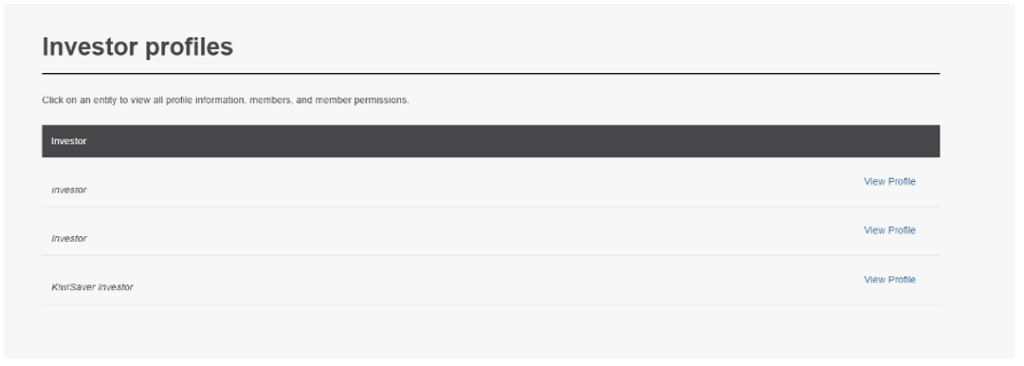
3) Select “Investor Profiles” in the top right corner if you are on a desktop. For mobile devices, click the “1 investor and 1 portfolio” tab and then click “Investor Profiles”.

4) Click “View Profile” next to the account you are wanting to add a bank account to.
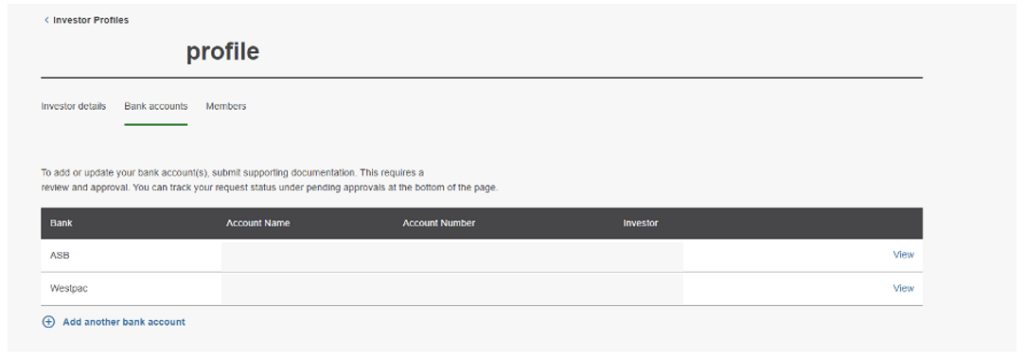
5) Click “Bank accounts”
6) Click “Add another bank account”
7) Enter in the bank account details and upload evidence of your bank account.
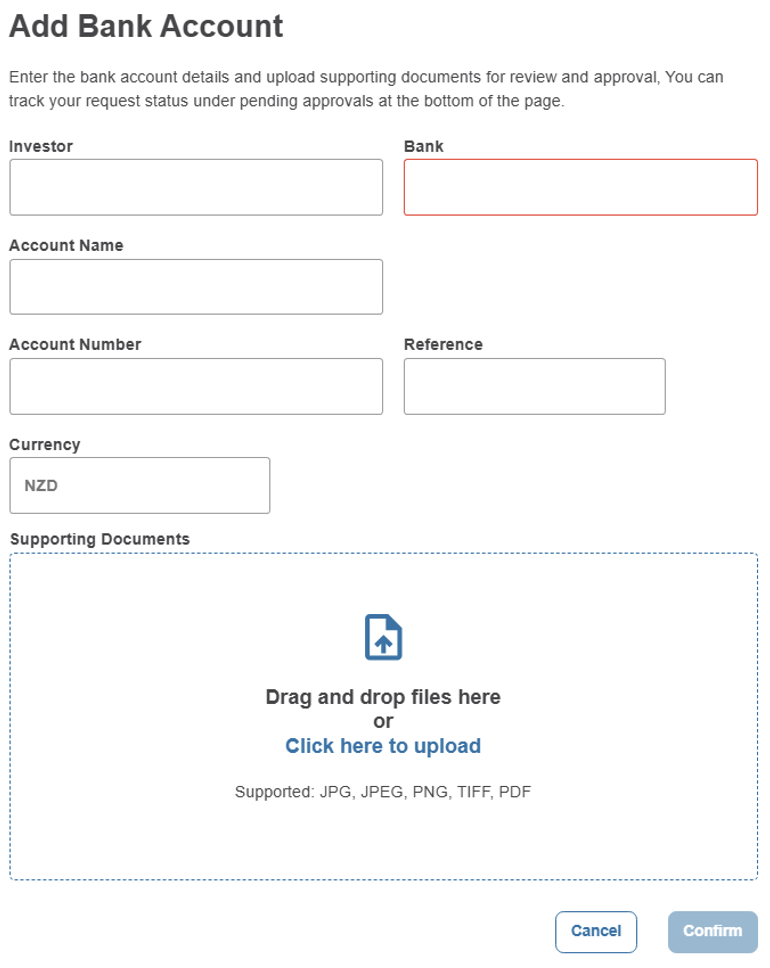
8) We will receive your request above, and if we have any questions we will contact you, otherwise you can expect to have this new account linked within a couple of business days.
There is no minimum amount for deposits into your InvestNow Transaction Account.
Minimum investment amount for Managed Funds purchases is $50, when part of a Regular Investment Plan, or $250 for one-off investments
Yes you can have multiple InvestNow accounts. Using a single email address, as your unique login, once you have logged in you can switch between the accounts you have been linked to.
Where can I see the performance of my investments?
You can view the performance of your investments by navigating to the ‘Performance’ tab within your InvestNow account.
By default, the ‘Performance tab’ displays the performance of your selected portfolio over the past 12 months using the ‘My Returns’ or Extended Internal Rate of Return (XIRR) calculation methodology, which reflects your personal or ‘real world’ returns generated from your investments.
You can customise the performance information displayed using the ‘Filter’ menu at the top of the ‘Performance’ tab. This allows you to:
- select different performance time periods or date ranges;
- switch between percentage (%) and dollar ($) returns;
- view performance on either a before-tax or after-tax basis; and
- choose which performance calculation methodology you would like to use.
How do I obtain a certified copy of an identification document?
We are required by law to verify your identity as part of the account opening process and ongoing due diligence (Anti-Money Laundering and Countering Financing of Terrorism Act 2009).
Where we ask you to supply certified copies of your identification documentation, you can ask “Trusted Reference” persons from the following occupations to complete this verification.
- Justice of the Peace
- Lawyer
- Registered medical doctor
- Registered teacher
- Registered chartered accountant
- Kaumatua
- Minister of religion
- Member of parliament
- Notary public
- Employee of the police (who holds the office of constable)
- NZ Honorary Consul
To certify the documents, the certifier is required to:
- Confirm the identification documents are a true copy of the original and represent the identity of the named individual.
- Sign the certified copy and include their name, occupation and date.
- Full name and occupation of the Trusted Reference
When you provide certified copies of your identification, the certification should have occurred within the previous three months.
A PIE (Portfolio Investment Entity) fund is a type of New Zealand managed fund with its own tax rules. Many PIE funds calculate and pay tax on investment income using each investor’s prescribed investor rate (PIR), while some listed PIEs are taxed at a fixed rate. In many cases, income from a PIE fund does not need to be included in your tax return, which may make managing your tax a little simpler. Tax treatment will depend on the type of PIE and your individual circumstances. See the InvestNow Investor Tax Guide for more information.
InvestNow offers retail Kiwi investors the ability to build and maintain, through a single sign on functionality, two portfolio types (click the links to see the full range of investment options available within both):
What is a diversified fund?
A diversified fund invests in a range of asset classes, regions, and/or industry sectors. Each of these assets have different characteristics eg their values may not all rise or decline at the same time. Investing in a range reduces the potential risk that anyone sector/region/industry can have on the overall performance of the fund – spreading the risk.
Diversified funds can be built to align to specific risk profiles, for example, Conservative, Balanced or Growth.
Your order will no longer be visible in the Buy & Sell > Pending Instructions page, and the the addition (invest) or reduction (sell) of units will appear in the Holdings page.
How do I determine my correct PIR?
The Inland Revenue Department (IRD) have a really usefull calculator to help you confirm your correct Prescribed Investor Rate (PIR), available here.
We do not offer compounding interest payments for individual term deposits. Term deposit interest is paid back to your transaction account.
However, you can choose to automatically roll over a term deposit at maturity, including both the principal and interest in a new term deposit.
How can I review my PIE tax calculation?
You can download a General Ledger report under the “Documents” page when you are logged into your InvestNow account. You can find a video on how to use the “Documents” page here. The key information will be under the “PIE Attributed” tab of the report. This will show the taxable income, expenses, imputation and foreign tax credits.
The calculation for PIE tax is: (taxable income – expenses) * your PIR – (imputation credits + foreign tax credits).
Once logged into your Managed Funds account, go to the Buy & Sell page. Scroll down to the list of funds you hold and click the Sell button.
- You can choose to sell:
- a set dollar amount or
- a specific number of units for a managed fund you hold or
- all the units you hold in a managed fund
- Enter the dollar amount or number of units
- Click the “Sell” button
If you want to cancel your Sell order go to the Pending Instructions page and click cancel.
Note that you can cancel a Sell order up until 12pm of the current business day. Where you have placed an order on a non-business day, you can cancel the order up until 12pm of the next business day.
Yes you can.
Please request the off-market transfer request here. We will then prepare an off-market transfer form and email it to you (using the email address already linked to your InvestNow account) for you to sign and return to us. Please note that the original signed copy of the form may be required.
At the time you sell any units in a PIE managed fund or at PIE tax year end (31st March) your PIE tax liability will be paid by InvestNow on your behalf and returned to the IRD.
If you are invested in listed PIE’s offered by Smart, during the year you may have received dividends from these funds. The dividends may include tax credits known as imputation credits, which are credits for NZ tax already paid by the companies the ETF is invested in, to ensure that the income isn’t taxed twice.
For Australian-domiciled managed funds which are not PIEs, InvestNow does not pay tax on your behalf and you need to report income from these funds on your tax return. Your Tax Summary Report will contain a summary of the taxable income from these funds including both the Fair Dividend Rate (FDR) and Comparative Value (CV) calculations.
Your Tax Summary Report will reflect the details of all tax liability payments. We will produce a Tax Summary Report within six weeks of the end of the tax year, which can be downloaded from your My Documents page.
How can I access a tax report?
The report is available in PDF format, and can be found on the “Documents” page when you are logged into your account.
To view the report:
- Click the “Documents” page
- Select the “Documents” tab
- Under the “View By” on the left-hand side, select “Tax Reports“.
Following consultation with the specific bank, you may be able to break your Term Deposit (TD) and have your funds returned to your Transaction Account. Please note that there may be fees charged by the bank and our custodian to process any approved break request.
The following steps apply to all requests to break TDs:
- Contact us on 0800 499 466 or via contact@investnow.co.nz, with details of the TD you wish to break.
- We will obtain a quote from the bank your TD is with, to determine any break fee and adjusted interest amount.
- In addition, there will be a processing fee of $25 charged by our custodian.
- We will contact you to advise if your term deposit can be broken, the total costs and timeframes – seeking your decision re proceeding with the break request.
Please note that most banks require up to 31 days’ notice to break a term deposit.
You should read the Client Agreement carefully to ensure that you understand all of the terms and conditions of your agreement with us.
You should read the disclosure material for any fund before investing. We strongly recommend that you seek independent advice before making any investment.
Why is there a refund payment to the IRD in my KiwiSaver portfolio?
The is typically for when the IRD realises the employee/employer/government contributions have been calculated and paid incorrectly. You may wish to contact Inland Revenue regarding the reason for the refund.
On the day that your term deposit matures, the funds from the maturity are credited to your transaction account. At 11:30 am on the same day, your new term deposit order will be created and sent to the bank. Before 11:30am you will be able to see the matured term deposit funds in your account, but please note that if you withdraw or spend these funds, the new term deposit will not be created.
If you wish to retain the funds from your term deposit, please modify the rollover instructions to ‘do not reinvest’ prior to the maturity date.
What is the difference between annualised and de-annualised returns?
For reporting periods longer than one year, performance is shown as an annualised return.
An annualised return represents the average return achieved each year over the selected period, taking into account the effect of compounding. For example, a 5-year annualised return of 8% means the investment delivered the equivalent of an 8% return per year for five consecutive years in a row.
For reporting periods of one year or less, performance is shown as a de-annualised (actual) return. This reflects the total return achieved over the selected timeframe without converting it into an annual rate.
As a general rule for performance reporting on InvestNow:
- Periods longer than one year show annualised returns.
- Periods of one year or less are shown as actual returns (de-annualised) for that period.
What is Portfolio Weight?
‘Portfolio Weight’ shows how much of your portfolio is invested in a particular investment or asset classification. For example, if 20% of your portfolio is invested in an international shares fund, that investment has a ‘Portfolio Weight’ of 20%. ‘Portfolio Weight’ helps you understand the relative importance of each holding within your overall portfolio.
You can access fund performance data here, on our public website, or within the secure portal once logged in.
Within the secure portal you can access historical performance charts, for funds you hold and all other funds available on InvestNow (see the Buy & Sell page). Plus you can see performance data in the Holdings page for the funds in your portfolio.
Please contact us immediately on 0800 499 466 (for international calls, use +64 4 499 9691) or e-mail us at contact@investnow.co.nz.
Our contact center is available Mon-Fri 8:00am to 5:00pm, except national public holidays.
Now that I am over 65, how do I withdraw money from my KiwiSaver portfolio?
Please send us an email (contact@investnow.co.nz) and we will send you a form to complete for the first time you request such a withdrawal – note that you will need to have the statutory declaration witnessed.
The form, along with the deposit slip confirming your bank account, can be scanned and emailed back to us.
For any any subsequent withdrawals just email us we will process the it.
Is there a minimum or maximum number of funds I must have in my KiwiSaver portfolio?
The minimum is one, however there is no maximum ie you can select any combination of funds available in the InvestNow KiwiSaver Scheme to meet your investing goals and objectives.
Check here for the full range of funds available in the InvestNow KiwiSaver Scheme.
It is important to note that the investments that can be held through the service are subject to change.
If you hold an investment and a decision is taken, by InvestNow or the Investment Manager, to no longer offer it on InvestNow, we work through the required actions, and options, with you.
When you sell any managed funds the net proceeds of the sale are deposited into your InvestNow Transaction Account. Once there, you can then withdraw those funds by transferring them to your nominated account, or reinvest the monies.
To raise a Withdrawal instruction, once logged in click on the Withdrawal link on the Dashboard and follow the instructions there.
Withdrawals are processed once a day and should be in your nominated bank account between 4pm and 5pm on the same working day.
Cloudcheck is the technology partner we work with to provide a customer identity verification solution – specifically we use their IDScan solution for the bio-metric identity verification. Learn more about Cloudcheck here.
Can I transfer my KiwiSaver investment to my Australian Super Scheme?
Yes, you can. Please send us an email (contact@investnow.co.nz) and we will send you a form to complete, along with supplying the following supporting documents:
- Proof of your Australian Superannuation Fund’s bank account. It must show the bank account name, bank account number, swift code, and logo of the bank.
- A letter from your Australian Superannuation Fund confirming that they accept KiwiSaver transfers.
- Evidence of your permanent residence at an Australian address, for example:
- a copy of a property sale and purchase agreement; or
- tenancy/leasing agreement for an overseas property; and
- recent utility bill; or bank statement
- Evidence of your departure from New Zealand, for example:
- evidence of confirmed travel arrangements; or
- passport evidence; or
- evidence of any necessary visas or shipping contracts/documentation; or
- evidence of Australian employment, i.e. a copy of a contract or letter from your Australian employer; or
- evidence of your Australian tax status issued by the relevant Australian tax authority
Upon completion, please return the Transfer Form, and supporting documents us and we will be in touch should we have any questions.
I am already an InvestNow customer, but I have opened another account – what happens next?
Once your new account is open, as you are already an InvestNow customer, you can access your new account by logging into your InvestNow portal. You can accept the invitation to join the new account by clicking your email address in the top right hand corner.
Once you have accepted the invitation, your account access will be created.
Now that you have multiple accounts, you will be able to switch between your accounts by clicking on the “1 investor and 1 Portfolio” link, click the name of the account you want to switch to then click “1 investor and 1 Portfolio” again.
IRD stands for “Inland Revenue Department”. An IRD Number is a unique tax number given to you by the Inland Revenue Department of New Zealand so that you can pay the correct work taxes as you work in New Zealand.
How do I make changes to my KiwiSaver portfolio?
You can change the make up of the funds in your KiwiSaver portfolio at any time, by following these steps:
- Log into your account and go to the “My Contributions” page (this will show you the current funds, and associated weightings, for your portfolio).
- Click on the ‘Edit‘ under your portfolio.
- Select the funds you would like as part of your portfolio.
- The default display is the funds that are currently in of your portfolio.
- You can use the filters on the left-hand side to find other funds available.
- You will need to check the box for each fund that you would like as part of your portfolio. Once you have selected the funds, scroll down and click ‘Next’.
- Select the percentage you would like for each fund and click ‘Next’. Please note that this must add to 100%.
- You can then select either “Rebalance Underlying Funds”, which will rebalance your entire portfolio (selling and buying as necessary) to the new weightings, or “Future Contributions”, which will not affect your existing funds but will be applied to all future contributions.
- Download the PDS document and check the box marked ‘I have read, understood and accept the latest Investment statements or Product Disclosure Statement’.
- Click ‘Confirm’ and a successful notification will appear once the change has been completed.
You can change your investment plan for your KiwiSaver at any point. If you select the rebalance option, you will need to wait for this to be completed to update your portfolio again. Please note that a buy/sell spread, swing price adjustment and/or buy/sell transaction fee may apply when funds are bought and sold as part of a rebalance.
Resident Withholding Tax (RWT) is a tax deducted from the gross amount of interest, for the relevant investment and saving products, paid to you.
When you open an InvestNow account, you will be asked to confirm your RWT rate and IRD number.
If we do not have an IRD number your account will be taxed at the “non-declaration” rate of 33%.
See the IRD website for more details.
When you create your account you select if you want distributions to be paid in cash or have them reinvested.
- If you select cash, the distribution is credited to your InvestNow Transaction Account where it is available to be invested or withdrawn.
- If you select reinvesting, the distribution is reinvested into the same fund that generated the distribution.
Please contact us (contact@investnow.co.nz) if you wish to change your distribution preference.
InvestNow is member of the Apex Group.
Apex Group Ltd., established in Bermuda in 2003, is a global financial services provider. With over 94 offices worldwide and 12,000+ employees in 38 countries, Apex Group delivers an expansive range of services to asset managers, financial institutions, private clients and family offices. Apex Group’s purpose is to be more than just a financial services provider and is committed to driving positive change to address three core areas; the Environment and Climate Change, Women’s Empowerment and Economic Independence, Education and Social Mobility.
How is Performance by Asset calculated?
‘Performance by Asset’ uses the same ‘My Returns’ or Extended Internal Rate of Return (XIRR) methodology featured in portfolio-level performance calculations.
This means the calculation takes into account the timing and size of contributions, withdrawals and other transactions relating to each investment. The return shown therefore reflects your own experience as an investor in that fund, rather than simply displaying the return published by the fund manager, which in contrast is typically based on an ‘Investment Returns’ or ‘Time Weighted Return (TWR) methodology.
See these additional FAQs:
Can I see the performance of the individual investments within my portfolio?
Yes. InvestNow’s ‘Performance by Asset’ feature allows you to drill down beyond your overall portfolio performance and view performance at the individual investment level – once logged in, go to the Performance page.
You can view performance by individual assets or investments, or by broader asset classifications such as International Shares, Australasian Shares, Property and Fixed Interest. This can help you better understand which parts of your portfolio have contributed most to your overall performance.
At present, ‘Performance by Asset’ is only available using the ‘My Returns’ or Extended Internal Rate of Return (XIRR) calculation methodology. Support for an ‘Investment Returns’ or Time Weighted Return (TWR) calculation methodology at the individual asset or asset classification level is expected to become available in the coming months.
See these additional FAQs:
Whose KiwiSaver scheme am I joining?
The InvestNow KiwiSaver Scheme is managed by FundRock NZ Limited (FundRock). Both InvestNow and FundRock NZ are members of the Apex Group.
FundRock NZ, based in Wellington, is a specialist investment management company focused on meeting the specific needs and requirements of New Zealand investors and clients. Our objective is to provide our clients with access to world-class investment solutions and opportunities, while ensuring that these are easy to use and understand.
For more information visit https://www.fundrock.com/fundrock-new-zealand
You can establish a regular deposit to your InvestNow Transaction Account with an Automatic Payment (AP) from your nominated bank account – you will need the details of the bank account, into which you will make the deposit, and your unique reference, so we can make sure all deposits are credited to your InvestNow Transaction Account.
To get these details (note – these do not change and will be the same if you have previously made a one-off deposit into your InvestNow account):
- Log into your account
- Go to the Dashboard page
- Scroll down, and click the Deposit button
- Take note of the bank account and reference details, using this when you set up the AP from your nominated bank account.
Where you have selected either the email or SMS (text) passcode option, the codes received will be valid for approximately 15 minutes.
If you have selected to use our preferred method, the authenticator app, the code is generally valid for 30 seconds.
You can find out more on the IRD website.
The current company tax rates are:
- 28% for income years 2012 and later
- 30% for income years 2009 to 2011
- 33% for income years 2008 and older
Once you have completed the online application joining form, and your account is available to you to access ie we have completed any checks we need to undertake, you will receive an email notification to set your password, after which you have full access to your new account.
Prior to investing in any Fund you should read the disclosure material and research the Fund to ensure that it meets your specific investment needs.
It is good practice to get independent advice from an Authorised Financial Adviser (AFA) before making any investment. Note that the team at InvestNow Saving and Investment Service are unable to provide you with financial advice.
Websites such as sorted.org.nz are also a useful resource. Visit their “Investing & savings guide” for helpful information.
Yes – if you chose a dollar value for the sale, the sale can be no lesser than the indicative unit price for one unit. If you chose to sell a number of units, it has to be for at least one unit in the fund.
The minimum cash withdrawal amount from InvestNow is $1.
InvestNow is an online platform for retail Kiwi investors. We offer a comprehensive range of managed funds, bank term deposits, and our own KiwiSaver Scheme.
You can open an account online to build/maintain investment portfolios to meet your personal needs – goals, timeframes, risk appetite etc. Accounts are available for Youths, Individuals, Joint Accounts, Family Trusts and NZ Businesses.
InvestNow is a non-advice service, however we will help you with investing education and guidance through our workshops, webinars and series of content to we produce.
InvestNow is a 100% fully-owned subsidiary of Apex Group, a “… single-source financial solutions provider dedicated to driving positive change while supporting the growth and ambitions of asset managers, allocators, financial institutions, and family offices around the world …”
Following the end of the tax year (31 March) InvestNow will provide an Annual Tax Report which includes your PIE tax summary (taxable income and tax payable), FIF calculations (FDR and CV methods) where required, and a summary of other taxable income including listed PIE dividends and term deposit interest.
Throughout the year you can download an InvestNow Tax Summary Report in order to assist you or your accountant in the preparation of your tax return. Your Multi-Rate PIE investments are not included in the Tax Summary Report as PIE tax is a final tax and this information is not required for your tax return.
The ability to generate a Tax Summary Report will be temporarily disabled at the end of the financial year while the Annual Tax Report reports are being created.
For more information about the Tax Summary Report, please refer to the InvestNow Tax Guide.
There are two ways we can verify your identity.
- You can get either your passport or driver’s licence certified. You can find a list of who can certify the documents here and the certification needs to be within the last 3 months. You will also need to provide Proof of address e.g. utility bill or a bank statement.
- We can send you a link to complete the identity verification electronically. You will need a New Zealand driver’s licence or New Zealand passport to complete this.
The identities of Companies and Trusts require additional documents being supplied to InvestNow:
- Companies
- Certificate of Incorporation
- Trusts
- Trust Deed including any amendments
- Proof of address
- Bank deposit slip or bank statement
- Evidence of the source of wealth for the trust
Can I open an account for a child or youth account?
Yes, go to the “Join” page and follow the simple steps, noting that you will need the following:
- An email address for your child.
- A copy of their current New Zealand birth certificate or New Zealand passport.
- An IRD number for your child.
- A bank statement for the nominated bank account. This can be in your name or your child’s name.
Once you click “Join“, select the youth account option, having the child as the owner of the account. You will select manual verification for them so you can upload a copy of their identity document.
You will add yourself as the parent/guardian, using your email address and entering in your details. At the end of the application, you will select yourself to be the authoriser on the account.
That’s something we will have to do for you. Give us a call on 0800499466, or contact us via email (contact@investnow.co.nz), and we will action the change for you.
What is Contribution to Return?
‘Contribution to Return’ shows how much each investment or asset classification contributed to your overall portfolio return during the selected period. While ‘Portfolio Weight’ tells you how much you have invested in a particular investment, ‘Contribution to Return’ shows how much that investment contributed to your overall result. This can help identify which investments had the greatest impact on your portfolio’s performance.
How do I make a voluntary contribution?
You can view the Public Trust bank account details for making a voluntary contribution by clicking ‘Deposit’ under the ‘Make a One-Off Contribution’ heading when you are logged into your InvestNow KiwiSaver Scheme account.
From your internet banking, you can simply search for InvestNow KiwiSaver Scheme as the payee in the bill payment register and complete the details. You can then save this for future contributions, or set up an automatic payment.
Payment can also be made directly to Inland Revenue by selecting the Pay Tax option in internet banking (choose the KSS tax code).
What security steps should I take to protect my computer?
Online security best practices today include (includes links to resources such as Netsafe & CERT NZ):
- Use a password manager to keep your passwords safe in one place.
- Switch on Multi Factor Authentication (MFA) to add an extra layer of security (note – Multi Factor Authentication is already enabled for your InvestNow account, whereby you receive a unique Passcode each time you login to your InvestNow account. Our recommendation is that you use an Authenticator App to receive your passcode.
- Use updated Anti-Virus Software.
- Activate a Pop-Up Window Blocker, which may also include adjusting the settings to allow pop-ups from trusted websites and sources.
- Regularly scan your computer for Spyware.
- Only download programs or click links from known and trusted sources.
- Keep your devices and apps updated – updates aren’t just about adding new features, they’re also about fixing vulnerabilities.
- Be cautious about using a public WiFi network, as insecure WiFi networks can allow other people to see your data.
Additional steps to take, specific to your InvestNow account:
- Choose a strong, unique password – we require a minimum of eight characters and a mix of upper and lower case characters, numbers and symbols. In general, longer passwords are more secure (see above re using a password manager with TFA).
- Log in to your account from time to time and check for any unusual activity.
- If you log in and go to Account Settings > My Details, you can change your login security preference. Our recommendation is that you use an Authenticator App to receive your passcode each time you log in – this can provide some additional protection.
- If there are multiple members on your account, you can review the permissions of the other members under Account Settings > Other members. You can also choose how many members are required to approve each order or withdrawal – just contact us at contact@investnow.co.nz if you want to change this setting.
Which managed funds pay distributions and how frequently do they pay them?
To see which funds pay distributions, and how often (frequency), please visit our Range of Funds page (the “Distribution Frequency” column). You can then read the Product Disclosure Document (PDS) for the fund, which will provide more information about any distribution.
Please note that if you have selected to receive any distributions in Cash, they will be credited to your InvestNow Transaction Account where you can either invest or withdraw the monies. If you have selected reinvestment, any distributions will be automatically reinvested into the fund that generated the distribution. If you want to change your distribution preference, please contact us at contact@investnow.co.nz.
You can call us, e-mail us or use our online chat (available on our public website and within the secure portal, when logged into your account).
Our contact centre is available on 0800 499 466 (for international calls, use +64 4 499 9691) Mon-Fri 8:00am to 5:00pm, except national public holidays.
You can e-mail us on contact@investnow.co.nz. We shall respond to your as soon as possible.
Can I cancel a transfer of money into or out of my InvestNow cash account?
You can cancel a Withdrawal instruction up until 3.30pm of the business day on which you raised the instruction. Where you have placed an instruction on a non-business day, you can cancel the order up until 3.30pm of the next business day. You will find your pending Withdrawal on the Pending Instructions tab of the Buy & Sell page. To cancel the withdrawal click the Cancel button.
To change your contact details follow these steps once logged in to your account.
- Click the link “1 investor and 1 profile” and it will display a list of the accounts you are a member of.
- Scroll down to the account you want to update, click the checkbox alongside the name of the account, and then click on the account name – this will bring you to the account profile page.
- Select the detail(s) you wish to change (the only fields you can update are those that display the pencil/paper icon).
- Update the details and click Confirm.
Our team will review all changes, and will contact you only if we require more information or context.
How do I create my password for the first time?
Go to the InvestNow log in page and click “Forgot Password”, and an invitation will be sent you to create your password. You can also repeat this step when you reset/update your password.
InvestNow client funds are held in an independent custodial account which is run and operated by Adminis, who have been appointed to provide custody services to InvestNow. This ensures that there is complete separation of client assets from InvestNow as a business. The custodial account is also structured to ensure that all assets, including the bank accounts, are ring-fenced from the custodian’s business. The custodian is audited annually and client accounts are subject to daily reconciliation.
InvestNow is a registered Financial Services Provider and is a member of the Apex Group.
If you have any outstanding tax liability payable at the end of the tax year, we will pay this to the IRD on your behalf.
Prior to the PIE tax year end, we will send you an e-mail with a provisional calculation of your tax obligation. This will be followed by another email in early April once the final PIE calculations have been completed. You will have the option to make a deposit to cover the PIE tax payable. However, if you do not have sufficient funds available in your Transaction account at the time, we will sell enough units from the largest holding in your portfolio to cover the tax liability.
Please note that we rely on you electing the correct PIR when you open an account – if your InvestNow PIR needs to be changed or is not correct, you can contact us to have it updated. PIR changes cannot be backdated for previous tax years.
For Smartshares ETFs, PIE tax is always paid at 28% as they are listed PIEs. If you invest in Smartshares and have a tax rate lower than 28%, the excess tax paid by a fund may be able to be used to reduce the tax payable on other income that you derive at the end of each income year by including the distributions from the fund(s) in your tax return. Please refer to Smartshares’ Other Material Information – Tax document, available from the Disclose register, for further details.
Where a rebate exists we will credit this to your transaction account as part of our year end tax processes.
For more information about how PIE tax works, please refer to our article “PIEs and PIE tax – your questions answered”.
If you have elected to have your term deposit automatically roll over, we will create a new term deposit for you and confirm when this has happened.
Depending on the bank your deposit is with, the new term deposit will either be created on the maturity date or the next business day.
If you have not chosen an automatic rollover option, your principal and interest (net of withholding tax) will be paid to your InvestNow transaction account. Please note that interest is not paid on funds in your transaction account, so you will need to arrange a new investment or load a withdrawal.
If you need to break a term deposit, please contact us at 0800499466 or contact@investnow.co.nz – noting that there are specific terms and conditions that apply to requesting to break a term deposit. For more details please read this FAQ.
An Investor is the entity (Youth, Individual, Joint, Trust or NZ Company) that has an account with InvestNow – it is the beneficial owner, in whose name that the investments are held.
A Member (also known as a Client) is an individual, or individuals, that have access to the Investor account i.e. they are “linked” to the account. Members can be either authorisers of transactions or simply have view-only permissions.
How long does it take my KiwiSaver funds to be transferred to InvestNow?
Once you have completed your account opening, have selected the fund(s) under “My Contributions” and your current KiwiSaver provider has received the switch notification, your funds should be transferred within 10 business days.
Buy/Sell spreads
When you buy or sell units in a fund, you may be charged a buy or sell spread. The buy spread is added to the unit price when you buy units, and the sell spread is deducted from the unit price when you sell units. For example: if you invest $10,000 into a fund with a 0.10% buy spread, the buy spread would be added to the price, bringing the starting value of your investment to $9,990.
Buy or sell spreads are intended to cover the transaction costs of buying or selling the underlying assets of a fund, so that these costs are not borne by other investors in the fund.
Please visit our Range of Funds page to see and/all spreads, buy/sell fees, transaction fees, management fees etc for all funds we offer on InvestNow.
How do I switch my KiwiSaver to InvestNow?
You will first need to set up your KiwiSaver account with InvestNow. Please refer to our FAQ here. Once your account is open, you will need to go to the “My Contributions” tab and select the fund or funds you want the KiwiSaver invested in. From there we will organise the transfer of your KiwiSaver to the InvestNow KiwiSaver Scheme, which takes approximately 10 business days.
Producing reports for your Managed Funds & TDs portfolio
Once logged in there are three types of reports you can produce, for whatever period you choose:
- General Ledger Report – provides information about your portfolio returns, contributions, tax information, and more (Excel format)
- Investment Report – provides information about your portfolio returns, contributions, tax information, and more (PDF format)
- Tax Summary Report – provides detailed tax information and guidance – can be useful for completing any tax returns (Excel format)
You can create any of the above reports by following these steps:
- Click the “Documents” tab
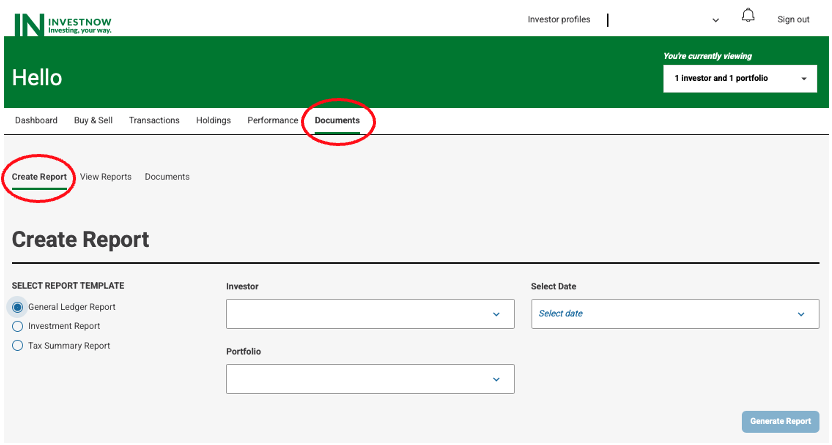
- Select the required report under “Report Template”,
- Select the Investor & Portfolio (this is only relevant when you are linked to 1+ InvestNow portfolios), and the time period under “Select Date”,
- Click “Generate Report”.
Producing reports for your KiwiSaver portfolio
Once logged in there are three types of reports you can produce, for whatever period you choose:
- General Ledger Report – provides information about your portfolio returns, contributions, tax information, and more (Excel format)
- Investment Report – provides information about your portfolio returns, contributions, tax information, and more (PDF format)
- Management Accounts Report – provides more detailed information that may be of use to you and/or your accountant (Excel format)
You can create any of the above reports by following these steps:
- Click the “Documents” tab
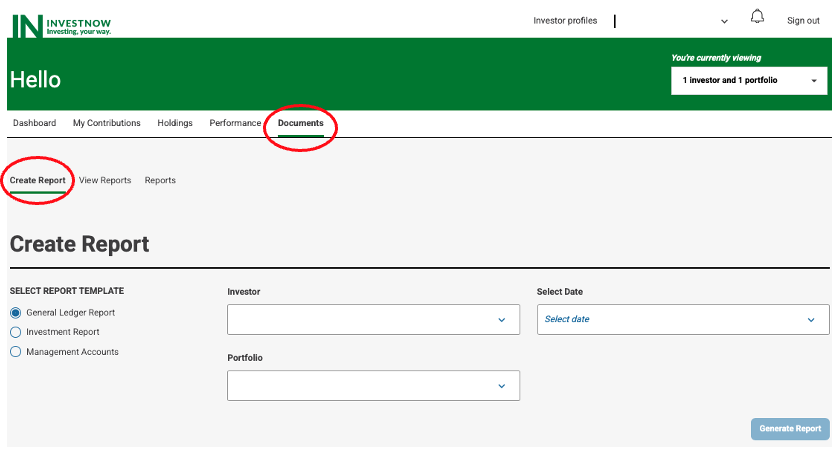
- Select the required report under “Report Template” and the time period under “Select Date”.
- Click “Generate Report”
Note: For some report types there may be other parameters you can select to further customise the report. And, depending upon the report type chosen, a copy will be downloaded to your device or available in the “View Reports” page.
The identity and documentation requirements for a trust account are more detailed compared to other types of account. The following requirements are specific to trust accounts:
- A copy of the trust deed (this does not need to be certified)
- Copy of any deed amendments
- ID for all trustees, settlors and anyone else who has control over the trust e.g. protectors, directors of a trustee company
- The date of birth for any named beneficiaries
- Proof of address in the trust’s name, e.g. a bank statement or a rates bill
- A brief explanation of the source of wealth for the trust, including a broad estimate of the trust’s overall wealth
- Some form of supporting documentation for the source of wealth for the trust confirming the Net Worth of the Trust, for example a letter from an accountant or solicitor, financial statements, sale and purchase agreement, business accounts, inheritance document etc
We are required to ask for information relating to the “source of wealth” for trusts. Typically, for a trust this might include things like financial accounts for a business the trust owns, evidence of sale of a property or a business, payslips, or information relating to an inheritance.
Requesting this level of information reflects our obligations under the AML-CFT Act 2009 and the guidelines set by the Financial Markets Authority (FMA). We will ask for this information when an account is opened, and may need to ask for more information on an ongoing basis.
Should we ask you for such information in the future, the regulations and guidelines state that our obligation is to develop an understanding of the size and nature of the wealth of a family trust and, importantly, how it was acquired. We aren’t expected to verify the entire financial history of a family trust, or identify every asset it holds. However, the law requires us to be satisfied that the nature and size of a customer’s wealth matches what we know about them.
If you ever have questions about this or any other matter please don’t hesitate to contact us on 08700 499 466 or at contact@investnow.co.nz (Mon-Fri 8:00am to 5:00pm, excluding national public holidays).
How do I add an additional member to my InvestNow account?
To add a member to your account please email us (contact@investnow.co.nz) providing their:
- Full name
- Email address
- IRD number
- Are they a tax resident of any country other than New Zealand?
- The name of the Account you wish to add them to.
Please note: You can not have multiple members linked to an InvestNow KiwiSaver account.
What do each of the column headings mean for the fund manager table?
Sector:
Sector refers to the type of asset the managed fund invests into, such as a diversified fund, cash fund, listed property fund, etc.
PDS Fee:
The PDS fee is the annual management fee estimate as stated in the Product Disclosure Statement (PDS) for this fund.
QFU Fee:
The Quarterly Fund Update (QFU) Fee is the latest actual fee charged by the fund in its most recent financial year, as stated in the fund’s most recent Quarterly Fund Update.
Buy/Sell Spread:
When you buy or sell units in a fund, you may be charged a buy or sell spread, which will be a cost to you. The buy spread is added to the unit price of the fund when you buy units, and the sell spread is deducted from the unit price when you sell units. The buy/sell spreads belong to the fund and are not fees paid to InvestNow or the investment manager. The purpose of buy/sell spreads is to make sure that any trading costs incurred as a result of an investor making a investments into or redemptions from a fund are borne by that investor, and not other investors in the fund.
Buy/Sell Transaction Fee:
When you buy or sell units in a fund, you may be charged a buy or sell transaction fee, which will be a cost to you. These fees are charged to cover the costs of the underlying brokerage, foreign currency exchange, transaction costs or investment management service fees associated with investing in the underlying investments.
1 Month, 3 Month, 6 Months, 12 Months, 1 Year, 3 Years, 5 Years, 10 Years:
These are performance periods for the performance figures that are stated. Periods above 1 year represent annualised performance.
Risk Indicator:
The risk indicator is the risk rating of a fund, which is rated from 1 (low) to 7 (high). The risk indicator ranges from defensive (being less volatile and more conservative) to aggressive at the upper end (being more volatile and less conservative).
Target Growth/Income Assets:
The portion of growth assets (such as shares, property, etc) that the fund targets relative to income assets (such as cash and bonds).
Management Style:
Management style outlines whether the fund is actively or passively managed. Active management involves identifying mispriced securities with the goal of generating returns above the market index, while passive management broadly aims to track rather than outperform the chosen market index.
Fund Type:
Managed Funds on InvestNow are classified as either Multi-Rate Portfolio Investment Entities (PIE), Listed Portfolio Investment Entities (Listed PIE) or Australian Unit Trusts (AUT).
Each of these constitute different managed fund structures which among other things will impact the tax treatment of the fund. PIEs are taxed at the investor’s Prescribed Investor Rate of either 0%, 10.5%, 17.5% or 28%, while Listed PIEs are taxed at a flat 28% rate. AUTs are overseas based investments and fall under the Foreign Investment Fund (FIF) tax regime, which taxes investment income at the investor’s marginal income tax rate of either 10.5%, 17.5%, 30%, 33% or 39%.
Net Assets:
Represents the Fund’s total Funds Under Management (FUM) in millions.
Inception Date:
This is the date of when the fund was first created.
Distribution Frequency:
This is the frequency that any distributions will be paid out. This could be monthly, quarterly, annually, etc.
Buy Timeframe:
Indicative number of business days for your buy order to be processed.
Sell Timeframe:
Indicative number of business days for your sell order to be processed.
Smart Investor:
Smart Investor is a tool from Sorted, used to find and compare managed funds and other regulated investment offers in New Zealand.
External website:
This is the link to the fund managers website where you can learn more about them and their funds.
PDS:
PDS stands for Product Disclosure Statement. The PDS contains relevant information about the fund.
How do I apply for a withdrawal e.g. first home, hardship or serious illness?
Please go to our Forms page, download and complete the relevant form and then send it to us at contact@investnow.co.nz. If you have any questions or require any assistance please call us on 0800 499 466.
Where can I see which funds are in my portfolio?
You will be able to see the funds you have selected for your KiwiSaver under the ‘Dashboard’ when you are logged in.
When are my buy and sells completed?
The cut-off time for the receipt of buy or sell orders and cleared funds for all Funds is currently 12pm NZ time (Monday to Friday, excluding national public holidays).
If buy or sell orders are accepted before the cut-off time for a Fund on a valuation day, units will normally be issued or redeemed price determined at the end of that day.
Please note that this does not apply to Russell Investments, Antipodes Partners, Elevation Capital or Pie Funds:
- Russell Investments NZ PIE funds – for orders in these funds, if they are loaded before the cut-off time, units will normally be issued at the following day’s valuation.
- Antipodes Global Value Fund – PIE – for orders in these funds, if they are loaded before the cut-off time, units will normally be issued at the following day’s valuation.
- Pie Funds Management – sell orders in these funds, if they are loaded before the cut-off time, will usually be priced after 8 working days and paid on the 10th working day
For some funds, there will be a buy spread and/or a sell spread – this is a charge built into the buy or sell price that covers the costs of processing your order. You can see a list of the buy and sell spreads for InvestNow funds here.
Your buy and sell orders will usually be processed within the timeframes below (working days) for each of the Fund Managers.
Please Note:
- The first working day is the working day after you have placed your buy or sell order, with that order having been placed and authorised before 12pm.
- If the units and/or gross sale proceeds are not received in time on the final business day, the units and/or net sale proceeds may not be visible in your account until the next business day.
Please note the Fund prices shown may differ from your buy or sell order unit price.
Orders will not be processed on public holidays, and there can potentially be other delays due to additional tasks being carried out by the fund managers – we would not expect these delays to be any longer than a few business days.
| Fund | Description | Type | Manager | Sector | PDS Fee | QFU Fee | Buy/Sell Spread* | 1 Month | 3 Months | 6 Months | 1 Year | 3 Years | 5 Years | 10 Years | Risk Indicator | Target Growth/Income Assets | Management Style | Fund Type | Net Assets | Inception Date | Distribution Frequency | Buy Timeframe | Sell Timeframe | Available in the InvestNow KiwiSaver Scheme? | Smart Investor | External Website | PDS |
|---|---|---|---|---|---|---|---|---|---|---|---|---|---|---|---|---|---|---|---|---|---|---|---|---|---|---|---|
| ACI Conservative Fund | The ACI Conservative Fund aims to achieve a rate of return (net of fees but before tax) of at least 1.75% per annum above inflation (as measured by Statistics New Zealand’s Consumer Price Index) over the longer term. The Fund’s objective is to provide relatively consistent returns, with some capital growth over the long term. Exposure to asset classes is achieved by primarily investing in DFA Australia Limited (Dimensional) funds, utilising their Sustainability Trusts where available. The allocations include a bias towards international diversification. Dimensional funds have an increased exposure to shares in small companies, value companies and companies with higher profitability with the objective of benefitting from a premium return from these companies over time. Such premiums are not always present year on year, which can drive shorter term differences in returns. | Managed Funds | Stewart Group | Diversified | 1.20% | 1.13% | 0.20% / 0.20% | 0.40% | 0.48% | 0.78% | 4.92% | 6.77% | – | – | 4 | 33% / 67% | Active | PIE | $5.66M | 06/04/2023 | – | 2 Days | 2 Days | No | https://smartinvestor.sorted.org.nz/kiwisaver-and-managed-funds/SCH13499/OFR13507/FND43018/ | https://acifunds.co.nz/ | https://cdn.investnow.co.nz/20260617102925/20260617-ACI-Funds-PDS.pdf |
| ACI Growth Fund | The ACI Growth Fund aims to achieve a rate of return (net of fees but before tax) of at least 4.5% per annum above inflation (as measured by Statistics New Zealand’s Consumer Price Index) over the longer term. The Fund invests predominantly in growth assets such as New Zealand, Australian, international shares and property but includes some income assets. The allocations include a bias towards international diversification, and exposure to these asset classes is achieved by primarily investing in DFA Australia Limited (Dimensional) Funds, utilising their Sustainability Trusts where available. Dimensional funds have an increased exposure to shares in small companies, value companies and companies with higher profitability with the objective of benefitting from a premium return from these companies over time. Such premiums are not always present year on year, which can drive shorter term differences in returns. | Managed Funds | Stewart Group | Diversified | 1.30% | 1.23% | 0.20% / 0.20% | 1.79% | 3.11% | 5.81% | 14.47% | 14.28% | – | – | 4 | 90% / 10% | Active | PIE | $11.39M | 06/04/2023 | – | 2 Days | 2 Days | No | https://smartinvestor.sorted.org.nz/kiwisaver-and-managed-funds/SCH13499/OFR13507/FND43019/ | https://acifunds.co.nz/ | https://cdn.investnow.co.nz/20260617102925/20260617-ACI-Funds-PDS.pdf |
| AMP Aggressive Managed Fund | To provide a well-diversified portfolio that aims to provide growth, primarily through holding growth assets. The fund has a low allocation to income assets. | Managed Funds | AMP | Diversified | 0.82% | 0.85% | 0% / 0% | 1.78% | 2.11% | 6.85% | 16.21% | – | – | – | 4 | 94.68% / 5.32% | Active | PIE | $21.99M | 21/10/2024 | – | 2 Days | 2 Days | No | https://smartinvestor.sorted.org.nz/kiwisaver-and-managed-funds/SCH13265/OFR13331/FND51805/ | https://www.amp.co.nz/returns-and-unit-prices/amf/amp-aggressive-managed-fund | https://cdn.investnow.co.nz/20260612145938/AMP_Managed_Funds_-_Product_Disclosure_Statement.pdf |
| AMP Balanced Managed Fund | To provide a well-diversified portfolio that has a balance of risk through holding growth assets and an allocation to lower-risk income assets. | Managed Funds | AMP | Diversified | 0.81% | 0.83% | 0% / 0% | 1.11% | 1.00% | 3.65% | 10.27% | 11.04% | – | – | 4 | 57.8% / 42.2% | Active | PIE | $59.37M | 18/05/2022 | – | 2 Days | 2 Days | No | https://smartinvestor.sorted.org.nz/kiwisaver-and-managed-funds/SCH13265/OFR13331/FND38914/ | https://www.amp.co.nz/returns-and-unit-prices/amf/amp-balanced-managed-fund | https://cdn.investnow.co.nz/20260612145938/AMP_Managed_Funds_-_Product_Disclosure_Statement.pdf |
| AMP Growth Managed Fund | To provide a well-diversified portfolio that aims to provide growth, primarily through holding growth assets diversified with a lower allocation to lower-risk income assets. | Managed Funds | AMP | Diversified | 0.81% | 0.84% | 0% / 0% | 1.48% | 1.62% | 5.34% | 13.68% | 13.51% | – | – | 4 | 78% / 22% | Active | PIE | $60.14M | 18/05/2022 | – | 2 Days | 2 Days | No | https://smartinvestor.sorted.org.nz/kiwisaver-and-managed-funds/SCH13265/OFR13331/FND38239/ | https://www.amp.co.nz/returns-and-unit-prices/amf/amp-growth-managed-fund.html | https://cdn.investnow.co.nz/20260612145938/AMP_Managed_Funds_-_Product_Disclosure_Statement.pdf |
| AMP International Shares Managed Fund | To provide a well-diversified portfolio that has exposure to diversified international equities of companies listed on stock exchanges. | Managed Funds | AMP | International Equities | 0.78% | 0.79% | 0% / 0% | 2.11% | 2.57% | 10.03% | 18.75% | – | – | – | 5 | 100% / 0% | Active | PIE | $19.64M | 21/10/2024 | – | 2 Days | 2 Days | No | https://smartinvestor.sorted.org.nz/kiwisaver-and-managed-funds/SCH13265/OFR13331/FND51820/ | https://www.amp.co.nz/returns-and-unit-prices/amf/amp-international-shares-managed-fund | https://cdn.investnow.co.nz/20260612145938/AMP_Managed_Funds_-_Product_Disclosure_Statement.pdf |
| Antipodes Global Value Fund - PIE | The aim of the Fund is to achieve absolute returns in excess of the MSCI All Country World Net Index in NZD (the Index) over the investment cycle (typically 3-5 years). The Fund invests in the Antipodes Global Fund – Long – UCITS, S Class (Underlying Fund) and cash or cash equivalent securities. The Underlying Fund’s investment exposure is predominantly to a broad range of international shares listed on stock exchanges in developed and emerging markets. The Underlying Fund may use exchange traded derivatives for risk management purposes and to achieve equity exposure. | Managed Funds & KiwiSaver | Antipodes | International Equities | 0.95% | 0.99% | 0.075% / 0.075% | 4.36% | 3.84% | 2.69% | 24.23% | 19.78% | 15.18% | – | 4 | 100% / 0% | Active | PIE | $145.77M | 25/07/2018 | – | 3 Days | 4 Days | Yes | https://smartinvestor.sorted.org.nz/kiwisaver-and-managed-funds/SCH12434/OFR12435/FND10581/ | https://antipodes.com/nz-pie-funds/antipodes-global-fund-long-pie/ | https://cdn.investnow.co.nz/20250905095933/20250903-Antipodes-PDS.pdf |
| ANZ Investments OneAnswer Australian Share Fund | The Australian Share Fund invests mainly in Australian equities. Investments may include equities in companies that are listed or are soon to be listed on the Australian stock exchange, and cash and cash equivalents. | Managed Funds | ANZ | Australasian Equities | 1.11% | 1.10% | 0% / 0% | 4.09% | 5.91% | 2.71% | 11.03% | 10.20% | 8.26% | 6.50% | 5 | 100% / 0% | Active | PIE | $24.16M | 29/02/1996 | – | 2 Days | 2 Days | No | https://smartinvestor.sorted.org.nz/kiwisaver-and-managed-funds/SCH11065/OFR11077/FND2210/ | https://www.anz.co.nz/comms/investments/investment-funds/ | https://cdn.investnow.co.nz/20251023140608/OASAC-PDS_1025.pdf |
| ANZ Investments OneAnswer Balanced Growth Fund | The Balanced Growth Fund invests mainly in growth assets (equities, listed property and listed infrastructure), with some exposure to income assets (cash and cash equivalents and fixed interest). The fund also has a small exposure to alternative assets. | Managed Funds | ANZ | Diversified | 0.97% | 0.93% | 0% / 0% | 1.04% | 1.70% | 4.55% | 10.97% | 9.58% | 4.46% | 6.94% | 4 | 63% / 37% | Active | PIE | $47.19M | 15/04/2010 | – | 2 Days | 2 Days | No | https://smartinvestor.sorted.org.nz/kiwisaver-and-managed-funds/SCH11064/OFR11075/FND2216/ | https://www.anz.co.nz/comms/investments/investment-funds/ | https://cdn.investnow.co.nz/20251023140608/OASAC-PDS_1025.pdf |
| ANZ Investments OneAnswer International Share Fund | The International Share Fund invests mainly in international equities. Investments may include equities in companies that are listed or are soon to be listed on a stock exchange, and cash and cash equivalents. | Managed Funds | ANZ | International Equities | 1.06% | 1.00% | 0% / 0% | 1.90% | 3.21% | 12.02% | 23.00% | 15.87% | 10.63% | 13.20% | 5 | 100% / 0% | Active | PIE | $191.50M | 12/05/1997 | – | 2 Days | 2 Days | No | https://smartinvestor.sorted.org.nz/kiwisaver-and-managed-funds/SCH11065/OFR11077/FND2211/ | https://www.anz.co.nz/comms/investments/investment-funds/ | https://cdn.investnow.co.nz/20251023140608/OASAC-PDS_1025.pdf |
| ANZ Investments OneAnswer New Zealand Share Fund | The New Zealand Share Fund invests mainly in New Zealand equities. Investments may include equities in companies that are listed or intend to list on the New Zealand stock exchange, and cash and cash equivalents. | Managed Funds | ANZ | Australasian Equities | 1.10% | 1.07% | 0% / 0% | 1% | 4.23% | 1.56% | 8.84% | 6.87% | 0.90% | 6.46% | 5 | 100% / 0% | Active | PIE | $48.17M | 31/03/1991 | – | 2 Days | 2 Days | No | https://smartinvestor.sorted.org.nz/kiwisaver-and-managed-funds/SCH11065/OFR11077/FND2208/ | https://www.anz.co.nz/comms/investments/investment-funds/ | https://cdn.investnow.co.nz/20251023140608/OASAC-PDS_1025.pdf |
| ANZ Investments OneAnswer Property Securities Fund | The Property Securities Fund invests mainly in New Zealand and Australian listed property assets. Investments may include companies, funds or trusts that invest in property and are listed or intend to list, and cash and cash equivalents. | Managed Funds | ANZ | Listed Property | 1.10% | 1.07% | 0% / 0% | -3.62% | -3.19% | -4.51% | -7.00% | 0.11% | -4.97% | 2.47% | 5 | 100% / 0% | Active | PIE | $40.32M | 30/11/1994 | – | 2 Days | 2 Days | No | https://smartinvestor.sorted.org.nz/kiwisaver-and-managed-funds/SCH11065/OFR11077/FND2206/ | https://www.anz.co.nz/comms/investments/investment-funds/ | https://cdn.investnow.co.nz/20251023140608/OASAC-PDS_1025.pdf |
| Aurellan Global Shares Fund | The Fund provides diversified exposure to global equities using a manager‑of‑managers approach, selecting specialist active managers across growth, value and quantitative styles. It aims to outperform the MSCI ACWI (unhedged) over rolling five‑year periods. | Managed Funds | Aurellan | International Equities | 1.12% | 1.12% | 0.15% / 0.15% | 2.35% | 3.02% | 6.88% | – | – | – | – | 5 | 100% / 0% | Active | PIE | $26.87M | 02/12/2025 | – | 2 Days | 2 Days | No | https://smartinvestor.sorted.org.nz/kiwisaver-and-managed-funds/SCH14022/OFR14038/FND60479/ | https://www.aurellan.com/ | https://cdn.investnow.co.nz/20260407163338/20260401_-_Aurellan_Investment_Funds_-_PDS.pdf |
| Aurellan Hedged Global Shares Fund | The Fund offers diversified global equity exposure through a manager‑of‑managers model, with most major foreign currency risks hedged back to NZD. It aims to outperform the MSCI ACWI hedged to NZD over rolling five‑year periods. | Managed Funds | Aurellan | International Equities | 1.12% | 1.12% | 0.15% / 0.15% | 2.61% | 1.83% | 5.09% | – | – | – | – | 5 | 100% / 0% | Active | PIE | $33.95M | 02/12/2025 | – | 2 Days | 2 Days | No | https://smartinvestor.sorted.org.nz/kiwisaver-and-managed-funds/SCH14022/OFR14038/FND60480/ | https://www.aurellan.com/ | https://cdn.investnow.co.nz/20260407163338/20260401_-_Aurellan_Investment_Funds_-_PDS.pdf |
| Bitcoin ETF PIE Fund | The Fund is designed to provide investors with exposure to Bitcoin within a PIE compliant fund. This is achieved by investing in one or more listed offshore domiciled funds which invest directly in Bitcoin (each an “Underlying Fund” and together the “Underlying Funds”). The Fund targets a return before fees and tax that broadly tracks the S&P Bitcoin Index in New Zealand dollars. This is a highly speculative investment. Bitcoin is a highly volatile asset. This means the Fund will not be appropriate for all investors. | Managed Funds | Raise | Commodities | 0.95% | 0.96% | 0.05% / 0.05% | 24.55% | 8.54% | 21.45% | -27.81% | 43.39% | – | – | 7 | 100% / 0% | Active | PIE | $30.63M | 14/09/2021 | – | 2 Days | 2 Days | No | https://smartinvestor.sorted.org.nz/kiwisaver-and-managed-funds/SCH13147/OFR13173/FND35080/ | https://www.bitcoinpiefund.co.nz/ | https://cdn.investnow.co.nz/20260113174603/20260112-Raise-PDS.pdf |
| Brandywine Global Opportunistic Fixed Income Fund | The Fund invests in a diversified portfolio of international fixed income securities, derivatives and cash. The investment objective of the Fund is to earn a return before fees and taxes in excess of the Bloomberg Global Aggregate Index – New Zealand dollar Hedged over rolling five-year periods. | Managed Funds | Franklin Templeton | International Fixed Interest | 0.76% | 0.76% | 0.075% / 0.075% | 0.08% | 1.03% | 1.07% | 3.79% | 3.33% | -0.02% | – | 4 | 0% / 100% | Active | PIE | $334.61M | 27/03/2018 | Semi-annually | 2 Days | 3 Days | No | https://smartinvestor.sorted.org.nz/kiwisaver-and-managed-funds/SCH12302/OFR12303/FND8399/ | https://www.fundrock.com/fundrock-new-zealand/fundrock-new-zealand-managers/franklin-resources-inc/ | https://cdn.investnow.co.nz/20260407163342/20260401_-_Franklin_Templeton_Investment_Funds_-_PDS.pdf |
| Castle Point 5 Oceans Fund | The 5 Oceans Fund is a diversified fund that provides exposure to a range of growth and defensive assets both globally and locally. The fund can invest both in direct securities and selected managed funds. The objective of the fund is to generate a positive return above cash with a focus on protecting investors capital. | Managed Funds & KiwiSaver | Castle Point | Diversified | 1.14% | 1.16% | 0.30% / 0.30% | 1.02% | 2.70% | 4.25% | 11.65% | 9.05% | 5.31% | – | 3 | 57.85% / 42.15% | Active | PIE | $88.60M | 25/10/2016 | Monthly | 2 Days | 2 Days | Yes | https://smartinvestor.sorted.org.nz/kiwisaver-and-managed-funds/SCH10745/OFR10746/FND1223/ | https://www.castlepointfunds.com/5-oceans-fund | https://cdn.investnow.co.nz/20260810124449/Castle-Point-PDS-23-July-26-FINAL.pdf |
| Castle Point Trans-Tasman Fund | The Trans-Tasman Fund invests in New Zealand and Australian Listed Companies and is benchmarked to the S&P/NZX 50 Index (incl Imputation Credits). The performance objective of the Fund is to outperform the benchmark over rolling three-year periods after all fees (and other expenses) but before tax. While the Fund is expected to be fully invested into equities (max 25% in Australia), it can hold some cash or cash equivalents (0-10%). | Managed Funds & KiwiSaver | Castle Point | Australasian Equities | 1.05% | 1.07% | 0.30% / 0.30% | 1.51% | 4.24% | 2.28% | 6.56% | 6.31% | 0.00% | – | 5 | 98% / 2% | Active | PIE | $11.36M | 20/11/2018 | Quarterly | 2 Days | 2 Days | Yes | https://smartinvestor.sorted.org.nz/kiwisaver-and-managed-funds/SCH10745/OFR10746/FND12482/ | https://www.castlepointfunds.com/trans-tasman-fund | https://cdn.investnow.co.nz/20260810124449/Castle-Point-PDS-23-July-26-FINAL.pdf |
| Devon Alpha Fund | The Fund aims to generate capital growth over the long term by actively investing in a concentrated portfolio of 10-15 New Zealand and Australian shares and holding cash when appropriate investment opportunities cannot be identified. | Managed Funds | Devon | Australasian Equities | 1.82% | 1.29% | 0% / 0% | 4.11% | 6.05% | 4.66% | 5.87% | 6.56% | 6.22% | 7.55% | 4 | 0%-100% / 0%-100% | Active | PIE | $136.35M | 03/06/2010 | Semi-annually | 2 Days | 2 Days | No | https://smartinvestor.sorted.org.nz/kiwisaver-and-managed-funds/SCH10753/OFR10754/FND667/ | https://devonfunds.co.nz/alpha-fund | https://cdn.investnow.co.nz/20260812135824/Devon_Investment_Funds_PDS_07_August_2026.pdf |
| Devon Australian Fund | The Fund aims to generate capital growth over the long term by actively managing Australian equity investments. The Australian market offers exposure to a number of sectors that are not available in New Zealand. | Managed Funds | Devon | Australasian Equities | 1.35% | 1.30% | 0% / 0% | 5.76% | 6.75% | 6.04% | 9.47% | 12.81% | 10.02% | 8.72% | 5 | 80%-100% / 0%-20% | Active | PIE | $11.66M | 20/08/2010 | Semi-annually | 2 Days | 2 Days | No | https://smartinvestor.sorted.org.nz/kiwisaver-and-managed-funds/SCH10753/OFR10754/FND1502/ | https://devonfunds.co.nz/australian-fund | https://cdn.investnow.co.nz/20260812135824/Devon_Investment_Funds_PDS_07_August_2026.pdf |
| Devon Dividend Yield Fund | A select portfolio of New Zealand and Australian listed equity securities chosen for their attractive dividend yields, with some growth prospects to maintain the dividend yield and capital value in real terms. | Managed Funds | Devon | Australasian Equities | 1.19% | 1.39% | 0% / 0% | 1.15% | 4% | 1.37% | 8.37% | 9.27% | 6.59% | 6.40% | 5 | 90%-100% / 0%-10% | Active | PIE | $16.38M | 20/12/2012 | Quarterly | 2 Days | 2 Days | No | https://smartinvestor.sorted.org.nz/kiwisaver-and-managed-funds/SCH10753/OFR10754/FND1504/ | https://devonfunds.co.nz/dividend-yield-fund | https://cdn.investnow.co.nz/20260812135824/Devon_Investment_Funds_PDS_07_August_2026.pdf |
| Devon Trans-Tasman Fund | The Fund aims to generate capital growth over the long term by actively investing in a portfolio of New Zealand and Australian shares. The Fund tends to be fully invested in shares but can hold cash. | Managed Funds | Devon | Australasian Equities | 1.37% | 1.36% | 0% / 0% | 3.94% | 6.28% | 3.48% | 12.37% | 10.75% | 7.86% | 8.64% | 5 | 50%-100% / 0%-50% | Active | PIE | $219.24M | 30/09/1998 | Semi-annually | 2 Days | 2 Days | No | https://smartinvestor.sorted.org.nz/kiwisaver-and-managed-funds/SCH10753/OFR10754/FND1505/ | https://devonfunds.co.nz/trans-tasman-fund | https://cdn.investnow.co.nz/20260812135824/Devon_Investment_Funds_PDS_07_August_2026.pdf |
| Dexus Global REIT Fund | The Dexus Global REIT Fund is an income focused property securities fund that invests in a portfolio of Real Estate Investment Trusts (REITs) listed in North America, Europe and Asia Pacific. | Managed Funds | Dexus | Listed Property | 0.98% | N/A | 0.15% / 0.15% | -5.27% | 2.91% | 1.36% | 3.09% | 7.91% | 4.16% | – | 0 | 98% / 2% | Active | AUT | $29.51M | 01/04/2020 | Monthly | 3 Days | 3 Days | No | N/A | https://www.dexus.com/investor-centre/investments/dexus-global-reit-fund | https://cdn.investnow.co.nz/20250619161459/31032025-DXGRF-PDS-and-Product-Guide.pdf |
| The Curve Fund | The strategy of the Fund is to mainly invest in shares (equity securities). The manager's bottom-up, proprietary research may lead the Fund to investment opportunities in medium and smaller capitalisation shares in out-of-favour or overlooked industries and sectors. It may also lead us to invest in emerging market economies. The Fund has no geographic limitations on investment. The Fund invests “long” only and is indifferent to index compositions. “Long only” means the manager looks to buy what they believe to be well-priced securities – the manager does not look to take “short” positions in overvalued securities. | Managed Funds | Elevation | International Equities | 1.72% | 1.72% | 0% / 0% | 2.02% | 3.21% | 1.89% | 7.29% | 5.94% | 3.10% | 7.87% | 5 | 95% / 5% | Active | PIE | $12.93M | 09/12/2008 | – | 2 Days | 2 Days | No | https://smartinvestor.sorted.org.nz/kiwisaver-and-managed-funds/SCH11207/OFR11348/FND3120/ | https://globalsharesfund.com/ | https://cdn.investnow.co.nz/20260821085757/The-Curve-PDS-01082026.pdf |
| Ellerston Global Mid Small Cap Fund | The Fund seeks to provide long term capital growth by investing in 20 – 40 securities with a global mid small cap bias. Securities within the portfolio are typically global leaders in their markets with stronger growth than most businesses. The strategy is not to assemble a group of stocks that replicate any particular geography, theme or index; consequently, the portfolio will not replicate a benchmark and is likely to be different to what may constitute other Global equity products, making it suitable for inclusion within a diversified portfolio. | Managed Funds | Ellerston | International Equities | 1.78% | N/A | 0.25% / 0.25% | -1.62% | -12.83% | 1.12% | 6.32% | 8.63% | 3.55% | – | 0 | 80%-100% / 0%-20% | Active | AUT | $61.46M | 01/03/2017 | Semi-annually | 3 Days | 4 Days | No | N/A | https://ellerstoncapital.com/funds/global-mid-small-cap-fund/ | https://cdn.investnow.co.nz/20250930104258/2025-Ellerston-Global-Mid-Small-Cap-Fund_Long-Form-PDS_FINAL.pdf |
| Fisher Funds Australian Growth Fund | The Australian Growth Fund gives investors targeted access to a hand-picked portfolio of quality growing Australian businesses. These companies are often overlooked by investors as they are not familiar with them or there is limited research available. | Managed Funds | Fisher Funds | Australasian Equities | 1.43% | 1.43% | 0% / 0% | 6.73% | 10.53% | 4.02% | -11.94% | 1.19% | 1.06% | 7.59% | 5 | 100% / 0% | Active | PIE | $74.69M | 15/06/2005 | – | 3 Days | 3 Days | No | https://smartinvestor.sorted.org.nz/kiwisaver-and-managed-funds/SCH10640/OFR10667/FND1209/ | https://fisherfunds.co.nz/funds-and-performance/australian-growth-fund | https://cdn.investnow.co.nz/20260724133352/Fisher-Funds-Managed-Funds-PDS-24-July-2026.pdf |
| Fisher Funds BondPlus Fund | The BondPlus Fund invests in international fixed interest assets and seeks to provide moderate protection for your investment, while also generating modest returns over the long term. The Fund’s assets are managed by external managers, PIMCO and Wellington. | Managed Funds | Fisher Funds | International Fixed Interest | 1.25% | 1.23% | 0% / 0% | -0.02% | -1.04% | -2.96% | -0.75% | 2.51% | -1.03% | 0.71% | 3 | 0% / 100% | Active | PIE | $83.57M | 01/11/1990 | – | 3 Days | 3 Days | No | https://smartinvestor.sorted.org.nz/kiwisaver-and-managed-funds/SCH10642/OFR10748/FND1065/ | https://fisherfunds.co.nz/investment/investment-series | https://cdn.investnow.co.nz/20260311143116/Fisher-Funds-Investment-Series-PDS-10-Mar-2026-non-editable-form.pdf |
| Fisher Funds CashPlus Fund | The CashPlus Fund aims to provide protection for your investment and a return that is better than 90-day bank bills by investing in New Zealand cash and New Zealand fixed interest assets. | Managed Funds | Fisher Funds | Cash and Cash Equivalents | 0.83% | 0.88% | 0% / 0% | 0.20% | 0.59% | 1.06% | 2.31% | 4.04% | 3.22% | 2.34% | 1 | 0% / 100% | Active | PIE | $11.49M | 30/04/2008 | – | 3 Days | 3 Days | No | https://smartinvestor.sorted.org.nz/kiwisaver-and-managed-funds/SCH10642/OFR10748/FND1060/ | https://fisherfunds.co.nz/investment/investment-series | https://cdn.investnow.co.nz/20260311143116/Fisher-Funds-Investment-Series-PDS-10-Mar-2026-non-editable-form.pdf |
| Fisher Funds Conservative Fund | The Fisher Funds Conservative Fund is a diversified portfolio that aims to provide moderate protection for your investment, while also providing a modest level of return over the short to medium term. It invests in mainly income assets (target 72.5%) with a small amount in growth assets (target 27.5%). | Managed Funds & KiwiSaver | Fisher Funds | Diversified | 1.34% | 1.29% | 0% / 0% | 0.48% | 0.45% | 0.23% | 2.42% | 5.43% | 2.04% | – | 3 | 20% / 80% | Active | PIE | $108.56M | 31/07/2018 | – | 3 Days | 3 Days | Yes | https://smartinvestor.sorted.org.nz/kiwisaver-and-managed-funds/SCH10640/OFR10667/FND11124/ | https://fisherfunds.co.nz/investment/managed-funds/investment-options/#Conservative | https://cdn.investnow.co.nz/20260724133352/Fisher-Funds-Managed-Funds-PDS-24-July-2026.pdf |
| Fisher Funds Global Fund | The Global Fund aims to achieve capital growth over the long term by investing in international shares only. | Managed Funds | Fisher Funds | International Equities | 1.62% | 1.64% | 0% / 0% | 2.20% | 3.64% | 6.10% | 12% | 12.94% | 6.83% | 10.49% | 5 | 100% / 0% | Active | PIE | $143.60M | 29/11/1985 | – | 3 Days | 3 Days | No | https://smartinvestor.sorted.org.nz/kiwisaver-and-managed-funds/SCH10642/OFR10748/FND1068/ | https://fisherfunds.co.nz/investment/investment-series | https://cdn.investnow.co.nz/20260311143116/Fisher-Funds-Investment-Series-PDS-10-Mar-2026-non-editable-form.pdf |
| Fisher Funds Growth Fund | The Fisher Funds Growth Fund is a diversified portfolio that aims to grow your investment with more focus on capital growth over the long term. It invests in mainly growth assets. | Managed Funds & KiwiSaver | Fisher Funds | Diversified | 1.39% | 1.39% | 0% / 0% | 2.27% | 3.69% | 3.91% | 5.24% | 8.66% | 4.03% | – | 4 | 80% / 20% | Active | PIE | $337.03M | 31/07/2018 | – | 3 Days | 3 Days | Yes | https://smartinvestor.sorted.org.nz/kiwisaver-and-managed-funds/SCH10640/OFR10667/FND11126/ | https://fisherfunds.co.nz/investment/managed-funds/investment-options/#Growth | https://cdn.investnow.co.nz/20260724133352/Fisher-Funds-Managed-Funds-PDS-24-July-2026.pdf |
| Fisher Funds Income Fund | The Income Fund aims to preserve your capital while generating positive, better than bank returns. We do this by actively managing a hand-picked portfolio of cash and fixed interest securities from around the world. | Managed Funds | Fisher Funds | International Fixed Interest | 0.98% | 0.99% | 0% / 0% | 0.26% | 0.69% | 0.90% | 2.76% | 6.11% | 3.23% | 3.04% | 3 | 0% / 100% | Active | PIE | $34.24M | 18/04/2011 | – | 3 Days | 3 Days | No | https://smartinvestor.sorted.org.nz/kiwisaver-and-managed-funds/SCH10640/OFR10667/FND1212/ | https://fisherfunds.co.nz/funds-and-performance/income-fund | https://cdn.investnow.co.nz/20260724133352/Fisher-Funds-Managed-Funds-PDS-24-July-2026.pdf |
| Fisher Funds International Growth Fund | The International Growth Fund gives investors access to a portfolio of quality international companies through a single tax efficient investment. The global stage offers us access to a wider universe of investment opportunities and we have the flexibility to invest anywhere outside of New Zealand and Australia. | Managed Funds | Fisher Funds | International Equities | 1.42% | 1.44% | 0% / 0% | 3.08% | 2.78% | -0.13% | -4.86% | 4.70% | -0.70% | 8.76% | 6 | 100% / 0% | Active | PIE | $62.64M | 07/11/2007 | – | 3 Days | 3 Days | No | https://smartinvestor.sorted.org.nz/kiwisaver-and-managed-funds/SCH10640/OFR10667/FND1210/ | https://fisherfunds.co.nz/funds-and-performance/international-growth-fund | https://cdn.investnow.co.nz/20260724133352/Fisher-Funds-Managed-Funds-PDS-24-July-2026.pdf |
| Fisher Funds New Zealand Fixed Income Trust | The New Zealand Fixed Income Trust aims to provide protection for your investment, while also generating a stable level of return over the long term. It invests in New Zealand fixed interest assets only. | Managed Funds | Fisher Funds | New Zealand Fixed Interest and Credit | 0.96% | 0.97% | 0% / 0% | 0.07% | 0.10% | -0.26% | 2.03% | 5.52% | 1.34% | 2.05% | 3 | 0% / 100% | Active | PIE | $67.83M | 20/07/2011 | – | 3 Days | 3 Days | No | https://smartinvestor.sorted.org.nz/kiwisaver-and-managed-funds/SCH10642/OFR10748/FND1064/ | https://fisherfunds.co.nz/investment/investment-series | https://cdn.investnow.co.nz/20260311143116/Fisher-Funds-Investment-Series-PDS-10-Mar-2026-non-editable-form.pdf |
| Fisher Funds New Zealand Growth Fund | The New Zealand Growth Fund is our flagship fund. It was established in 1998 and invests in a hand-picked portfolio of approximately 20 quality New Zealand growth companies at any one time. | Managed Funds | Fisher Funds | Australasian Equities | 1.40% | 1.50% | 0% / 0% | 2.19% | 5.04% | 2.62% | -0.55% | 5.30% | -1.08% | 7.57% | 5 | 100% / 0% | Active | PIE | $152.96M | 10/08/1998 | – | 3 Days | 3 Days | No | https://smartinvestor.sorted.org.nz/kiwisaver-and-managed-funds/SCH10640/OFR10667/FND1208/ | https://fisherfunds.co.nz/funds-and-performance/new-zealand-growth-fund | https://cdn.investnow.co.nz/20260724133352/Fisher-Funds-Managed-Funds-PDS-24-July-2026.pdf |
| Fisher Funds Property & Infrastructure Fund | The Fund comprises a hand-picked portfolio of listed property and infrastructure assets from New Zealand and around the world. We think of this Fund as the ‘backbone’ Fund of our managed funds range because these assets are the backbone of economies and indeed it’s reasonable for this Fund to be the backbone of your portfolio as well. | Managed Funds | Fisher Funds | Listed Property | 1.58% | 1.76% | 0% / 0% | -2.09% | -3.32% | -3.52% | 1.33% | 7.23% | 3.96% | 8.28% | 5 | 100% / 0% | Active | PIE | $138.34M | 05/12/2008 | – | 3 Days | 3 Days | No | https://smartinvestor.sorted.org.nz/kiwisaver-and-managed-funds/SCH10640/OFR10667/FND1630/ | https://fisherfunds.co.nz/funds-and-performance/property-and-infrastructure-fund | https://cdn.investnow.co.nz/20260724133352/Fisher-Funds-Managed-Funds-PDS-24-July-2026.pdf |
| Fisher Funds Trans Tasman Equity Trust | The Trans Tasman Equity Trust aims to achieve capital growth over the long term by investing in a mix of New Zealand shares (target weighting 70%) and Australian shares (target weighting 30%). | Managed Funds | Fisher Funds | Australasian Equities | 1.61% | 1.64% | 0% / 0% | 4.53% | 7.78% | 3.29% | -8.06% | 2.59% | -0.45% | 7.39% | 5 | 100% / 0% | Active | PIE | $64.26M | 29/11/1985 | – | 3 Days | 3 Days | No | https://smartinvestor.sorted.org.nz/kiwisaver-and-managed-funds/SCH10642/OFR10748/FND1067/ | https://fisherfunds.co.nz/investment/investment-series | https://cdn.investnow.co.nz/20260311143116/Fisher-Funds-Investment-Series-PDS-10-Mar-2026-non-editable-form.pdf |
| Foundation Series Balanced Fund | The Fund aims for mid-range long-run returns by investing in a diversified portfolio with a balance of income and growth assets. The Fund incorporates certain responsible investment considerations and is exposed to investment strategies that seek to limit exposure to companies involved in specific business practices. The Fund’s objective is to perform broadly in line with the return of its investment benchmark before fees and tax over the long-term. The Fund’s investment benchmark is the weighted average return (before tax, fees and other expenses) of the asset class benchmark indices, which includes both New Zealand as well as international fixed interest and equity asset classes. The long-term returns from the Foundation Series Balanced Fund are likely to be lower and more stable than those of the Foundation Series Growth Fund. | Managed Funds & KiwiSaver | InvestNow | Diversified | 0.37% | 0.38% | 0% / 0% | 1.25% | 1.25% | 4.63% | 9.06% | 10.79% | 5.87% | – | 4 | 60% / 40% | Passive | PIE | $44.87M | 02/09/2020 | – | 2 Days | 2 Days | Yes | https://smartinvestor.sorted.org.nz/kiwisaver-and-managed-funds/SCH13175/OFR12915/FND20381/ | https://www.fundrock.com/fundrock-new-zealand-funds/foundation-series-balanced-fund/ | https://cdn.investnow.co.nz/20260130134419/20260130-Foundation-Series-Funds-Diversified-Funds-PDS.pdf |
| Foundation Series Global ESG Fund | The Fund aims for high long-run returns by investing in Exchange-Traded Funds (‘ETFs’) that invests in shares of large, mid-sized and small companies listed on international stock markets. The Fund incorporates certain responsible investment considerations and is exposed to investment strategies that seek to limit exposure to companies involved in particular business practices. The Fund’s objective is to perform broadly in line with the return of its investment benchmark before fees and tax over the long-term. The Fund’s investment benchmark is a composite index consisting of 67% FTSE USA All Cap Choice TR NZD Index and 33% FTSE Global All Cap ex USA Choice TR NZD Index. | Managed Funds & KiwiSaver | InvestNow | International Equities | 0.10% | 0.09% | 0% / 0% | 2.71% | 3.17% | 13.71% | 22.21% | – | – | – | 5 | 100% / 0% | Passive | PIE | $15.18M | 04/03/2025 | – | 2 Days | 2 Days | Yes | https://smartinvestor.sorted.org.nz/kiwisaver-and-managed-funds/SCH13175/OFR12915/FND56007/ | https://www.fundrock.com/fundrock-new-zealand-funds/foundation-series-global-esg-fund/ | https://cdn.investnow.co.nz/20260130134412/20260130-Foundation-Series-Funds-Core-Equity-Funds-2-PDS.pdf |
| Foundation Series Growth Fund | The Fund aims for high long-run returns by investing in a diversified portfolio weighted towards growth assets but with some income asset exposure. The Fund incorporates certain responsible investment considerations and is exposed to investment strategies that seek to limit exposure to companies involved in specific business practices. The Fund’s objective is to perform broadly in line with the return of its investment benchmark before fees and tax over the long-term. The Fund’s investment benchmark is the weighted average return (before tax, fees and other expenses) of the asset class benchmark indices, which includes both New Zealand as well as international fixed interest and equity asset classes. The long-term returns from the Foundation Series Growth Fund are likely to be higher and less stable than those of the Foundation Series Balanced Fund. | Managed Funds & KiwiSaver | InvestNow | Diversified | 0.37% | 0.38% | 0% / 0% | 1.64% | 1.85% | 6.50% | 11.65% | 12.83% | 7.63% | – | 4 | 80% / 20% | Passive | PIE | $74.99M | 02/09/2020 | – | 2 Days | 2 Days | Yes | https://smartinvestor.sorted.org.nz/kiwisaver-and-managed-funds/SCH13175/OFR12915/FND20382/ | https://www.fundrock.com/fundrock-new-zealand-funds/foundation-series-growth-fund/ | https://cdn.investnow.co.nz/20260130134419/20260130-Foundation-Series-Funds-Diversified-Funds-PDS.pdf |
| Foundation Series Hedged Total World Fund | The Fund aims for high long-run returns by investing in an Exchange-Traded Fund (‘ETF’) that invests in shares of large, mid-sized and small companies listed on international stock markets. The Fund’s objective is to perform broadly in line with the return of its investment benchmark before fees and tax over the long-term. The Fund aims to have all foreign currency exposure hedged to the New Zealand dollar. The Fund’s investment benchmark is the FTSE Global All Cap 100% Hedged to NZD Net Tax (US RIC) Index. | Managed Funds & KiwiSaver | InvestNow | International Equities | 0.06% | 0.06% | 0% / 0% | 2.57% | 1.78% | 8.57% | 20.21% | – | – | – | 6 | 100% / 0% | Passive | PIE | $135.42M | 05/02/2024 | – | 2 Days | 2 Days | Yes | https://smartinvestor.sorted.org.nz/kiwisaver-and-managed-funds/SCH13175/OFR12915/FND47038/ | https://www.fundrock.com/fundrock-new-zealand-funds/foundation-series-hedged-total-world-fund/ | https://cdn.investnow.co.nz/20260130134403/20260130-Foundation-Series-Funds-Core-Equity-Funds-1-PDS.pdf |
| Foundation Series Hedged US 500 Fund | The Fund aims for high long-run returns by investing in an Exchange-Traded Fund (‘ETF’) that invests in shares of the largest companies listed on stock markets in the United States. The Fund’s objective is to perform broadly in line with the return of its investment benchmark before fees and tax over the long-term. The Fund aims to have all foreign currency exposure hedged to the New Zealand dollar. The Fund’s investment benchmark is the Morningstar US Target Market Exposure TR Hedged NZD Index. | Managed Funds & KiwiSaver | InvestNow | International Equities | 0.03% | 0.03% | 0% / 0% | 2.43% | 1.28% | 10.80% | 17.57% | – | – | – | 6 | 100% / 0% | Passive | PIE | $55.55M | 05/02/2024 | – | 2 Days | 2 Days | Yes | https://smartinvestor.sorted.org.nz/kiwisaver-and-managed-funds/SCH13175/OFR12915/FND47037/ | https://www.fundrock.com/fundrock-new-zealand-funds/foundation-series-hedged-us-500-fund/ | https://cdn.investnow.co.nz/20260130134403/20260130-Foundation-Series-Funds-Core-Equity-Funds-1-PDS.pdf |
| Foundation Series High Growth Fund | The Fund aims for high long-run returns by investing in a diversified portfolio of predominantly growth assets but with a small amount of income asset exposure. The Fund incorporates certain responsible investment considerations and is exposed to investment strategies that seek to limit exposure to companies involved in specific business practices. The Fund’s objective is to perform broadly in line with the return of its investment benchmark before fees and tax over the long-term. The Fund’s investment benchmark is the weighted average return (before tax, fees and other expenses) of the asset class benchmark indices. The long-term returns from the Foundation Series High Growth Fund are likely to be higher and less stable than those of the Foundation Series Growth Fund. | Managed Funds & KiwiSaver | InvestNow | Diversified | 0.37% | 0.39% | 0% / 0% | 2.03% | 2.42% | 8.41% | 15.68% | – | – | – | 5 | 98% / 2% | Passive | PIE | $17.95M | 04/03/2025 | – | 2 Days | 2 Days | Yes | https://smartinvestor.sorted.org.nz/kiwisaver-and-managed-funds/SCH13175/OFR12915/FND56009/ | https://www.fundrock.com/fundrock-new-zealand-funds/foundation-series-high-growth-fund/ | https://cdn.investnow.co.nz/20260130134419/20260130-Foundation-Series-Funds-Diversified-Funds-PDS.pdf |
| Foundation Series Nasdaq-100 Fund | The Fund aims for high long-run returns by investing in an Exchange-Traded Fund (‘ETF’) that invests in shares of the largest non-financial companies listed on the Nasdaq stock exchange. The Fund’s objective is to perform broadly in line with the return of its investment benchmark before fees and tax over the long-term. The Fund’s investment benchmark is the Nasdaq-100 Notional Net Return Index®. | Managed Funds & KiwiSaver | InvestNow | International Equities | 0.15% | 0.15% | 0% / 0% | 3.53% | -1.59% | 20.07% | 26.08% | – | – | – | 6 | 100% / 0% | Passive | PIE | $53.47M | 05/06/2025 | – | 2 Days | 2 Days | Yes | https://smartinvestor.sorted.org.nz/kiwisaver-and-managed-funds/SCH13175/OFR12915/FND57410/ | https://www.fundrock.com/fundrock-new-zealand-funds/foundation-series-nasdaq-100-fund/ | https://cdn.investnow.co.nz/20260130134412/20260130-Foundation-Series-Funds-Core-Equity-Funds-2-PDS.pdf |
| Foundation Series Total World Fund | The Fund aims for high long-run returns by investing in an Exchange-Traded Fund (‘ETF’) that invests in shares of large, mid-sized and small companies listed on international stock markets. The Fund’s objective is to perform broadly in line with the return of its investment benchmark before fees and tax over the long-term. The Fund’s investment benchmark is the FTSE Global All Cap Unhedged to NZD Net Tax (US RIC) Index. | Managed Funds & KiwiSaver | InvestNow | International Equities | 0.06% | 0.06% | 0% / 0% | 2.35% | 3.16% | 10.85% | 21.85% | 20.56% | – | – | 5 | 100% / 0% | Passive | PIE | $854.39M | 07/11/2022 | – | 2 Days | 2 Days | Yes | https://smartinvestor.sorted.org.nz/kiwisaver-and-managed-funds/SCH13175/OFR12915/FND40819/ | https://www.fundrock.com/fundrock-new-zealand-funds/foundation-series-total-world-fund/ | https://cdn.investnow.co.nz/20260130134403/20260130-Foundation-Series-Funds-Core-Equity-Funds-1-PDS.pdf |
| Foundation Series US 500 Fund | The Fund aims for high long-run returns by investing in an Exchange-Traded Fund (‘ETF’) that invests in shares of the largest companies listed on stock markets in the United States. The Fund’s objective is to perform broadly in line with the return of its investment benchmark before fees and tax over the long-term. The Fund’s investment benchmark is the Morningstar US Target Market Exposure TR NZD Index. | Managed Funds & KiwiSaver | InvestNow | International Equities | 0.03% | 0.03% | 0% / 0% | 2.01% | 2.91% | 14.03% | 20.00% | 21.26% | – | – | 5 | 100% / 0% | Passive | PIE | $320.10M | 07/11/2022 | – | 2 Days | 2 Days | Yes | https://smartinvestor.sorted.org.nz/kiwisaver-and-managed-funds/SCH13175/OFR12915/FND40818/ | https://www.fundrock.com/fundrock-new-zealand-funds/foundation-series-us-500-fund/ | https://cdn.investnow.co.nz/20260130134403/20260130-Foundation-Series-Funds-Core-Equity-Funds-1-PDS.pdf |
| Foundation Series US Dividend Equity Fund | The Fund aims for high long-run returns by investing in an Exchange-Traded Fund (‘ETF’) that invests in high dividend yielding shares issued by companies in the United States that have a record of consistently paying dividends. The Fund’s objective is to perform broadly in line with the return of its investment benchmark before fees and tax over the long-term. The Fund’s investment benchmark is the Dow Jones U.S. Dividend 100 Index (NZD) TR. | Managed Funds & KiwiSaver | InvestNow | International Equities | 0.06% | 0.06% | 0% / 0% | 3.58% | 8.76% | 11.82% | 25.52% | – | – | – | 5 | 100% / 0% | Passive | PIE | $18.03M | 04/03/2025 | Quarterly | 2 Days | 2 Days | Yes | https://smartinvestor.sorted.org.nz/kiwisaver-and-managed-funds/SCH13175/OFR12915/FND56008/ | https://www.fundrock.com/fundrock-new-zealand-funds/foundation-series-us-dividend-equity-fund/ | https://cdn.investnow.co.nz/20260130134412/20260130-Foundation-Series-Funds-Core-Equity-Funds-2-PDS.pdf |
| Generate Focused Growth Managed Fund | The Fund aims to provide a higher return over the long term. It invests in an actively managed portfolio made up predominantly of growth assets with a minor allocation of income assets. | Managed Funds & KiwiSaver | Generate | Diversified | 1.31% | 1.35% | 0% / 0% | 1.34% | 0.16% | 8.13% | 11.25% | 14% | 8.06% | – | 5 | 95% / 5% | Active | PIE | $176.88M | 01/11/2019 | – | 3 Days | 3 Days | Yes | https://smartinvestor.sorted.org.nz/kiwisaver-and-managed-funds/SCH12736/OFR12737/FND15960/ | https://www.generatewealth.co.nz/managed-funds | https://cdn.investnow.co.nz/20251203102931/Generate_Unit_Trust_Managed_FundsPDS_1-12-2025.pdf |
| Harbour Balanced Growth Fund | To outperform the benchmark before fees and tax over a rolling 5-year period. It is designed as a standalone diversified fund, and can also be mixed with other funds to add diversity to an investor’s overall portfolio. The Fund utilises high conviction investments managed by Harbour, complemented with global managers such as T. Rowe Price, Baillie Gifford and Western Asset Management. It has a target allocation of 70% to growth assets that is actively managed to respond to market conditions. | Managed Funds & KiwiSaver | Harbour | Diversified | 0.98% | 1.04% | 0% / 0% | 1.24% | 2.34% | 5.42% | 11.59% | 9.06% | 2.45% | – | 4 | 70% / 30% | Active | PIE | $56.57M | 01/11/2019 | Monthly | 2 Days | 3 Days | Yes | https://smartinvestor.sorted.org.nz/kiwisaver-and-managed-funds/SCH10815/OFR10909/FND16569/ | https://www.harbourasset.co.nz/our-funds/active-growth-fund/ | https://cdn.investnow.co.nz/20260402174128/Harbour_Investment_Funds_PDS_-_Diversified_Funds.pdf |
| Harbour Australasian Equity Focus Fund | A concentrated ‘best ideas’ growth fund holding Australasian listed equities (usually 15 to 25) which receive a high rating from our in-house analysts. The Fund is designed to deliver strong growth over the long term, through investing in a smaller number of high quality companies with strong growth prospects. | Managed Funds & KiwiSaver | Harbour | Australasian Equities | 1.22% | 1.21% | 0% / 0% | 1.64% | 3.76% | -0.73% | -5.94% | 1.46% | -2.29% | 6.99% | 5 | 95% / 5% | Active | PIE | $11.32M | 10/04/2014 | – | 2 Days | 2 Days | Yes | https://smartinvestor.sorted.org.nz/kiwisaver-and-managed-funds/SCH10815/OFR10909/FND1425/ | https://www.harbourasset.co.nz/our-funds/aus-equity-focus-fund/ | https://cdn.investnow.co.nz/20260611170256/Harbour_Investment_Funds_PDS_2_June_2026_Australasian_Equities_and_Fixed_Interest_Funds.pdf |
| Harbour Australasian Equity Fund | An actively managed growth fund, providing exposure to Australasian listed equities (usually 25 to 45 at a time). This Fund is designed to provide long-term capital growth through investing in New Zealand and Australian stocks with strong growth potential. It aims to outperform the local equity market. | Managed Funds | Harbour | Australasian Equities | 1.07% | 1.12% | 0% / 0% | 2.02% | 5.72% | 0.48% | 1.29% | 4.43% | -0.85% | 6.71% | 5 | 98% / 2% | Active | PIE | $66.98M | 11/04/2010 | – | 2 Days | 2 Days | No | https://smartinvestor.sorted.org.nz/kiwisaver-and-managed-funds/SCH10815/OFR10909/FND1421/ | https://www.harbourasset.co.nz/our-funds/aus-equity-fund/ | https://cdn.investnow.co.nz/20260611170256/Harbour_Investment_Funds_PDS_2_June_2026_Australasian_Equities_and_Fixed_Interest_Funds.pdf |
| Harbour Australasian Equity Income Fund | The Fund is designed to generate attractive levels of quarterly income from a diversified portfolio of New Zealand and Australian listed equities that pay sustainable and growing dividend yields as well as holding cash and fixed interest securities. | Managed Funds | Harbour | Australasian Equities | 1.03% | 1.10% | 0% / 0% | -1.52% | -0.46% | 2.56% | 3.35% | 6.21% | 3.14% | 6.80% | 4 | 90% / 10% | Active | PIE | $29.04M | 01/11/2011 | Quarterly | 2 Days | 2 Days | No | https://smartinvestor.sorted.org.nz/kiwisaver-and-managed-funds/SCH10815/OFR10909/FND1424/ | https://www.harbourasset.co.nz/our-funds/equity-income-fund/ | https://cdn.investnow.co.nz/20260611170256/Harbour_Investment_Funds_PDS_2_June_2026_Australasian_Equities_and_Fixed_Interest_Funds.pdf |
| Harbour Income Fund | A diversified fund designed for investors who want to generate a steady and sustainable income across all market cycles, without sacrificing capital growth. It aims to exceed the Official Cash Rate plus 3.5% per annum (over rolling 3-year periods). | Managed Funds | Harbour | Diversified | 0.63% | 0.66% | 0% / 0% | -0.14% | 0.58% | 1.18% | 2.89% | 6.78% | 4.16% | 5.18% | 3 | 32% / 68% | Active | PIE | $289.09M | 28/10/2015 | Monthly | 2 Days | 2 Days | No | https://smartinvestor.sorted.org.nz/kiwisaver-and-managed-funds/SCH10815/OFR10909/FND1422/ | https://www.harbourasset.co.nz/our-funds/income-fund/ | https://cdn.investnow.co.nz/20260402174128/Harbour_Investment_Funds_PDS_-_Diversified_Funds.pdf |
| Harbour Long Short Fund | An actively managed fund which invests principally, through both long and short positions, in listed Australasian equities. This Fund is designed to deliver positive absolute returns through the economic cycle with low volatility and low correlation of returns with equity markets. | Managed Funds | Harbour | Australasian Equities | 1.18% | 1.23% | 0% / 0% | 1.68% | 1.38% | 0.11% | 1.56% | 3.91% | 1.51% | – | 4 | 30% / 70% | Active | PIE | $5.46M | 03/01/2019 | – | 2 Days | 2 Days | No | https://smartinvestor.sorted.org.nz/kiwisaver-and-managed-funds/SCH10815/OFR10909/FND12572/ | https://www.harbourasset.co.nz/our-funds/long-short-fund/ | https://cdn.investnow.co.nz/20260611170256/Harbour_Investment_Funds_PDS_2_June_2026_Australasian_Equities_and_Fixed_Interest_Funds.pdf |
| Harbour NZ Core Fixed Interest Fund | An actively managed fund that holds a mix of New Zealand Government and corporate bonds, designed as a risk-diversifier for those investors that also hold riskier assets such as equities and property. | Managed Funds & KiwiSaver | Harbour | New Zealand Fixed Interest and Credit | 0.63% | 0.66% | 0% / 0% | 0.06% | 0.28% | 0.14% | 2.60% | 5.81% | 1.92% | 2.33% | 3 | 0% / 100% | Active | PIE | $280.54M | 24/05/2011 | Quarterly | 2 Days | 2 Days | Yes | https://smartinvestor.sorted.org.nz/kiwisaver-and-managed-funds/SCH10815/OFR10909/FND1412/ | https://www.harbourasset.co.nz/our-funds/core-fixed-interest-fund/ | https://cdn.investnow.co.nz/20260611170256/Harbour_Investment_Funds_PDS_2_June_2026_Australasian_Equities_and_Fixed_Interest_Funds.pdf |
| Harbour NZ Corporate Bond Fund | A fixed interest fund that is designed to provide income through the yields available from investment-grade New Zealand corporate bonds. | Managed Funds | Harbour | New Zealand Fixed Interest and Credit | 0.45% | 0.47% | 0% / 0% | 0.28% | 0.67% | 0.59% | 2.81% | 6.11% | 2.69% | 2.88% | 3 | 0% / 100% | Active | PIE | $686.82M | 16/02/2009 | Quarterly | 2 Days | 2 Days | No | https://smartinvestor.sorted.org.nz/kiwisaver-and-managed-funds/SCH10815/OFR10909/FND1413/ | https://www.harbourasset.co.nz/our-funds/corporate-bond-fund/ | https://cdn.investnow.co.nz/20260611170256/Harbour_Investment_Funds_PDS_2_June_2026_Australasian_Equities_and_Fixed_Interest_Funds.pdf |
| Harbour NZ Index Shares Fund | This Fund is designed to provide low-cost exposure to the New Zealand share market by passively tracking the S&P/NZX 50 Portfolio Index. This index contains the top 50 companies listed on the NZX, but with a 5% cap on each company. | Managed Funds | Harbour | Australasian Equities | 0.20% | 0.21% | 0% / 0% | 0.94% | 4.09% | 0.28% | 5.33% | 5.73% | 0.91% | 6.59% | 5 | 99% / 1% | Passive | PIE | $787.36M | 03/12/2014 | Semi-annually | 2 Days | 2 Days | No | https://smartinvestor.sorted.org.nz/kiwisaver-and-managed-funds/SCH10815/OFR10909/FND1423/ | https://www.harbourasset.co.nz/our-funds/index-shares/ | https://cdn.investnow.co.nz/20260611170256/Harbour_Investment_Funds_PDS_2_June_2026_Australasian_Equities_and_Fixed_Interest_Funds.pdf |
| Harbour Real Estate Investment Fund | An actively managed fund that invests in listed companies which derive their economic value predominantly from owning or controlling real estate. The Fund provides investors with easier access to a diversified portfolio of different types of commercial and industrial property. | Managed Funds | Harbour | Listed Property | 0.72% | 0.77% | 0% / 0% | -1.29% | -1.33% | -3.73% | -5.90% | 1.21% | -3.15% | – | 5 | 97.5% / 2.5% | Active | PIE | $127.66M | 01/10/2018 | Semi-annually | 2 Days | 2 Days | No | https://smartinvestor.sorted.org.nz/kiwisaver-and-managed-funds/SCH10815/OFR10909/FND11581/ | https://www.harbourasset.co.nz/our-funds/harbour-real-estate-investment-fund/ | https://cdn.investnow.co.nz/20260611170256/Harbour_Investment_Funds_PDS_2_June_2026_Australasian_Equities_and_Fixed_Interest_Funds.pdf |
| Harbour Sustainable NZ Shares Fund | The fund invests in companies in the S&P NZX Portfolio Index, with exclusions to companies including but not limited to large carbon emitters, producers of alcohol, gambling services, controversial weapons and military equipment, pornography, firearms, tobacco, recreational cannabis, child labour, companies with human and animal right violations. There will also be positive and negative tilts to the remaining companies based on Harbour’s proprietary Corporate Behaviour Score. The Fund has the ability to implement securities lending. | Managed Funds | Harbour | Australasian Equities | 0.25% | 0.27% | 0% / 0% | 0.12% | 2.56% | -0.54% | 3.96% | 5.36% | 0.85% | – | 5 | 99% / 1% | Active | PIE | $408.52M | 07/04/2021 | Semi-annually | 2 Days | 2 Days | No | https://smartinvestor.sorted.org.nz/kiwisaver-and-managed-funds/SCH10815/OFR10909/FND22696/ | https://www.harbourasset.co.nz/our-funds/harbour-sustainable-nz-shares-fund/ | https://cdn.investnow.co.nz/20260611170256/Harbour_Investment_Funds_PDS_2_June_2026_Australasian_Equities_and_Fixed_Interest_Funds.pdf |
| Harbour T. Rowe Price Global Equity Fund | A high conviction, truly global equity portfolio seeking to invest in companies with above-average and sustainable growth characteristics. The Fund invests in a broadly diversified portfolio of global equities, typically comprising around 150 stocks. | Managed Funds & KiwiSaver | Harbour | International Equities | 1.17% | 1.21% | 0% / 0% | 2.56% | 1.70% | 11.85% | 16.10% | 16.34% | 7.31% | 14.15% | 5 | 98% / 2% | Active | PIE | $702.64M | 21/10/2015 | – | 2 Days | 3 Days | Yes | https://smartinvestor.sorted.org.nz/kiwisaver-and-managed-funds/SCH10815/OFR10909/FND1426/ | https://www.harbourasset.co.nz/our-funds/global-equity-fund/ | https://cdn.investnow.co.nz/20260611170242/Harbour_Investment_Fund_PDS_Global_Funds_18_May_2026-2.pdf |
| Harbour T. Rowe Price Global Equity Fund – Hedged | A high conviction, truly global equity portfolio seeking to invest in companies with above-average and sustainable growth characteristics. The Fund invests in a broadly diversified portfolio of global equities, typically comprising around 150 stocks, and is 100% hedged to NZD. | Managed Funds | Harbour | International Equities | 1.19% | 1.24% | 0% / 0% | 2.88% | 0.35% | 9.34% | 14.19% | 14.55% | – | – | 6 | 95% / 5% | Active | PIE | $244.67M | 01/10/2021 | – | 2 Days | 3 Days | No | https://smartinvestor.sorted.org.nz/kiwisaver-and-managed-funds/SCH10815/OFR10909/FND35147/ | https://www.harbourasset.co.nz/our-funds/global-equity-fund/ | https://cdn.investnow.co.nz/20260611170242/Harbour_Investment_Fund_PDS_Global_Funds_18_May_2026-2.pdf |
| Hunter Global Fixed Interest Fund | The Fund invests in a portfolio of international fixed income securities, derivatives and cash. The investment objective of the Fund is to provide a total return, before costs and tax, 1% p.a. higher than the Bloomberg Barclays Global Aggregate Index - 100% New Zealand dollar hedged over a rolling three year period. | Managed Funds & KiwiSaver | Harbour | International Fixed Interest | 0.52% | 0.53% | 0% / 0.10% | 0.07% | -0.84% | -2.95% | -0.08% | 3.71% | -0.02% | – | 4 | 0% / 100% | Active | PIE | $126.35M | 15/03/2017 | Semi-annually | 2 Days | 3 Days | Yes | https://smartinvestor.sorted.org.nz/kiwisaver-and-managed-funds/SCH11176/OFR11173/FND2387/ | https://hunterinvestments.co.nz/hunter-fund/ | https://cdn.investnow.co.nz/20260402174141/Hunter_Global_Fixed_Interest_Fund_PDS-2-1.pdf |
| India Avenue Equity Fund | The Fund seeks to provide long-term capital growth to clients by investing in listed shares of companies benefitting from strong economic growth in India. We believe India’s growth creates a vibrant ecosystem for companies to grow their profits from growing consumption, infrastructure, technology and financial needs of a significant (over 1.3 billion people) and youthful (50% aged 26 or below) population. By investing in a diverse portfolio of companies, it is our belief that we can generate outperformance of our passive, market-capitalization weighted benchmark (MSCI India), with less volatility, over rolling 5 year periods. | Managed Funds | India Avenue | International Equities | 1.50% | N/A | 0.35% / 0.35% | -0.76% | 7.66% | -1.00% | -8.76% | 2.43% | 3.47% | – | 0 | 70%-100% / 0%-30% | Active | AUT | $157.69M | 06/09/2016 | Annually | 3 Days | 4 Days | No | N/A | https://indiaavenueinvest.com/our-fund/ | https://cdn.investnow.co.nz/20210601165208/India-Avenue-Equity-Fund-Retail-Class-NZ-PDS.pdf |
| Lighthouse Global Equity Fund | The Fund invests in very large capitalisation stocks and ETFs listed on the NYSE and Nasdaq stock markets. The investment objective of the Fund is to deliver long-run pre-tax returns (after fees and expenses) that are at least 2% pa above the return of the MSCI All Country World Net Index, and to minimise the Fund’s “losing years” – that is financial years where investors receive a negative return, or loss, rather than a positive return. The Fund may use leverage of up to 30% of NAV. The Fund’s foreign currency exposures are not hedged back to New Zealand dollars. | Managed Funds | Lighthouse | International Equities | 1.05% | 1.05% | 0.10% / 0.10% | 1.11% | -16.47% | 16% | 0.42% | 24.43% | 12.41% | – | 7 | 98% / 2% | Active | PIE | $23.94M | 01/03/2021 | – | 2 Days | 2 Days | No | https://smartinvestor.sorted.org.nz/kiwisaver-and-managed-funds/SCH13048/OFR13049/FND22649/ | https://lighthousefunds.nz/our-managed-fund | https://cdn.investnow.co.nz/20260407163329/20260402_-_Lighthouse_Investment_Funds_-_PDS.pdf |
| Mercer All Country Global Shares Index Fund | The fund is a passively managed international shares portfolio that is designed to track the return of the MSCI All Country World ex Tobacco Index. The fund targets a position of being 69% gross hedged to the New Zealand dollar. The hedges are based on the currency components of the underlying index. | Managed Funds & KiwiSaver | Mercer | International Equities | 0.50% | 0.50% | 0.09% / 0.06% | 3.53% | 2.78% | 10.24% | 20.39% | 19.04% | 11.52% | – | 5 | 100% / 0% | Passive | PIE | $116.31M | 27/11/2017 | Semi-annually | 2 Days | 2 Days | Yes | https://smartinvestor.sorted.org.nz/kiwisaver-and-managed-funds/SCH10307/OFR10322/FND8207/ | https://www.multimanager.mercer.co.nz/funds/overview.html | https://cdn.investnow.co.nz/20260812144009/Mercer_Investment_Funds_PDS_Global_Shares_Funds_12_August_2026.pdf |
| Mercer Core Global Shares Fund | The fund invests in shares listed on share markets predominately in developed economies. The portfolio uses multiple managers and is diversified by region, manager and investment approaches. | Managed Funds | Mercer | International Equities | 1.31% | 1.31% | 0.07% / 0.07% | 1.95% | 3.27% | 11.21% | 19.99% | 21.31% | 16.28% | 14.69% | 5 | 100% / 0% | Active | PIE | $69.37M | 26/11/2007 | – | 2 Days | 2 Days | No | https://smartinvestor.sorted.org.nz/kiwisaver-and-managed-funds/SCH10307/OFR10322/FND84/ | https://www.multimanager.mercer.co.nz/funds/overview.html | https://cdn.investnow.co.nz/20260812144009/Mercer_Investment_Funds_PDS_Global_Shares_Funds_12_August_2026.pdf |
| Mercer Core Hedged Global Shares Fund | The fund invests in shares listed on share markets predominately in developed economies, and is fully hedged to the New Zealand dollar. The portfolio uses multiple managers and is diversified by region, manager and investment approaches. | Managed Funds | Mercer | International Equities | 1.70% | 1.70% | 0.07% / 0.07% | 2.24% | 1.71% | 9.07% | 19.35% | 18.90% | 10.50% | 10.92% | 6 | 100% / 0% | Active | PIE | $20.70M | 26/11/2007 | – | 2 Days | 2 Days | No | https://smartinvestor.sorted.org.nz/kiwisaver-and-managed-funds/SCH10307/OFR10322/FND85/ | https://www.multimanager.mercer.co.nz/funds/overview.html | https://cdn.investnow.co.nz/20260812144009/Mercer_Investment_Funds_PDS_Global_Shares_Funds_12_August_2026.pdf |
| Mercer Responsible Balanced Fund | The fund is a diversified portfolio with a slightly higher allocation to a mix of growth assets (e.g., shares and listed property) relative to a mix of income assets (e.g., cash and fixed income). The fund has been certified by the Responsible Investment Association of Australasia. | Managed Funds & KiwiSaver | Mercer | Diversified | 1.33% | 1.33% | 0.10% / 0.10% | 1.17% | 2.03% | 4.11% | 8.20% | 9.25% | 4.27% | 6.26% | 4 | 60% / 40% | Active | PIE | $29.42M | 11/08/2009 | – | 2 Days | 2 Days | Yes | https://smartinvestor.sorted.org.nz/kiwisaver-and-managed-funds/SCH10307/OFR10322/FND101/ | https://www.multimanager.mercer.co.nz/funds/overview.html | https://cdn.investnow.co.nz/20260812135038/Mercer_Investment_Funds_PDS_Multi_Asset_Class_Funds_12_August_2026.pdf |
| Mercer Responsible Global Shares Fund | The fund invests in shares listed on international share markets managed within a sustainable approach. The fund is managed to specific ‘sustainable investment’ criteria which prohibits investments in certain companies or activities, and encourages investment in companies with strong environmental, social and governance characteristics. This fund has additional exclusions applied as described in our Sustainable Investment Policy and has been certified by the Responsible Investment Association of Australasia (RIAA). | Managed Funds | Mercer | International Equities | 1.88% | 1.88% | 0.06% / 0.07% | 2.21% | 2.81% | 10.06% | 19.26% | 19.35% | 11.31% | 12.00% | 5 | 100% / 0% | Active | PIE | $15.17M | 06/11/2007 | – | 2 Days | 2 Days | No | https://smartinvestor.sorted.org.nz/kiwisaver-and-managed-funds/SCH10307/OFR10322/FND87/ | https://www.multimanager.mercer.co.nz/funds/overview.html | https://cdn.investnow.co.nz/20260812144009/Mercer_Investment_Funds_PDS_Global_Shares_Funds_12_August_2026.pdf |
| Mercer Responsible Hedged Global Fixed Interest Index Fund | The fund is a passively managed international fixed interest portfolio that is designed to track the return of the Bloomberg Barclays MSCI Global Aggregate SRI Select ex Fossil Fuels Index. The fund is fully hedged to New Zealand dollars. As described in our Sustainable Investment Policy, this fund is managed to specific ‘sustainable investment’ criteria which prohibits investments in certain companies or activities, and encourages investment in companies with strong environmental, social and governance characteristics. | Managed Funds & KiwiSaver | Mercer | International Fixed Interest | 0.45% | 0.45% | 0.07% / 0.07% | -0.05% | -1.03% | -2.71% | -0.43% | 2.63% | -1.08% | – | 4 | 0% / 100% | Passive | PIE | $397.00M | 27/11/2017 | Semi-annually | 2 Days | 2 Days | Yes | https://smartinvestor.sorted.org.nz/kiwisaver-and-managed-funds/SCH10307/OFR10322/FND8206/ | https://www.multimanager.mercer.co.nz/funds/overview.html | https://cdn.investnow.co.nz/20260824143807/Mercer_Investment_Funds_PDS_Cash_and_Fixed_Interest_Funds_12_August_2026.pdf |
| Mercer Responsible Trans-Tasman Shares Fund | The fund is a diversified portfolio of predominantly New Zealand shares across a range of industries and sectors. The portfolio may also invest in Australian shares. The fund is managed to specific ‘sustainable investment’ criteria which prohibits investments in certain companies or activities, and encourages investment in companies with strong environmental, social and governance factors and also actively engages on key thematic engagements each year. This fund has additional exclusions applied as described in our Sustainable Investment Policy and has been certified by the Responsible Investment Association of Australasia (RIAA). | Managed Funds | Mercer | Australasian Equities | 1.12% | 1.12% | 0.30% / 0.30% | 0.26% | 3.86% | 0.56% | 3.70% | 6.07% | 0.15% | 7.35% | 5 | 100% / 0% | Active | PIE | $33.49M | 12/12/2012 | – | 2 Days | 2 Days | No | https://smartinvestor.sorted.org.nz/kiwisaver-and-managed-funds/SCH10307/OFR10322/FND94/ | https://www.multimanager.mercer.co.nz/funds/overview.html | https://cdn.investnow.co.nz/20260812144017/Mercer_Investment_Funds_PDS_NZ_and_Australian_Shares_Funds_12_August_2026.pdf |
| Mercer Global Shares Fund | The fund invests in international shares listed on share markets around the world by using investment managers from around the world which are combined in a multi-manager fund. | Managed Funds | Mercer | International Equities | 1.40% | 1.40% | 0.09% / 0.09% | 2.90% | 1.99% | 9.82% | 20.64% | 19.95% | 12.50% | 12.55% | 5 | 100% / 0% | Active | PIE | $36.84M | 13/12/1994 | – | 2 Days | 2 Days | No | https://smartinvestor.sorted.org.nz/kiwisaver-and-managed-funds/SCH10307/OFR10322/FND83/ | https://www.multimanager.mercer.co.nz/funds/overview.html | https://cdn.investnow.co.nz/20260812144009/Mercer_Investment_Funds_PDS_Global_Shares_Funds_12_August_2026.pdf |
| Mercer Global Listed Infrastructure Fund | The fund invests in infrastructure securities in both developed and emerging markets across a range of sectors. This provides access to a range of infrastructure sectors across geographic regions, with active portfolio management that seeks to target excess returns and predictable, stable cash flows. | Managed Funds | Mercer | Infrastructure | 1.39% | 1.39% | 0.19% / 0.11% | -2.16% | 0.22% | -2.38% | 10.89% | 11.44% | 8.03% | 7.86% | 5 | 100% / 0% | Active | PIE | $68.45M | 07/09/2012 | Semi-annually | 2 Days | 2 Days | No | https://smartinvestor.sorted.org.nz/kiwisaver-and-managed-funds/SCH10307/OFR10322/FND98/ | https://www.multimanager.mercer.co.nz/funds/overview.html | https://cdn.investnow.co.nz/20260812144027/Mercer_Investment_Funds_PDS_Property_and_Infrastructure_Funds_12_August_2026.pdf |
| Mercer Global Listed Real Estate Fund | The fund invests in a global portfolio of property securities listed on stock exchanges around the world. It aims to generate medium to high returns over the long term by investing in a broad range of property regions, sectors and securities through a single fund. | Managed Funds & KiwiSaver | Mercer | Listed Property | 1.38% | 1.38% | 0.14% / 0.11% | -2.97% | 0.46% | -0.59% | 9.93% | 8.65% | 0.45% | 3.75% | 6 | 100% / 0% | Active | PIE | $69.69M | 29/11/2007 | Semi-annually | 2 Days | 2 Days | Yes | https://smartinvestor.sorted.org.nz/kiwisaver-and-managed-funds/SCH10307/OFR10322/FND97/ | https://www.multimanager.mercer.co.nz/funds/overview.html | https://cdn.investnow.co.nz/20260812144027/Mercer_Investment_Funds_PDS_Property_and_Infrastructure_Funds_12_August_2026.pdf |
| Mercer NZ Cash Fund | The fund is an actively managed portfolio of bank bills, floating rate notes and short term securities and liquid deposits and is a very low risk product that targets capital security. | Managed Funds & KiwiSaver | Mercer | Cash and Cash Equivalents | 0.33% | 0.34% | 0% / 0% | 0.19% | 0.61% | 1.17% | 2.54% | 4.15% | 3.66% | 3% | 2 | 0% / 100% | Active | PIE | $261.62M | 01/06/1995 | Semi-annually | 2 Days | 2 Days | Yes | https://smartinvestor.sorted.org.nz/kiwisaver-and-managed-funds/SCH10307/OFR10322/FND78/ | https://www.multimanager.mercer.co.nz/funds/overview.html | https://cdn.investnow.co.nz/20260909114532/Mercer_Investment_Funds_PDS_Cash_and_Fixed_Interest_Funds_8_September_2026.pdf |
| Mercer NZ Fixed Interest Fund | The fund is an actively managed portfolio of fixed interest securities, focusing predominantly on government bonds and corporate securities in the New Zealand market. | Managed Funds & KiwiSaver | Mercer | New Zealand Fixed Interest and Credit | 0.64% | 0.64% | 0.07% / 0.07% | -0.03% | 0.03% | -0.20% | 2.14% | 5.40% | 1.42% | 1.97% | 3 | 0% / 100% | Active | PIE | $187.76M | 05/06/1995 | Semi-annually | 2 Days | 2 Days | Yes | https://smartinvestor.sorted.org.nz/kiwisaver-and-managed-funds/SCH10307/OFR10322/FND79/ | https://www.multimanager.mercer.co.nz/funds/overview.html | https://cdn.investnow.co.nz/20260824143807/Mercer_Investment_Funds_PDS_Cash_and_Fixed_Interest_Funds_12_August_2026.pdf |
| Mercer NZ Shares Passive Fund | The fund is a passively managed New Zealand shares portfolio that is designed to track the return of the S&P/NZX 50 Index. | Managed Funds & KiwiSaver | Mercer | Australasian Equities | 0.44% | 0.44% | 0.30% / 0.30% | 0.04% | 4.21% | 1.05% | 7.34% | 6.61% | 1.37% | – | 5 | 100% / 0% | Passive | PIE | $35.28M | 27/11/2017 | Semi-annually | 2 Days | 2 Days | Yes | https://smartinvestor.sorted.org.nz/kiwisaver-and-managed-funds/SCH10307/OFR10322/FND8205/ | https://www.multimanager.mercer.co.nz/funds/overview.html | https://cdn.investnow.co.nz/20260812144017/Mercer_Investment_Funds_PDS_NZ_and_Australian_Shares_Funds_12_August_2026.pdf |
| Milford Active Growth Fund | The Fund’s objective is to provide annual returns of 10% after the base fund fee but before tax and before the performance fee, over the minimum recommended investment timeframe of seven years. It is a diversified fund that primarily invests in equities, with a moderate allocation to fixed interest securities. | Managed Funds & KiwiSaver | Milford | Diversified | 1.25% | 1.05% | 0.10%* | 0.78% | 2.77% | 0.17% | 4.68% | 10.47% | 6.71% | 9.49% | 4 | 78% / 22% | Active | PIE | $6002.56M | 01/10/2007 | – | 2 Days | 2 Days | Yes | https://smartinvestor.sorted.org.nz/kiwisaver-and-managed-funds/SCH10700/OFR10702/FND753/ | https://milfordasset.com/funds-performance/active-growth-fund | https://cdn.investnow.co.nz/20260617105242/Milford-Investment-Funds-PDS-June-2026.pdf |
| Milford Aggressive Fund | The Fund’s objective is to maximise capital growth after the base fund fee but before tax and before any indirect performance fee, over the minimum recommended investment timeframe of ten years. It primarily invests in international equities, with a moderate allocation to Australasian equities. | Managed Funds & KiwiSaver | Milford | Diversified | 1.15% | 1.15% | 0.08%* | 2.17% | 1.66% | 5.00% | 8.16% | 12.51% | 6.88% | – | 5 | 95% / 5% | Active | PIE | $4432.00M | 21/06/2021 | – | 2 Days | 2 Days | Yes | https://smartinvestor.sorted.org.nz/kiwisaver-and-managed-funds/SCH10700/OFR10702/FND23786/ | https://milfordasset.com/funds-performance/aggressive-fund | https://cdn.investnow.co.nz/20260617105242/Milford-Investment-Funds-PDS-June-2026.pdf |
| Milford Australian Absolute Growth Fund | The Fund’s targets an absolute return with an annualised return objective of 5% above the New Zealand Official Cash Rate while seeking to protect capital after the base fund fee but before tax and before the performance fee, over rolling three year periods. The Fund has a minimum recommended investment timeframe of seven years. It is a diversified fund that primarily invests in Australasian equities, complemented by selective exposure to international equities, fixed interest securities and cash. | Managed Funds | Milford | Australasian Equities | 1.30% | 1.05% | 0.12%* | 1.52% | 0.82% | -2.73% | 2.00% | 4.72% | 4.05% | – | 4 | 82.5% / 17.5% | Active | PIE | $162.33M | 01/03/2018 | – | 2 Days | 2 Days | No | https://smartinvestor.sorted.org.nz/kiwisaver-and-managed-funds/SCH10700/OFR10702/FND9239/ | https://milfordasset.com/funds-performance/australian-absolute-growth-fund | https://cdn.investnow.co.nz/20260617105242/Milford-Investment-Funds-PDS-June-2026.pdf |
| Milford Balanced Fund | The Fund’s objective is to provide capital growth after management and administration charges but before tax and before the performance fee over the minimum recommended investment timeframe of five years. It is a diversified fund that primarily invests in equities, with a significant allocation to fixed interest securities. | Managed Funds & KiwiSaver | Milford | Diversified | 1.07% | 1.05% | 0.12%* | 0.46% | 1.20% | 0.60% | 4% | 8.21% | 5.15% | 7.60% | 4 | 61% / 39% | Active | PIE | $2755.10M | 01/04/2010 | – | 2 Days | 2 Days | Yes | https://smartinvestor.sorted.org.nz/kiwisaver-and-managed-funds/SCH10700/OFR10702/FND513/ | https://milfordasset.com/funds-performance/balanced-fund | https://cdn.investnow.co.nz/20260617105242/Milford-Investment-Funds-PDS-June-2026.pdf |
| Milford Cash Fund | The Fund’s objective is to provide a return above the New Zealand Official Cash Rate. It primarily invests in New Zealand cash, short-dates debt securities and term deposits. | Managed Funds | Milford | Cash and Cash Equivalents | 0.20% | 0.20% | 0.00%* | 0.23% | 0.67% | 1.31% | 2.68% | 4.25% | 3.74% | – | 1 | 0% / 100% | Active | PIE | $1026.20M | 01/03/2019 | – | 2 Days | 2 Days | No | https://smartinvestor.sorted.org.nz/kiwisaver-and-managed-funds/SCH10700/OFR10702/FND13445/ | https://milfordasset.com/funds-performance/cash-fund | https://cdn.investnow.co.nz/20260617105242/Milford-Investment-Funds-PDS-June-2026.pdf |
| Milford Conservative Fund | The Fund’s objective is to provide a moderate return and protect capital after management and administration charges but before tax over the minimum recommended investment timeframe of three years. It is a diversified fund that primarily invests in fixed interest securities, with a moderate allocation to equities. | Managed Funds & KiwiSaver | Milford | Diversified | 0.85% | 0.85% | 0.12%* | -0.01% | 0.74% | -0.57% | 0.99% | 5.88% | 3.11% | 4.46% | 3 | 18% / 82% | Active | PIE | $939.23M | 01/09/2015 | Quarterly | 2 Days | 2 Days | Yes | https://smartinvestor.sorted.org.nz/kiwisaver-and-managed-funds/SCH10700/OFR10702/FND752/ | https://milfordasset.com/funds-performance/conservative-fund | https://cdn.investnow.co.nz/20260617105242/Milford-Investment-Funds-PDS-June-2026.pdf |
| Milford Diversified Income Fund | The Fund’s objective is to provide income and capital growth after the base fund fee but before tax and before the performance fee, over the minimum recommended investment timeframe of four years. It is a diversified fund that primarily invests in fixed interest and equity income-generating securities. | Managed Funds | Milford | Diversified | 0.85% | 0.65% | 0.14%* | 0.12% | 0.91% | 0.21% | 2.75% | 7.26% | 4.33% | 6.02% | 3 | 40% / 60% | Active | PIE | $3692.97M | 01/04/2010 | Quarterly | 2 Days | 2 Days | No | https://smartinvestor.sorted.org.nz/kiwisaver-and-managed-funds/SCH10700/OFR10702/FND515/ | https://milfordasset.com/funds-performance/diversified-income-fund | https://cdn.investnow.co.nz/20260617105242/Milford-Investment-Funds-PDS-June-2026.pdf |
| Milford Global Corporate Bond Fund | The Fund’s objective is to protect capital and generate a positive, NZD hedged return after management and administration charges but before tax that exceeds the relevant benchmark over the minimum recommended investment timeframe of three years. | Managed Funds | Milford | International Fixed Interest | 0.85% | 0.85% | 0.12%* | 0.20% | -0.85% | -2.36% | 0.61% | 4.89% | 1.54% | – | 3 | 0% / 100% | Active | PIE | $415.79M | 01/02/2017 | Quarterly | 2 Days | 2 Days | No | https://smartinvestor.sorted.org.nz/kiwisaver-and-managed-funds/SCH10700/OFR10702/FND9241/ | https://milfordasset.com/funds-performance/global-corporate-bond-fund | https://cdn.investnow.co.nz/20260617105242/Milford-Investment-Funds-PDS-June-2026.pdf |
| Milford Global Equity Fund | The Fund’s objective is to provide capital growth after management and administration charges but before tax and before the performance fee by outperforming the relevant share market index over the minimum recommended investment timeframe of eight years. It is primarily invested in international equities. | Managed Funds | Milford | International Equities | 1.35% | 1.35% | 0.07%* | 2% | 2.03% | 6.83% | 11.20% | 13.64% | 6.73% | 10.82% | 5 | 95% / 5% | Active | PIE | $3004.89M | 12/04/2013 | – | 2 Days | 2 Days | No | https://smartinvestor.sorted.org.nz/kiwisaver-and-managed-funds/SCH10700/OFR10702/FND755/ | https://milfordasset.com/funds-performance/global-equity-fund | https://cdn.investnow.co.nz/20260617105242/Milford-Investment-Funds-PDS-June-2026.pdf |
| Milford Trans-Tasman Bond Fund | The Fund’s objective is to generate a positive, low return after management and administration charges but before tax that exceeds the relevant benchmark over the minimum recommended investment timeframe of three years. | Managed Funds | Milford | New Zealand Fixed Interest and Credit | 0.65% | 0.65% | 0.12%* | 0.01% | 0.61% | 0.53% | 1.76% | 5.67% | 2.58% | 3.30% | 3 | 0% / 100% | Active | PIE | $2187.51M | 02/12/2013 | Quarterly | 2 Days | 2 Days | No | https://smartinvestor.sorted.org.nz/kiwisaver-and-managed-funds/SCH10700/OFR10702/FND9240/ | https://milfordasset.com/funds-performance/trans-tasman-bond-fund | https://cdn.investnow.co.nz/20260617105242/Milford-Investment-Funds-PDS-June-2026.pdf |
| Milford Trans-Tasman Equity Fund | The Fund’s objective is to provide capital growth after management and administration charges but before tax and before the performance fee by outperforming a mix of two relevant share market indices over the minimum recommended investment timeframe of eight years. It is primarily invested in Australasian equities. | Managed Funds | Milford | Australasian Equities | 1.05% | 1.05% | 0.17%* | 1.03% | 3.21% | -0.66% | 0.47% | 6.56% | 3.05% | 9.48% | 5 | 95% / 5% | Active | PIE | $788.02M | 01/10/2007 | – | 2 Days | 2 Days | No | https://smartinvestor.sorted.org.nz/kiwisaver-and-managed-funds/SCH10700/OFR10702/FND754/ | https://milfordasset.com/funds-performance/trans-tasman-equity-fund | https://cdn.investnow.co.nz/20260617105242/Milford-Investment-Funds-PDS-June-2026.pdf |
| Mint Australasian Equity Fund | Typically invests in New Zealand and Australian listed equities and has an investment objective of outperforming the S&P/NZX50 Gross Index after fees and expenses, over the medium to long term. | Managed Funds & KiwiSaver | Mint | Australasian Equities | 1.17% | 1.19% | 0% / 0% | 2.14% | 5.96% | 3.72% | 3.94% | 5.51% | 0.87% | 6.78% | 5 | 98% / 2% | Active | PIE | $150.72M | 15/02/2007 | – | 3 Days | 3 Days | Yes | https://smartinvestor.sorted.org.nz/kiwisaver-and-managed-funds/SCH10787/OFR10827/FND900/ | https://www.mintasset.co.nz/our-funds/funds-overview/mint-australasian-equity-fund/ | https://cdn.investnow.co.nz/20260804150313/Mint-Product-Disclosure-Statement.pdf |
| Mint Australasian Property Fund | Typically invests in New Zealand and Australian listed property, and property related securities and has an investment objective of outperforming the S&P/NZX All Real Estate (Industry Group) Gross Index after fees and expenses, over the medium to long term. | Managed Funds | Mint | Listed Property | 0.93% | 1.07% | 0% / 0% | -1.58% | -1.03% | -2.88% | -6.21% | 1.60% | -3.56% | 2.94% | 5 | 98% / 2% | Active | PIE | $13.15M | 31/12/2007 | – | 3 Days | 3 Days | No | https://smartinvestor.sorted.org.nz/kiwisaver-and-managed-funds/SCH10787/OFR10827/FND930/ | https://www.mintasset.co.nz/our-funds/funds-overview/mint-australasian-property-fund/ | https://cdn.investnow.co.nz/20260804150313/Mint-Product-Disclosure-Statement.pdf |
| Mint Growth Fund | The Fund invests predominantly in growth assets such as New Zealand and international equities (including listed property), with a smaller allocation to defensive assets including cash and fixed interest securities. Asset allocations may vary over time in response to market conditions and risk considerations. The Fund seeks to provide capital growth over the long term. The objective of the Fund is to deliver returns in excess of the Official Cash Rate (OCR) by 4.5% per annum, before fees, over rolling 5-year periods. | Managed Funds & KiwiSaver | Mint | Diversified | 1.20% | 1.21% | 0% / 0% | 1.76% | 0.51% | 1.01% | -0.92% | 5.85% | 1.52% | – | 5 | 80% / 20% | Active | PIE | $47.78M | 10/12/2018 | – | 3 Days | 3 Days | Yes | https://smartinvestor.sorted.org.nz/kiwisaver-and-managed-funds/SCH10787/OFR10827/FND12527/ | https://www.mintasset.co.nz/our-funds/funds-overview/mint-diversified-growth-fund/ | https://cdn.investnow.co.nz/20260804150313/Mint-Product-Disclosure-Statement.pdf |
| Mint Conservative Fund | The Fund invests predominantly in defensive assets such as cash and fixed interest securities, with a modest allocation to growth assets including equities and listed property. Asset allocations may vary over time in response to market conditions and risk considerations. The Fund seeks to provide moderate capital growth over the medium term. The objective of the Fund is to deliver returns in excess of the Official Cash Rate (OCR) by 3% per annum, before fees, over rolling 5-year periods. | Managed Funds & KiwiSaver | Mint | Diversified | 0.98% | 1.01% | 0% / 0% | 0.39% | 0.88% | 0.53% | 1.07% | 4.94% | 1.63% | 3.27% | 4 | 22% / 78% | Active | PIE | $34.26M | 31/08/2014 | Quarterly | 3 Days | 3 Days | Yes | https://smartinvestor.sorted.org.nz/kiwisaver-and-managed-funds/SCH10787/OFR10827/FND950/ | https://www.mintasset.co.nz/our-funds/funds-overview/mint-diversified-income-fund/ | https://cdn.investnow.co.nz/20260804150313/Mint-Product-Disclosure-Statement.pdf |
| Mint New Zealand SRI Equity Fund | Typically invests in New Zealand listed equities and has an investment objective of outperforming the S&P/NZX50 Gross Index after fees and expenses, over the medium to long term. The Fund is designed to meet specific responsible investment criteria, with the aim of building a portfolio where the holdings in aggregate, generate a better ESG score in our systems than the benchmark S&P/NZX50 Gross Index. | Managed Funds | Mint | Australasian Equities | 0.93% | 0.97% | 0% / 0% | 1.49% | 5.12% | 3.22% | 7.93% | 6.19% | 1.12% | – | 5 | 98% / 2% | Active | PIE | $75.38M | 12/10/2017 | – | 3 Days | 3 Days | No | https://smartinvestor.sorted.org.nz/kiwisaver-and-managed-funds/SCH10787/OFR10827/FND22677/ | https://www.mintasset.co.nz/our-funds/funds-overview/mint-new-zealand-sri-equity-fund/ | https://cdn.investnow.co.nz/20260804150313/Mint-Product-Disclosure-Statement.pdf |
| Morrison Listed Infrastructure - High Conviction PIE Fund (NZD Hedged) | The Fund has exposure to an actively managed portfolio hedged to the New Zealand dollar of 20-30 liquid infrastructure investments supported by long-term structural trends such as the energy transition, digitalisation, global mobility and resource efficiency which shape societal demand for investment in new and existing infrastructure. The strategy aims to maximise risk-adjusted returns supported by Morrison’s specialist infrastructure knowledge and conviction in fundamental valuation analysis as a manager and operator of infrastructure assets. | Managed Funds | Morrison | Infrastructure | 1.00% | 1.00% | 0.20% / 0.20% | -1.01% | – | – | – | – | – | – | 5 | 98% / 2% | Active | PIE | $93.83M | 05/06/2026 | Semi-annually | 2 Days | 2 Days | No | https://www.smartinvestor.sorted.org.nz/kiwisaver-and-managed-funds/SCH15060/OFR15156/FND62013/ | https://morrisonglobal.com/listed-infrastructure/ | https://cdn.investnow.co.nz/20261007163009/Morrison_Infrastructure_PIE_Scheme_-_PDS.pdf |
| Morrison Listed Infrastructure - High Conviction PIE Fund (NZD Unhedged) | The Fund has exposure to an actively managed portfolio of 20-30 liquid infrastructure investments supported by long-term structural trends such as the energy transition, digitalisation, global mobility and resource efficiency which shape societal demand for investment in new and existing infrastructure. The strategy aims to maximise risk-adjusted returns supported by Morrison’s specialist infrastructure knowledge. | Managed Funds | Morrison | Infrastructure | 1.00% | 1.00% | 0.20% / 0.20% | -1.21% | – | – | – | – | – | – | 5 | 98% / 2% | Active | PIE | $53.20M | 05/06/2026 | Semi-annually | 2 Days | 2 Days | No | https://www.smartinvestor.sorted.org.nz/kiwisaver-and-managed-funds/SCH15060/OFR15156/FND62014/ | https://morrisonglobal.com/listed-infrastructure/ | https://cdn.investnow.co.nz/20261007163009/Morrison_Infrastructure_PIE_Scheme_-_PDS.pdf |
| Amova Concentrated Equity Fund | and conviction in fundamental valuation analysis as a manager and operator of infrastructure assets. | Managed Funds | Amova | Australasian Equities | 1.15% | 1.15% | 0.29% / 0.29% | 0.05% | 0.08% | 0.41% | -4.55% | 2.20% | -0.71% | 5.85% | 5 | 100% / 0% | Active | PIE | $12.02M | 21/08/2006 | Semi-annually | 2 Days | 2 Days | No | https://smartinvestor.sorted.org.nz/kiwisaver-and-managed-funds/SCH10488/OFR10608/FND468/ | https://www.nikkoam.co.nz/invest/retail/nikko-am-concentrated-equity-fund | https://cdn.investnow.co.nz/20250901140617/Amova_Domestic_Equity_Funds_Product_Disclosure_Statement_1_September_2025.pdf |
| Amova Core Equity Fund | Aims to outperform the S&P/NZX 50 Index Gross with Imputation credits by 3.0% per annum over a rolling three year period before fees, expenses and taxes. This fund aims to invest in a broad selection of NZ listed companies with potential for growth of income and capital and may also invest in some Australian shares if the portfolio managers see opportunities, as part of an actively managed portfolio. This fund has a high level of volatility. | Managed Funds | Amova | Australasian Equities | 0.95% | 0.95% | 0.29% / 0.29% | 1.75% | 4.86% | 1.58% | 4.99% | 5.10% | 1.14% | 6.82% | 5 | 100% / 0% | Active | PIE | $23.08M | 05/05/2010 | Semi-annually | 2 Days | 2 Days | No | https://smartinvestor.sorted.org.nz/kiwisaver-and-managed-funds/SCH10488/OFR10608/FND469/ | https://www.nikkoam.co.nz/invest/retail/nikko-am-core-equity-fund | https://cdn.investnow.co.nz/20250901140617/Amova_Domestic_Equity_Funds_Product_Disclosure_Statement_1_September_2025.pdf |
| Amova Global Shares Fund | Aims to outperform the MSCI All Countries World Index (net dividends reinvested), in NZD (unhedged) by 3.0% p.a. over a rolling three year period before fees, expenses and taxes. This fund aims to provide investors with a relatively concentrated actively managed investment portfolio of global equities to achieve long term capital growth. This fund invests in a selection of around 40-50 companies from around the world, covering a diverse range of regions and sectors. This fund has a high level of volatility. | Managed Funds | Amova | International Equities | 1.20% | 1.20% | 0.07% / 0.07% | 2.66% | 6.23% | 7.01% | -1.63% | 13.37% | 8.10% | – | 5 | 100% / 0% | Active | PIE | $126.33M | 22/08/2017 | – | 2 Days | 2 Days | No | https://smartinvestor.sorted.org.nz/kiwisaver-and-managed-funds/SCH10488/OFR10608/FND7187/ | https://www.nikkoam.co.nz/invest/retail/nikko-am-global-shares-fund | https://cdn.investnow.co.nz/20250901140625/Amova_Global_Equity_Funds_Product_Disclosure_Statement_1_September_2025.pdf |
| Amova Global Shares Hedged Fund | Aims to outperform the MSCI All Countries World Index (net dividends reinvested), gross hedged 100% to NZD by 3.0% p.a. over a rolling three year period before fees, expenses and taxes. This fund aims to provide investors with a relatively concentrated actively managed investment portfolio of global equities to achieve long term capital growth. This fund invests in a selection of around 40-50 companies from around the world, covering a diverse range of regions and sectors. Currency exposure created as a consequence of global equity investment hedged to the NZD. This fund has a very high level of volatility. | Managed Funds | Amova | International Equities | 1.20% | 1.20% | 0.07% / 0.07% | 3.73% | 6.59% | 6.13% | -0.96% | 12.22% | 3.13% | – | 6 | 100% / 0% | Active | PIE | $209.24M | 10/05/2019 | – | 2 Days | 2 Days | No | https://smartinvestor.sorted.org.nz/kiwisaver-and-managed-funds/SCH10488/OFR10608/FND14536/ | https://www.nikkoam.co.nz/invest/retail/nikko-am-global-shares-hedged-fund | https://cdn.investnow.co.nz/20250901140625/Amova_Global_Equity_Funds_Product_Disclosure_Statement_1_September_2025.pdf |
| Amova NZ Corporate Bond Fund | Aims to outperform the Bloomberg NZBond Credit 0+ Year Index by 0.70% p.a. over a rolling three year period before fees, expenses and taxes. Aims to invests in a selection of bonds issued by predominantly NZ based banks and companies, providing investors with a regular income. Low to medium level of volatility | Managed Funds | Amova | New Zealand Fixed Interest and Credit | 0.70% | 0.70% | 0% / 0% | 0.19% | 0.46% | 0.12% | 2.25% | 5.94% | 2.74% | 3.16% | 3 | 0% / 100% | Active | PIE | $626.91M | 13/07/2009 | Quarterly | 2 Days | 2 Days | No | https://smartinvestor.sorted.org.nz/kiwisaver-and-managed-funds/SCH10488/OFR10608/FND476/ | https://www.nikkoam.co.nz/invest/retail/nikko-am-corporate-bond-fund | https://cdn.investnow.co.nz/20250901140943/Amova_Cash_and_Fixed_Interest_Product_Disclosure_Statement_1_September_2025.pdf |
| Pathfinder Ethical Growth Fund | A highly diversified global portfolio that invests in companies meeting Pathfinder’s Ethical Investment guidelines. These guidelines focus on selecting companies benefitting our planet and people, and also excluding companies and industries that are harmful. The team at Pathfinder believes this approach will deliver both financial returns and better environmental and social outcomes. The Pathfinder Ethical Growth Fund has a portfolio with a higher exposure to growth assets and a lower exposure to income assets. Investments are spread across multiple asset types, geographies, companies and sectors to provide diversification. The investment strategy includes management of foreign currency exposure to New Zealand dollars. | Managed Funds & KiwiSaver | Pathfinder | Diversified | 1.35% | 1.37% | 0% / 0% | 1.15% | 2.75% | 6.04% | 12.42% | 11.18% | 6.08% | – | 5 | 71.8% / 28.2% | Active | PIE | $125.87M | 17/08/2020 | – | 3 Days | 3 Days | Yes | https://smartinvestor.sorted.org.nz/kiwisaver-and-managed-funds/SCH10778/OFR10780/FND20394/ | https://pathfinder.kiwi/managed-funds/ethical-growth-fund/ | https://cdn.investnow.co.nz/20260402174153/Pathfinder_Managed_Funds_Product_Disclosure_Statement.pdf |
| Pathfinder Ethical Trans-Tasman Fund | The Fund invests directly in Australasian equities that satisfy Pathfinder’s ethical investment criteria. The fund is an actively managed, high conviction portfolio of Australian and New Zealand stocks. Investments are chosen based on a combination of top-down macroeconomic views and bottom-up stock specific selection factors. The Portfolio will hold 10-40 positions at a given time with the ability to go to cash to protect against down-side risk. The fund is benchmark unaware and returns may deviate significantly from the market index. | Managed Funds | Pathfinder | Australasian Equities | 1.00% | 1.00% | 0% / 0% | 0.79% | 5.53% | -0.29% | -0.01% | 4.74% | 0.69% | – | 5 | 100% / 0% | Active | PIE | $11.58M | 18/09/2019 | – | 3 Days | 3 Days | No | https://smartinvestor.sorted.org.nz/kiwisaver-and-managed-funds/SCH10778/OFR10780/FND19393/ | https://pathfinder.kiwi/managed-funds/ethical-trans-tasman-fund/ | https://cdn.investnow.co.nz/20260402174153/Pathfinder_Managed_Funds_Product_Disclosure_Statement.pdf |
| Pathfinder Global Property Fund | Property stocks can behave differently to the wider stock market and can provide an inflation protection. Global property provides diversification – across countries, sectors, company sizes, sources of revenue and management styles. This Fund is designed to provide a liquid and currency-managed global listed property exposure, including an allocation to New Zealand. Stocks are screened on environmental, social and governance (ESG) criteria. | Managed Funds | Pathfinder | Listed Property | 1.00% | 1.00% | 0.05% / 0.05% | -3.34% | 0.57% | -1.46% | 4.05% | 7.40% | 0.52% | 2.06% | 6 | 100% / 0% | Active | PIE | $17.58M | 23/07/2015 | – | 3 Days | 3 Days | No | https://smartinvestor.sorted.org.nz/kiwisaver-and-managed-funds/SCH10778/OFR10780/FND1228/ | https://pathfinder.kiwi/managed-funds/global-property-fund/ | https://cdn.investnow.co.nz/20260402174153/Pathfinder_Managed_Funds_Product_Disclosure_Statement.pdf |
| Pathfinder Global Responsibility Fund | Every diversified portfolio should have global equity exposure. This Fund is a core global equity portfolio targeting 250 large and mid-cap stocks from around the developed world. Environmental, Social and Governance (ESG) factors are fully integrated into the investment process. A number of responsible investment (RI) screens are also applied to the stock selection process. | Managed Funds | Pathfinder | International Equities | 0.93% | 0.93% | 0% / 0% | 1.84% | 3.44% | 12.30% | 24.17% | 16.81% | 11.01% | – | 5 | 100% / 0% | Active | PIE | $176.80M | 02/10/2017 | – | 3 Days | 3 Days | No | https://smartinvestor.sorted.org.nz/kiwisaver-and-managed-funds/SCH10778/OFR10780/FND7234/ | https://pathfinder.kiwi/managed-funds/global-responsibility-fund/ | https://cdn.investnow.co.nz/20260402174153/Pathfinder_Managed_Funds_Product_Disclosure_Statement.pdf |
| Pathfinder Global Water Fund | Investment in the water industry is driven by several strong macro themes – infrastructure, urbanisation, climate change effects and global population growth. The Fund invests in water stocks which include industrial companies (pipe, pump and irrigation manufacturers), specialist engineering companies, specialist chemical producers, water utilities and technology companies (desalination and water metering). Stocks are screened on environmental, social and governance (ESG) criteria. | Managed Funds | Pathfinder | International Equities | 1.30% | 1.30% | 0.05% / 0.05% | -1.33% | 4.80% | -4.32% | 2.59% | 7.22% | 3.45% | 8.17% | 6 | 100% / 0% | Active | PIE | $67.63M | 21/04/2010 | – | 3 Days | 3 Days | No | https://smartinvestor.sorted.org.nz/kiwisaver-and-managed-funds/SCH10778/OFR10780/FND1229/ | https://pathfinder.kiwi/managed-funds/global-water-fund/ | https://cdn.investnow.co.nz/20260402174153/Pathfinder_Managed_Funds_Product_Disclosure_Statement.pdf |
| Pie Global Growth 2 Fund | The Fund is designed to achieve capital growth over a period exceeding five years. Investment predominantly in listed international large companies. It may also invest in other types of financial products such as cash and unlisted equities. | Managed Funds | Pie Funds | International Equities | 1.49% | 1.46% | 0% / 0% | 2.05% | 2.54% | 9.06% | 21.79% | 15.57% | 7.18% | – | 5 | 100% / 0% | Active | PIE | $456.27M | 01/05/2018 | – | 3 Days | 10 Days | No | https://smartinvestor.sorted.org.nz/kiwisaver-and-managed-funds/SCH10581/OFR10740/FND9513/ | https://www.piefunds.co.nz/Investment-Services/Investment-Funds/Global-Growth-2 | https://cdn.investnow.co.nz/20260821182950/Pie_Funds_Management_PDS_17_August_2026.pdf |
| Pie Growth UK & Europe Fund | The Fund is designed to achieve capital growth over a period exceeding five years. Investment predominantly in listed UK & European smaller companies. It may also invest in other types of financial products such as cash and unlisted equities. | Managed Funds | Pie Funds | International Equities | 1.92% | 1.86% | 0% / 0% | 1.76% | -5.25% | -1.23% | -0.87% | 8.50% | 1.33% | – | 5 | 100% / 0% | Active | PIE | $111.22M | 01/11/2016 | – | 3 Days | 10 Days | No | https://smartinvestor.sorted.org.nz/kiwisaver-and-managed-funds/SCH10581/OFR10740/FND1633/ | https://www.piefunds.co.nz/Investment-Services/Investment-Funds/Growth-UK-Europe | https://cdn.investnow.co.nz/20260821182950/Pie_Funds_Management_PDS_17_August_2026.pdf |
| QuayStreet Income Fund | A diversified portfolio with an emphasis on income producing assets. The objective is to provide a level of return above the Fund’s benchmark over the long term, while preserving the real value of investments relative to inflation. | Managed Funds | QuayStreet | Diversified | 0.75% | 0.75% | 0% / 0% | 0.08% | 0.82% | 0.99% | 3.11% | 5.92% | 4.14% | 4.44% | 3 | 20% / 80% | Active | PIE | $381.33M | 30/09/2014 | Quarterly | 2 Days | 2 Days | No | https://smartinvestor.sorted.org.nz/kiwisaver-and-managed-funds/SCH10414/OFR10416/FND321/ | https://quaystreet.com/our-funds/income-fund | https://cdn.investnow.co.nz/20260407163402/PDS_-_QuayStreet_Funds_-_31_March_2026.pdf |
| QuayStreet NZ Equity Fund | Primarily invests in shares from the New Zealand market. The objective is to provide a level of return above the Fund’s benchmark over the long term. | Managed Funds | QuayStreet | Australasian Equities | 1.25% | 1.25% | 0% / 0% | 1.57% | 4.85% | 1.01% | 6.27% | 5.67% | 1.54% | 7.14% | 4 | 100% / 0% | Active | PIE | $218.75M | 30/11/2010 | – | 2 Days | 2 Days | No | https://smartinvestor.sorted.org.nz/kiwisaver-and-managed-funds/SCH10414/OFR10416/FND326/ | https://quaystreet.com/our-funds/nz-equity-fund | https://cdn.investnow.co.nz/20260407163402/PDS_-_QuayStreet_Funds_-_31_March_2026.pdf |
| Russell Investments Global Fixed Interest Fund | Russell Investments Global Fixed Interest Fund is a PIE Fund providing exposure to a global fixed interest portfolio managed actively on a multi-manager basis. The Fund’s underlying investment exposure comprises of a diversified range of fixed interest investments, including international government securities, government-related securities, corporate securities, asset-backed securities and hybrid securities in both developed and emerging markets around the globe. | Managed Funds & KiwiSaver | Russell Investments | International Fixed Interest | 0.58% | 0.58% | 0.15% / 0.15% | -0.05% | -0.68% | -2.68% | -0.57% | 3% | -0.99% | 1.27% | 4 | 0% / 100% | Active | PIE | $600.41M | 21/12/2011 | Semi-annually | 3 Days | 4 Days | Yes | https://smartinvestor.sorted.org.nz/kiwisaver-and-managed-funds/SCH10586/OFR10646/FND448/ | https://russellinvestments.com/nz/funds/russell-investments-global-fixed-interest-fund | https://cdn.investnow.co.nz/20260421113903/20260420-Russell-Investment-Funds-PDS.pdf |
| Russell Investments Global Listed Infrastructure Fund | The Russell Investments Global Listed Infrastructure Fund provides targeted exposure to the global listed infrastructure sector via an actively managed multi-manager portfolio. The objective of the fund is to outperform the S&P Global Infrastructure Index – NZDH (Net TR) consistently over time. | Managed Funds | Russell Investments | Infrastructure | 0.96% | 0.97% | 0.18% / 0.13% | -1.95% | 0.18% | -3.52% | 10.36% | 13.51% | – | – | 6 | 100% / 0% | Active | PIE | $170.48M | 17/03/2022 | Semi-annually | 3 Days | 4 Days | No | https://smartinvestor.sorted.org.nz/kiwisaver-and-managed-funds/SCH10586/OFR10646/FND37498/ | https://russellinvestments.com/nz/funds/russell-investments-global-listed-infrastructure-fund | https://cdn.investnow.co.nz/20260421113855/20260420-Russell-Investment-Funds-PDS-Listed-Real-Assets.pdf |
| Russell Investments Global Shares Fund | Russell Investments Global Shares Fund is a PIE Fund providing exposure to an actively managed global shares portfolio. | Managed Funds & KiwiSaver | Russell Investments | International Equities | 0.85% | 0.87% | 0.14% / 0.12% | 2.02% | 3.16% | 7.09% | 20.55% | 18.32% | 13.01% | 13.35% | 4 | 100% / 0% | Active | PIE | $385.55M | 14/11/2012 | Semi-annually | 3 Days | 4 Days | Yes | https://smartinvestor.sorted.org.nz/kiwisaver-and-managed-funds/SCH10586/OFR10646/FND442/ | https://russellinvestments.com/nz/funds/russell-investments-global-shares-fund | https://cdn.investnow.co.nz/20260421113903/20260420-Russell-Investment-Funds-PDS.pdf |
| Russell Investments Hedged Global Shares Fund | Russell Investments Hedged Global Shares Fund is a PIE Fund providing exposure to an actively managed global shares portfolio, which is typically hedged to New Zealand Dollars. | Managed Funds & KiwiSaver | Russell Investments | International Equities | 0.87% | 0.89% | 0.16% / 0.14% | 2.21% | 1.52% | 4.81% | 19.33% | 17.06% | 9.20% | 10.88% | 5 | 100% / 0% | Active | PIE | $316.33M | 24/07/2012 | Semi-annually | 3 Days | 4 Days | Yes | https://smartinvestor.sorted.org.nz/kiwisaver-and-managed-funds/SCH10586/OFR10646/FND445/ | https://russellinvestments.com/nz/funds/russell-investments-hedged-global-shares-fund | https://cdn.investnow.co.nz/20260421113903/20260420-Russell-Investment-Funds-PDS.pdf |
| Russell Investments Hedged Sustainable Global Shares Fund | The Russell Investments Hedged Sustainable Global Shares Fund is a PIE Fund providing ultra low-cost, diversified exposure to the global share market and targets being fully hedged to the New Zealand dollar. The Fund is designed to provide access to a broad range of global shares, in developed and emerging markets, while reducing exposure to carbon emissions and fossil fuel reserves by 50% compared to its broad market benchmark. The Fund also increases exposure to companies with a high responsible investment rating and to those participating in the transition to renewable energy. | Managed Funds | Russell Investments | International Equities | 0.29% | 0.31% | 0.16% / 0.14% | 2.40% | 2.01% | 9.39% | 21.49% | 19.63% | – | – | 5 | 100% / 0% | Active | PIE | $1037.26M | 14/12/2021 | Semi-annually | 3 Days | 4 Days | No | https://smartinvestor.sorted.org.nz/kiwisaver-and-managed-funds/SCH10586/OFR10646/FND36309/ | https://russellinvestments.com/nz/funds/russell-investments-hedged-sustainable-global-shares-fund | https://cdn.investnow.co.nz/20260421113912/20260420-Russell-Investment-Funds-PDS-Sustainable-Global-Shares-Funds.pdf |
| Russell Investments NZ Fixed Interest Fund | Russell Investments NZ Fixed Interest Fund is a PIE Fund and actively managed portfolio of what we consider to be quality New Zealand fixed interest investments designed for investors who wish to invest in a broadly diversified portfolio of fixed interest securities. | Managed Funds & KiwiSaver | Russell Investments | New Zealand Fixed Interest and Credit | 0.49% | 0.48% | 0.05% / 0.05% | 0.08% | 0.14% | -0.12% | 2.07% | 5.36% | 1.58% | 2.08% | 3 | 0% / 100% | Active | PIE | $167.49M | 14/02/2013 | Semi-annually | 3 Days | 4 Days | Yes | https://smartinvestor.sorted.org.nz/kiwisaver-and-managed-funds/SCH10586/OFR10646/FND447/ | https://russellinvestments.com/nz/funds/russell-investments-new-zealand-fixed-interest-fund | https://cdn.investnow.co.nz/20260421113903/20260420-Russell-Investment-Funds-PDS.pdf |
| Russell Investments NZ Shares Fund | Russell Investments NZ Shares Fund* is a PIE Fund providing exposure to a diversified portfolio of predominately New Zealand and Australian shares, managed actively with the aim of outperforming the broader market. *As at 3 September 2014 the Fund became the Russell Investments NZ Shares Fund. | Managed Funds | Russell Investments | Australasian Equities | 0.78% | 0.77% | 0.30% / 0.30% | 1% | 4.57% | 0.39% | 5.70% | 5.53% | 0.59% | 6.44% | 5 | 100% / 0% | Active | PIE | $257.91M | 14/02/2013 | Semi-annually | 3 Days | 4 Days | No | https://smartinvestor.sorted.org.nz/kiwisaver-and-managed-funds/SCH10586/OFR10646/FND446/ | https://russellinvestments.com/nz/funds/russell-investments-nz-shares-fund | https://cdn.investnow.co.nz/20260421113903/20260420-Russell-Investment-Funds-PDS.pdf |
| Russell Investments Sustainable Global Shares Fund | The Russell Investments Sustainable Global Shares Fund is a PIE Fund providing ultra low-cost, diversified exposure to the global share market. The Fund is designed to provide access to a broad range of global shares, in developed and emerging markets, while reducing exposure to carbon emissions and fossil fuel reserves by 50% compared to its broad market benchmark. The Fund also increases exposure to companies with a high responsible investment rating and to those participating in the transition to renewable energy. | Managed Funds | Russell Investments | International Equities | 0.30% | 0.31% | 0.14% / 0.12% | 2.20% | 3.58% | 11.71% | 22.59% | 20.79% | – | – | 5 | 100% / 0% | Active | PIE | $422.63M | 14/12/2021 | Semi-annually | 3 Days | 4 Days | No | https://smartinvestor.sorted.org.nz/kiwisaver-and-managed-funds/SCH10586/OFR10646/FND36308/ | https://russellinvestments.com/nz/funds/russell-investments-sustainable-global-shares-fund | https://cdn.investnow.co.nz/20260421113912/20260420-Russell-Investment-Funds-PDS-Sustainable-Global-Shares-Funds.pdf |
| Salt Enhanced Property Fund | The Fund’s strategy is to invest in a portfolio of shares of New Zealand and Australian property trusts, companies and other securities with exposure to property and property-related sectors. The Fund’s investment objective is to outperform the S&P/NZX All Real Estate Gross Index benchmark by holding “long-only” New Zealand and Australian property and property-related securities, short selling securities, holding cash and levering its assets. The Fund aims to own securities whose sustainable dividend yields are attractive relative to their property quality and financial leverage, while short-selling securities whose yields are too low. | Managed Funds & KiwiSaver | Salt | Listed Property | 1.03% | 1.03% | 0.20% / 0.20% | -0.81% | -0.63% | -2.35% | -4.72% | 2.61% | -2.38% | 4.58% | 5 | 95% / 5% | Active | PIE | $18.33M | 11/11/2014 | Semi-annually | 3 Days | 3 Days | Yes | https://smartinvestor.sorted.org.nz/kiwisaver-and-managed-funds/SCH10872/OFR10881/FND1144/ | https://www.saltfunds.co.nz/salt-enhanced-property-fund | https://cdn.investnow.co.nz/20260821181946/Salt_Investment_Funds_-_Product_Disclosure_Statement_-_19_August_2026.pdf |
| Salt Long Short Fund | The Fund aims to deliver positive absolute returns in all market environments with low/no correlation to long only equity indices. In addition to holding “long-only” NZ and Australian securities, the Fund may, at our discretion short sell securities, hold cash, lever its assets and utilise active currency management to generate returns. | Managed Funds | Salt | Australasian Equities | 2.13% | 2.13% | 0.20% / 0.20% | 0.52% | 1.75% | 2.69% | 13.26% | 16.42% | 13.69% | 10.17% | 4 | 30% / 70% | Active | PIE | $204.71M | 30/06/2014 | – | 3 Days | 3 Days | No | https://smartinvestor.sorted.org.nz/kiwisaver-and-managed-funds/SCH10872/OFR10881/FND1143/ | https://www.saltfunds.co.nz/long-short-fund | https://cdn.investnow.co.nz/20260821181946/Salt_Investment_Funds_-_Product_Disclosure_Statement_-_19_August_2026.pdf |
| Salt NZ Dividend Appreciation Fund | The Fund’s strategy is to invest in a portfolio of shares listed on the New Zealand share market that have high and sustainable dividend yields. Research suggests that companies that pay strong and sustainable dividends tend to have strong free cashflow generation that can be returned to shareholders or reinvested in their business. Such companies tend to outperform their index benchmarks in most timeframes excluding strong bull markets. | Managed Funds & KiwiSaver | Salt | Australasian Equities | 1.09% | 1.09% | 0.20% / 0.20% | 1.29% | 4.95% | 2.07% | 10.51% | 11.29% | 5.00% | 8.40% | 5 | 100% / 0% | Active | PIE | $119.56M | 30/06/2015 | Semi-annually | 3 Days | 3 Days | No | https://smartinvestor.sorted.org.nz/kiwisaver-and-managed-funds/SCH10872/OFR10881/FND1145/ | https://www.saltfunds.co.nz/dividend-appreciation-fund | https://cdn.investnow.co.nz/20260821181946/Salt_Investment_Funds_-_Product_Disclosure_Statement_-_19_August_2026.pdf |
| Smart Asia Pacific ETF | Invests in international shares and is designed to track the return on the FTSE Developed Asia Pacific All Cap Index. | Managed Funds | Smart | International Equities | 0.55% | 0.55% | Market Driven | 3.36% | -0.78% | 6.52% | 35.31% | 22.18% | 13.70% | 11.56% | 4 | 100% / 0% | Passive | Listed PIE | $166.60M | 29/07/2015 | Semi-annually | 2 Days | 3 Days | No | https://smartinvestor.sorted.org.nz/kiwisaver-and-managed-funds/SCH10752/OFR10865/FND1094/ | https://www.smartinvest.co.nz/funds-and-performance/etfs/international-shares/smart-asia-pacific-etf | https://cdn.investnow.co.nz/20250922114717/Product_Disclosure_Statement_-_Smart_Exchange_Traded_Funds_-_Global_Series_-_22_September_2025.pdf |
| Smart Australian Dividend ETF | Invests in Australian shares and is designed to track the return on the S&P/ASX Dividend Opportunities Index. | Managed Funds | Smart | Australasian Equities | 0.54% | 0.54% | Market Driven | -2.36% | 0.17% | 0.10% | 8.01% | 14.13% | 10.83% | 8.91% | 5 | 100% / 0% | Passive | Listed PIE | $57.01M | 16/12/2014 | Semi-annually | 2 Days | 3 Days | No | https://smartinvestor.sorted.org.nz/kiwisaver-and-managed-funds/SCH10752/OFR10865/FND1095/ | https://www.smartinvest.co.nz/funds-and-performance/etfs/australian-shares/smart-australian-dividend-etf | https://cdn.investnow.co.nz/20250922114707/Product_Disclosure_Statement_-_Smart_Exchange_Traded_Funds_-_Australasia_Series_-_22_September_2025.pdf |
| Smart Australian Financials ETF | Invests in Australian shares and is designed to track the return on the S&P/ASX 200 Financials Ex-A-REIT Index. | Managed Funds | Smart | Australasian Equities | 0.54% | 0.54% | Market Driven | -5.68% | 0.43% | -4.57% | 6.20% | 21.20% | 14.59% | 10.75% | 6 | 100% / 0% | Passive | Listed PIE | $66.40M | 07/04/2015 | Semi-annually | 2 Days | 3 Days | No | https://smartinvestor.sorted.org.nz/kiwisaver-and-managed-funds/SCH10752/OFR10865/FND1096/ | https://www.smartinvest.co.nz/funds-and-performance/etfs/australian-shares/smart-australian-financials-etf | https://cdn.investnow.co.nz/20250922114707/Product_Disclosure_Statement_-_Smart_Exchange_Traded_Funds_-_Australasia_Series_-_22_September_2025.pdf |
| Smart Australian Mid Cap ETF | Invests in Australian shares and is designed to track the return on the S&P/ASX Mid Cap 50 Index. | Managed Funds | Smart | Australasian Equities | 0.75% | 0.75% | Market Driven | 7.14% | 8.04% | 2.98% | 11.10% | 13.98% | 10.07% | 11.15% | 6 | 100% / 0% | Passive | Listed PIE | $324.95M | 27/04/2004 | Semi-annually | 2 Days | 3 Days | No | https://smartinvestor.sorted.org.nz/kiwisaver-and-managed-funds/SCH10752/OFR10865/FND1097/ | https://www.smartinvest.co.nz/funds-and-performance/etfs/australian-shares/smart-australian-mid-cap-etf | https://cdn.investnow.co.nz/20250922114707/Product_Disclosure_Statement_-_Smart_Exchange_Traded_Funds_-_Australasia_Series_-_22_September_2025.pdf |
| Smart Australian Property ETF | Invests in Australian property and is designed to track the return on the S&P/ASX 200 A-REIT Equal Weight Index. | Managed Funds | Smart | Listed Property | 0.54% | 0.54% | Market Driven | -6.79% | -3.17% | -6.80% | -8.41% | 8.46% | 2.38% | 5.20% | 6 | 100% / 0% | Passive | Listed PIE | $22.07M | 16/12/2014 | Semi-annually | 2 Days | 3 Days | No | https://smartinvestor.sorted.org.nz/kiwisaver-and-managed-funds/SCH10752/OFR10865/FND1098/ | https://www.smartinvest.co.nz/funds-and-performance/etfs/property/smart-australian-property-etf | https://cdn.investnow.co.nz/20250922114707/Product_Disclosure_Statement_-_Smart_Exchange_Traded_Funds_-_Australasia_Series_-_22_September_2025.pdf |
| Smart Australian Resources ETF | Invests in Australian shares and is designed to track the return on the S&P/ASX 200 Resources Index. | Managed Funds | Smart | Australasian Equities | 0.54% | 0.54% | Market Driven | 12.81% | 3.87% | 7.69% | 59.09% | 19.62% | 18.36% | 17.29% | 6 | 100% / 0% | Passive | Listed PIE | $143.56M | 07/04/2015 | Semi-annually | 2 Days | 3 Days | No | https://smartinvestor.sorted.org.nz/kiwisaver-and-managed-funds/SCH10752/OFR10865/FND1099/ | https://www.smartinvest.co.nz/funds-and-performance/etfs/australian-shares/smart-australian-resources-etf | https://cdn.investnow.co.nz/20250922114707/Product_Disclosure_Statement_-_Smart_Exchange_Traded_Funds_-_Australasia_Series_-_22_September_2025.pdf |
| Smart Australian Top 20 ETF | Invests in Australian shares and is designed to track the return on the S&P/ASX 20 Index. | Managed Funds | Smart | Australasian Equities | 0.60% | 0.60% | Market Driven | 0.64% | 4.12% | 3.08% | 17.89% | 16.36% | 11.99% | 11.32% | 5 | 100% / 0% | Passive | Listed PIE | $230.83M | 27/02/1997 | Semi-annually | 2 Days | 3 Days | No | https://smartinvestor.sorted.org.nz/kiwisaver-and-managed-funds/SCH10752/OFR10865/FND1113/ | https://www.smartinvest.co.nz/funds-and-performance/etfs/australian-shares/smart-australian-top-20-etf | https://cdn.investnow.co.nz/20250922114707/Product_Disclosure_Statement_-_Smart_Exchange_Traded_Funds_-_Australasia_Series_-_22_September_2025.pdf |
| Smart Australian Top 200 ETF | Invests in Australian shares and is designed to track the return on the S&P/ASX 200 Total Return Index. | Managed Funds | Smart | Australasian Equities | 0.30% | 0.30% | Market Driven | 2.86% | 4.74% | 2.17% | 13.61% | 15.05% | 10.79% | – | 5 | 100% / 0% | Passive | Listed PIE | $477.47M | 15/07/2020 | Semi-annually | 2 Days | 3 Days | No | https://smartinvestor.sorted.org.nz/kiwisaver-and-managed-funds/SCH10752/OFR10865/FND19355/ | https://www.smartinvest.co.nz/funds-and-performance/etfs/australian-shares/smart-australian-top-200-etf | https://cdn.investnow.co.nz/20251223135253/PDS_Core_Series_23_Sep_Final.pdf |
| Smart Automation and Robotics ETF | Invests in international shares and is designed to track the return on the iSTOXX® Global Automation & Robotics Index. | Managed Funds | Smart | International Equities | 0.75% | 0.75% | Market Driven | 7.80% | 4.16% | 28.68% | 39.89% | 23.52% | 13.29% | – | 6 | 100% / 0% | Passive | Listed PIE | $97.48M | 06/06/2019 | Semi-annually | 2 Days | 3 Days | No | https://smartinvestor.sorted.org.nz/kiwisaver-and-managed-funds/SCH10752/OFR10865/FND14629/ | https://www.smartinvest.co.nz/funds-and-performance/etfs/thematic-shares/smart-automation-and-robotics-etf | https://cdn.investnow.co.nz/20250922114717/Product_Disclosure_Statement_-_Smart_Exchange_Traded_Funds_-_Global_Series_-_22_September_2025.pdf |
| Smart Emerging Markets ESG ETF | Invests in emerging markets shares and is designed to track the return on the MSCI EM IMI Screened Index. | Managed Funds | Smart | International Equities | 0.59% | 0.59% | Market Driven | 6.23% | -1.22% | 8.27% | 33.89% | 21.81% | 11.66% | – | 5 | 100% / 0% | Passive | Listed PIE | $39.28M | 06/06/2019 | Semi-annually | 2 Days | 3 Days | No | https://smartinvestor.sorted.org.nz/kiwisaver-and-managed-funds/SCH10752/OFR10865/FND14630/ | https://www.smartinvest.co.nz/funds-and-performance/etfs/international-shares/smart-emerging-markets-esg-etf | https://cdn.investnow.co.nz/20250922114717/Product_Disclosure_Statement_-_Smart_Exchange_Traded_Funds_-_Global_Series_-_22_September_2025.pdf |
| Smart Emerging Markets ETF | Invests in international shares and is designed to track the return on the FTSE Emerging Markets All Cap China A Inclusion Index. | Managed Funds | Smart | International Equities | 0.59% | 0.59% | Market Driven | 3.13% | 1.24% | 4.95% | 18.93% | 17.18% | 9.64% | 9.49% | 5 | 100% / 0% | Passive | Listed PIE | $195.47M | 29/07/2015 | Semi-annually | 2 Days | 3 Days | No | https://smartinvestor.sorted.org.nz/kiwisaver-and-managed-funds/SCH10752/OFR10865/FND1111/ | https://www.smartinvest.co.nz/funds-and-performance/etfs/international-shares/smart-emerging-markets-etf | https://cdn.investnow.co.nz/20250922114717/Product_Disclosure_Statement_-_Smart_Exchange_Traded_Funds_-_Global_Series_-_22_September_2025.pdf |
| Smart Europe ESG ETF | Invests in European shares and is designed to track the return on the MSCI Europe Screened Index. | Managed Funds | Smart | International Equities | 0.55% | 0.55% | Market Driven | 1.02% | 5.00% | 4.97% | 18.83% | 17.86% | 12.59% | – | 5 | 100% / 0% | Passive | Listed PIE | $30.31M | 06/06/2019 | Semi-annually | 2 Days | 3 Days | No | https://smartinvestor.sorted.org.nz/kiwisaver-and-managed-funds/SCH10752/OFR10865/FND14631/ | https://www.smartinvest.co.nz/funds-and-performance/etfs/international-shares/smart-europe-esg-etf | https://cdn.investnow.co.nz/20250922114717/Product_Disclosure_Statement_-_Smart_Exchange_Traded_Funds_-_Global_Series_-_22_September_2025.pdf |
| Smart Europe ETF | Invests in international shares and is designed to track the return on the FTSE Developed Europe All Cap Index. | Managed Funds | Smart | International Equities | 0.55% | 0.55% | Market Driven | -0.20% | 4.35% | 4.11% | 18.53% | 17.79% | 12.35% | 11.58% | 5 | 100% / 0% | Passive | Listed PIE | $189.16M | 29/07/2015 | Semi-annually | 2 Days | 3 Days | No | https://smartinvestor.sorted.org.nz/kiwisaver-and-managed-funds/SCH10752/OFR10865/FND1100/ | https://www.smartinvest.co.nz/funds-and-performance/etfs/international-shares/smart-europe-etf | https://cdn.investnow.co.nz/20250922114717/Product_Disclosure_Statement_-_Smart_Exchange_Traded_Funds_-_Global_Series_-_22_September_2025.pdf |
| Smart Global Aggregate Bond ETF | Invests in international bonds and is designed to track the return on the Bloomberg Global Aggregate Bond Total Return Index Hedged NZD. | Managed Funds | Smart | International Fixed Interest | 0.30% | 0.30% | Market Driven | 0% | -1.11% | -2.36% | -0.31% | 3.03% | -0.61% | – | 3 | 0% / 100% | Passive | Listed PIE | $42.25M | 06/06/2019 | Quarterly | 2 Days | 3 Days | No | https://smartinvestor.sorted.org.nz/kiwisaver-and-managed-funds/SCH10752/OFR10865/FND14632/ | https://www.smartinvest.co.nz/funds-and-performance/etfs/bonds-and-cash/smart-global-aggregate-bond-etf | https://cdn.investnow.co.nz/20251223135253/PDS_Core_Series_23_Sep_Final.pdf |
| Smart Global Bond ETF | Invests in international bonds, with the objective of outperforming the Bloomberg Global Aggregate Total Return Bond Index Hedged NZD by 1% per annum over rolling 3-year periods. The investment manager is PIMCO Australia Pty Ltd. | Managed Funds | Smart | International Fixed Interest | 0.54% | 0.54% | Market Driven | -0.48% | -1.28% | -3.73% | -1.42% | 3.44% | -0.15% | 1.76% | 3 | 0% / 100% | Active | Listed PIE | $27.62M | 12/11/2015 | Quarterly | 2 Days | 3 Days | No | https://smartinvestor.sorted.org.nz/kiwisaver-and-managed-funds/SCH10752/OFR10865/FND1101/ | https://www.smartinvest.co.nz/funds-and-performance/etfs/bonds-and-cash/smart-global-bond-etf | https://cdn.investnow.co.nz/20250922114717/Product_Disclosure_Statement_-_Smart_Exchange_Traded_Funds_-_Global_Series_-_22_September_2025.pdf |
| Smart Global ESG ETF | Invests in international shares and is designed to track the return on the MSCI World Ex Australia Custom ESG Leaders Net Total Return Index. | Managed Funds | Smart | International Equities | 0.54% | 0.54% | Market Driven | 3.00% | 3.93% | 12.55% | 19.64% | 19.67% | 14.70% | – | 5 | 100% / 0% | Passive | Listed PIE | $358.42M | 06/06/2019 | Semi-annually | 2 Days | 3 Days | No | https://smartinvestor.sorted.org.nz/kiwisaver-and-managed-funds/SCH10752/OFR10865/FND14633/ | https://www.smartinvest.co.nz/funds-and-performance/etfs/international-shares/smart-global-esg-etf | https://cdn.investnow.co.nz/20250922114717/Product_Disclosure_Statement_-_Smart_Exchange_Traded_Funds_-_Global_Series_-_22_September_2025.pdf |
| Smart Gold ETF | Seeks to reflect generally the performance of the price of gold. | Managed Funds | Smart | Commodities | 0.55% | 0.55% | Market Driven | 7.06% | -1.21% | -13.76% | 28.40% | – | – | – | 6 | 100% / 0% | Passive | Listed PIE | $68.48M | 24/10/2024 | – | 2 Days | 3 Days | No | https://smartinvestor.sorted.org.nz/kiwisaver-and-managed-funds/SCH10752/OFR10865/FND51047/ | https://www.smartinvest.co.nz/funds-and-performance/etfs/thematic-shares/smart-gold-etf | https://cdn.investnow.co.nz/20250922114717/Product_Disclosure_Statement_-_Smart_Exchange_Traded_Funds_-_Global_Series_-_22_September_2025.pdf |
| Smart Healthcare Innovation ETF | Invests in international shares and is designed to track the return on the iSTOXX® Global Breakthrough Healthcare Index. | Managed Funds | Smart | International Equities | 0.75% | 0.75% | Market Driven | 8.86% | 19.70% | 18.05% | 32.53% | 13.17% | 3.46% | – | 6 | 100% / 0% | Passive | Listed PIE | $27.46M | 06/06/2019 | – | 2 Days | 3 Days | No | https://smartinvestor.sorted.org.nz/kiwisaver-and-managed-funds/SCH10752/OFR10865/FND14634/ | https://www.smartinvest.co.nz/funds-and-performance/etfs/thematic-shares/smart-healthcare-innovation-etf | https://cdn.investnow.co.nz/20250922114717/Product_Disclosure_Statement_-_Smart_Exchange_Traded_Funds_-_Global_Series_-_22_September_2025.pdf |
| Smart Japan ESG ETF | Invests in Japanese shares and is designed to track the return on the MSCI Japan Screened Index. | Managed Funds | Smart | International Equities | 0.55% | 0.55% | Market Driven | 3.18% | 4.98% | 7.05% | 26.04% | 19.90% | 13.07% | – | 5 | 100% / 0% | Passive | Listed PIE | $28.11M | 06/06/2019 | – | 2 Days | 3 Days | No | https://smartinvestor.sorted.org.nz/kiwisaver-and-managed-funds/SCH10752/OFR10865/FND14635/ | https://www.smartinvest.co.nz/funds-and-performance/etfs/international-shares/smart-japan-esg-etf | https://cdn.investnow.co.nz/20250922114717/Product_Disclosure_Statement_-_Smart_Exchange_Traded_Funds_-_Global_Series_-_22_September_2025.pdf |
| Smart NZ Bond ETF | Invests in New Zealand bonds, with the objective of outperforming the S&P/NZX A-Grade Corporate Bond Total Return Index over rolling 3-year periods. | Managed Funds | Smart | New Zealand Fixed Interest and Credit | 0.54% | 0.54% | Market Driven | -0.75% | -0.21% | -0.44% | 1.43% | 5.20% | 2.29% | 2.94% | 3 | 0% / 100% | Active | Listed PIE | $62.34M | 12/11/2015 | Quarterly | 2 Days | 3 Days | No | https://smartinvestor.sorted.org.nz/kiwisaver-and-managed-funds/SCH10752/OFR10865/FND1103/ | https://www.smartinvest.co.nz/funds-and-performance/etfs/bonds-and-cash/smart-nz-bond-etf | https://cdn.investnow.co.nz/20250922114707/Product_Disclosure_Statement_-_Smart_Exchange_Traded_Funds_-_Australasia_Series_-_22_September_2025.pdf |
| Smart NZ Cash ETF | Invests in New Zealand cash, with the objective of outperforming the S&P/NZX Bank Bills 90-Day Total Return Index over rolling 1-year periods. | Managed Funds | Smart | Cash and Cash Equivalents | 0.20% | 0.20% | Market Driven | -0.29% | 0.27% | 0.94% | 2.34% | 4.25% | 3.81% | 2.92% | 2 | 0% / 100% | Active | Listed PIE | $45.35M | 12/11/2015 | Quarterly | 2 Days | 3 Days | No | https://smartinvestor.sorted.org.nz/kiwisaver-and-managed-funds/SCH10752/OFR10865/FND1104/ | https://www.smartinvest.co.nz/funds-and-performance/etfs/bonds-and-cash/smart-nz-cash-etf | https://cdn.investnow.co.nz/20251223135253/PDS_Core_Series_23_Sep_Final.pdf |
| Smart NZ Dividend ETF | Invests in New Zealand shares and is designed to track the return on the S&P/NZX 50 High Dividend Index. | Managed Funds | Smart | Australasian Equities | 0.54% | 0.54% | Market Driven | -0.33% | -1.41% | 0.19% | 6.84% | 7.99% | 3.75% | 6.36% | 5 | 100% / 0% | Passive | Listed PIE | $108.94M | 07/04/2015 | Semi-annually | 2 Days | 3 Days | No | https://smartinvestor.sorted.org.nz/kiwisaver-and-managed-funds/SCH10752/OFR10865/FND1105/ | https://www.smartinvest.co.nz/funds-and-performance/etfs/new-zealand-shares/smart-nz-dividend-etf | https://cdn.investnow.co.nz/20250922114707/Product_Disclosure_Statement_-_Smart_Exchange_Traded_Funds_-_Australasia_Series_-_22_September_2025.pdf |
| Smart NZ Mid Cap ETF | Invests in New Zealand shares and is designed to track the return on the S&P/NZX Mid Cap Index. | Managed Funds | Smart | Australasian Equities | 0.60% | 0.60% | Market Driven | 0.02% | 0.55% | -2.23% | 3.59% | 8.02% | 0.57% | 7.33% | 5 | 100% / 0% | Passive | Listed PIE | $125.46M | 16/06/1997 | Semi-annually | 2 Days | 3 Days | No | https://smartinvestor.sorted.org.nz/kiwisaver-and-managed-funds/SCH10752/OFR10865/FND1117/ | https://www.smartinvest.co.nz/funds-and-performance/etfs/new-zealand-shares/smart-nz-mid-cap-etf | https://cdn.investnow.co.nz/20250922114707/Product_Disclosure_Statement_-_Smart_Exchange_Traded_Funds_-_Australasia_Series_-_22_September_2025.pdf |
| Smart NZ Property ETF | Invests in New Zealand property and is designed to track the return on the S&P/NZX Real Estate Select Index. | Managed Funds | Smart | Listed Property | 0.54% | 0.54% | Market Driven | -1.13% | -0.56% | -2.44% | -5.07% | 1.96% | -3.64% | 3.46% | 5 | 100% / 0% | Passive | Listed PIE | $68.26M | 12/11/2015 | Semi-annually | 2 Days | 3 Days | No | https://smartinvestor.sorted.org.nz/kiwisaver-and-managed-funds/SCH10752/OFR10865/FND1116/ | https://www.smartinvest.co.nz/funds-and-performance/etfs/property/smart-nz-property-etf | https://cdn.investnow.co.nz/20250922114707/Product_Disclosure_Statement_-_Smart_Exchange_Traded_Funds_-_Australasia_Series_-_22_September_2025.pdf |
| Smart NZ Top 10 ETF | Invests in New Zealand shares and is designed to track the return on the S&P/NZX 10 Index. | Managed Funds | Smart | Australasian Equities | 0.60% | 0.60% | Market Driven | 2.39% | 7.37% | 3.27% | 9.84% | 5.82% | 1.62% | 6.34% | 5 | 100% / 0% | Passive | Listed PIE | $105.87M | 11/06/1996 | Semi-annually | 2 Days | 3 Days | No | https://smartinvestor.sorted.org.nz/kiwisaver-and-managed-funds/SCH10752/OFR10865/FND1114/ | https://www.smartinvest.co.nz/funds-and-performance/etfs/new-zealand-shares/smart-nz-top-10-etf | https://cdn.investnow.co.nz/20250922114707/Product_Disclosure_Statement_-_Smart_Exchange_Traded_Funds_-_Australasia_Series_-_22_September_2025.pdf |
| Smart NZ Top 50 ETF | Invests in New Zealand shares and is designed to track the return on the S&P/NZX 50 Portfolio Index, which ha a 5% cap on the weight of each company. | Managed Funds | Smart | Australasian Equities | 0.50% | 0.50% | Market Driven | 0.86% | 3.84% | 0.02% | 4.91% | 5.34% | 0.60% | 7.02% | 5 | 100% / 0% | Passive | Listed PIE | $572.66M | 10/12/2004 | Semi-annually | 2 Days | 3 Days | No | https://smartinvestor.sorted.org.nz/kiwisaver-and-managed-funds/SCH10752/OFR10865/FND1115/ | https://www.smartinvest.co.nz/funds-and-performance/etfs/new-zealand-shares/smart-nz-top-50-etf | https://cdn.investnow.co.nz/20250922114707/Product_Disclosure_Statement_-_Smart_Exchange_Traded_Funds_-_Australasia_Series_-_22_September_2025.pdf |
| Smart S&P/NZX 50 ETF | Invests in New Zealand shares and is designed to track the return on the S&P/NZX 50 Gross with Imputation Index. | Managed Funds | Smart | Australasian Equities | 0.20% | 0.20% | Market Driven | 1.64% | 5.19% | 1.65% | 8.14% | 7.08% | 1.67% | – | 5 | 100% / 0% | Passive | Listed PIE | $145.58M | 15/07/2020 | Semi-annually | 2 Days | 3 Days | No | https://smartinvestor.sorted.org.nz/kiwisaver-and-managed-funds/SCH10752/OFR10865/FND19356/ | https://www.smartinvest.co.nz/funds-and-performance/etfs/new-zealand-shares/smart-spnzx-50-etf | https://cdn.investnow.co.nz/20251223135253/PDS_Core_Series_23_Sep_Final.pdf |
| Smart Total World ETF | Invests in international shares and is designed to track the return on the FTSE Global All Cap Index. | Managed Funds | Smart | International Equities | 0.40% | 0.40% | Market Driven | 2.27% | 2.04% | 9.78% | 20.25% | 20.18% | 14.18% | 14.31% | 5 | 100% / 0% | Passive | Listed PIE | $393.10M | 29/07/2015 | Semi-annually | 2 Days | 3 Days | No | https://smartinvestor.sorted.org.nz/kiwisaver-and-managed-funds/SCH10752/OFR10865/FND1112/ | https://www.smartinvest.co.nz/funds-and-performance/etfs/international-shares/smart-total-world-etf | https://cdn.investnow.co.nz/20251223135253/PDS_Core_Series_23_Sep_Final.pdf |
| Smart US 500 ETF | Invests in US shares and is designed to track the return on the S&P 500 Index. | Managed Funds | Smart | International Equities | 0.34% | 0.34% | Market Driven | 2.43% | 1.92% | 12.92% | 18.49% | 21.02% | 16.26% | 17.26% | 5 | 100% / 0% | Passive | Listed PIE | $1197.40M | 29/07/2015 | Semi-annually | 2 Days | 3 Days | No | https://smartinvestor.sorted.org.nz/kiwisaver-and-managed-funds/SCH10752/OFR10865/FND1106/ | https://www.smartinvest.co.nz/funds-and-performance/etfs/us-shares/smart-us-500-etf | https://cdn.investnow.co.nz/20251223135253/PDS_Core_Series_23_Sep_Final.pdf |
| Smart US ESG ETF | Invests in US shares and is designed to track the return on the MSCI USA Screened Index. | Managed Funds | Smart | International Equities | 0.34% | 0.34% | Market Driven | 4.12% | 2.69% | 14.88% | 19.36% | 22.01% | 16.44% | – | 5 | 100% / 0% | Passive | Listed PIE | $45.56M | 06/06/2019 | – | 2 Days | 3 Days | No | https://smartinvestor.sorted.org.nz/kiwisaver-and-managed-funds/SCH10752/OFR10865/FND14636/ | https://www.smartinvest.co.nz/funds-and-performance/etfs/us-shares/smart-us-esg-etf | https://cdn.investnow.co.nz/20250922114717/Product_Disclosure_Statement_-_Smart_Exchange_Traded_Funds_-_Global_Series_-_22_September_2025.pdf |
| Smart US Large Growth ETF | Invests in US shares and is designed to track the return on the CRSP US Large Cap Growth Index. | Managed Funds | Smart | International Equities | 0.51% | 0.51% | Market Driven | 3.73% | -0.99% | 14.98% | 13.40% | 22.87% | 15.46% | 19.56% | 6 | 100% / 0% | Passive | Listed PIE | $597.64M | 29/07/2015 | Semi-annually | 2 Days | 3 Days | No | https://smartinvestor.sorted.org.nz/kiwisaver-and-managed-funds/SCH10752/OFR10865/FND1107/ | https://www.smartinvest.co.nz/funds-and-performance/etfs/us-shares/smart-us-large-growth-etf | https://cdn.investnow.co.nz/20250922114717/Product_Disclosure_Statement_-_Smart_Exchange_Traded_Funds_-_Global_Series_-_22_September_2025.pdf |
| Smart US Large Value ETF | Invests in US shares and is designed to track the return on the CRSP US Large Cap Value Index. | Managed Funds | Smart | International Equities | 0.51% | 0.51% | Market Driven | 0.86% | 6.61% | 10.58% | 23.82% | 18.50% | 15.60% | 14.29% | 5 | 100% / 0% | Passive | Listed PIE | $77.04M | 29/07/2015 | Semi-annually | 2 Days | 3 Days | No | https://smartinvestor.sorted.org.nz/kiwisaver-and-managed-funds/SCH10752/OFR10865/FND1108/ | https://www.smartinvest.co.nz/funds-and-performance/etfs/us-shares/smart-us-large-value-etf | https://cdn.investnow.co.nz/20250922114717/Product_Disclosure_Statement_-_Smart_Exchange_Traded_Funds_-_Global_Series_-_22_September_2025.pdf |
| Smart US Mid Cap ETF | Invests in US shares and is designed to track the return on the CRSP US Mid Cap Index. | Managed Funds | Smart | International Equities | 0.51% | 0.51% | Market Driven | 0.57% | 4.67% | 8.77% | 13.46% | 15.95% | 10.67% | 13.17% | 5 | 100% / 0% | Passive | Listed PIE | $55.96M | 29/07/2015 | Semi-annually | 2 Days | 3 Days | No | https://smartinvestor.sorted.org.nz/kiwisaver-and-managed-funds/SCH10752/OFR10865/FND1109/ | https://www.smartinvest.co.nz/funds-and-performance/etfs/us-shares/smart-us-mid-cap-etf | https://cdn.investnow.co.nz/20250922114717/Product_Disclosure_Statement_-_Smart_Exchange_Traded_Funds_-_Global_Series_-_22_September_2025.pdf |
| Smart US Small Cap ETF | Invests in US shares and is designed to track the return on the CRSP US Small Cap Index. | Managed Funds | Smart | International Equities | 0.51% | 0.51% | Market Driven | 0.38% | 2.24% | 8.72% | 18.56% | 15.79% | 10.52% | 12.69% | 6 | 100% / 0% | Passive | Listed PIE | $54.81M | 29/07/2015 | Semi-annually | 2 Days | 3 Days | No | https://smartinvestor.sorted.org.nz/kiwisaver-and-managed-funds/SCH10752/OFR10865/FND1110/ | https://www.smartinvest.co.nz/funds-and-performance/etfs/us-shares/smart-us-small-cap-etf | https://cdn.investnow.co.nz/20250922114717/Product_Disclosure_Statement_-_Smart_Exchange_Traded_Funds_-_Global_Series_-_22_September_2025.pdf |
| Squirrel Monthly Income Fund | The Fund is designed to provide investors with a regular income return generated through exposure to a diversified portfolio of loans predominately secured against registered first mortgages on residential property across New Zealand. Loan exposure is obtained by investing in the Squirrel Wholesale Funds scheme, whose funds obtain their loan exposure through investing via the Squirrel P2P platform operated by Squirrel. Assets of the Squirrel Wholesale Funds may include exposure to fractional and/or whole loans, as well as cash and cash equivalents. | Managed Funds | Squirrel | New Zealand Fixed Interest and Credit | 2.00% | 1.89% | 0% / 0% | 0.45% | 1.38% | 2.85% | 5.91% | 6.80% | – | – | 2 | 0% / 100% | Active | PIE | $242.68M | 13/10/2021 | Monthly | 3 Days | 30 Days | No | https://smartinvestor.sorted.org.nz/kiwisaver-and-managed-funds/SCH13142/OFR13187/FND35154/ | https://www.squirrel.co.nz/invest/monthly-income-fund | https://cdn.investnow.co.nz/20260708114340/squirrel-retail-pds-5-june-2026.pdf |
| TAHITO Ethical Sustainable Fund | The Fund is an indigenous ethical and sustainable fund. The Fund uses positive ESG integrated screens in selecting investments. Māori indigenous values and principles serve as the foundation to the Fund’s philosophy and investment selection process. The Fund will provide actively managed exposure to a portfolio of primarily New Zealand and Australian companies that have been selected in accordance with the TAHITO investment philosophy. The Fund aims to generate a better return than the benchmark over the medium to long term. | Managed Funds | TAHITO | Australasian Equities | 1.06% | 1.26% | 0.22% / 0.22% | 2.66% | 6.77% | -0.50% | -4.33% | 3.75% | 2.03% | – | 5 | 98% / 2% | Active | PIE | $26.16M | 17/06/2021 | – | 2 Days | 2 Days | No | https://smartinvestor.sorted.org.nz/kiwisaver-and-managed-funds/SCH10600/OFR10601/FND35028/ | https://tahito.co.nz/ | https://cdn.investnow.co.nz/20260528141817/TAHITO-PDS-13-May-26-Final.pdf |
| Te Ahumairangi Global Equity Fund | Te Ahumairangi Global Equity Fund is an actively managed fund dedicated to investing in global equity markets. Te Ahumairangi manages the fund with a particular focus on building a portfolio that should perform relatively well compared to other equity funds if equity markets are weak. | Managed Funds & KiwiSaver | Te Ahumairangi | International Equities | 0.61% | 0.61% | 0.10% / 0.10% | 1.97% | 7.46% | 9.37% | 24.75% | 21.75% | – | – | 4 | 98% / 2% | Active | PIE | $1132.89M | 05/11/2021 | – | 2 Days | 2 Days | Yes | https://smartinvestor.sorted.org.nz/kiwisaver-and-managed-funds/SCH13146/OFR13188/FND35155/ | https://teahumairangi.co.nz/our-fund/ | https://cdn.investnow.co.nz/20260407163323/20260401-Te_Ahumairangi_Investment_Funds-PDS.pdf |
| Vanguard International Shares Select Exclusions Index Fund | The Fund provides low-cost access to a broadly diversified range of securities that excludes companies involved in the production of tobacco, controversial weapons and companies that manufacture nuclear weapons, components that were developed or significantly modified for exclusive use in nuclear weapons, and companies that provide auxiliary services related to nuclear weapons. The Fund is exposed to the fluctuating values of foreign currencies, as there will not be any hedging of foreign currencies to the Australian dollar. | Managed Funds | Vanguard | International Equities | 0.20% | N/A | 0.06% / 0.06% | 0.66% | 2.72% | 9.71% | 10.28% | 16.26% | 11.74% | – | 0 | 100% / 0% | Passive | AUT | $2322.12M | 13/12/2016 | Quarterly | 2 Days | 4 Days | No | N/A | https://www.vanguard.com.au/institutional/products/en/detail/wholesale/8122/equity | https://cdn.investnow.co.nz/20250905095916/AU-PDS-Vanguard_International_Shares_Select_Exclusions_Index_Fund-1-September-2025.pdf |
| Vanguard International Shares Select Exclusions Index Fund – Hedged – NZD Class | The Fund provides low-cost access to a broadly diversified range of securities that excludes companies involved in the production of tobacco, controversial weapons and companies that manufacture nuclear weapons, components that were developed or significantly modified for exclusive use in nuclear weapons, and companies that provide auxiliary services related to nuclear weapons. The Fund is hedged to New Zealand dollars so the value of the Fund is relatively unaffected by currency fluctuations for New Zealand investors. | Managed Funds | Vanguard | International Equities | 0.26% | N/A | 0.07% / 0.07% | 2.47% | 2.32% | 9.23% | 19.23% | 19.08% | 10.97% | – | 0 | 100% / 0% | Passive | AUT | $282.27M | 13/12/2016 | Quarterly | 2 Days | 4 Days | No | N/A | https://www.vanguard.com.au/institutional/products/en/detail/wholesale/8125/equity | https://cdn.investnow.co.nz/20250905100216/AU-PDS-Vanguard_International_Shares_Select_Exclusions_Index_Fund-NZD_Hedged-1-September-2025.pdf |
Why is the performance of an individual investment different from the return published by the fund manager
The individual investment performance shown within Performance by Asset currently uses the ‘My Returns’ or Extended Internal Rate of Return (XIRR) calculation methodology. This means it takes into account the size and timing of your contributions, withdrawals and other transactions into that fund, and reflects your personal ‘real-world’ performance experience as an investor.
By comparison, the return published by a fund manager is typically based on the ‘Investment Returns’ or Time Weighted Returns (TWR) calculation methodology, which excludes the impact of investor deposits, withdrawals and transactions, and solely measures how the fund itself performed due to market movements and the decisions of the investment manager.
As a result, the return shown for an individual investment within your account may differ from the return shown in a fund factsheet, even though both figures relate to the same underlying fund.
For example, imagine a fund returned +20% during the first half of the year and -10% during the second half, resulting in an overall fund return of +8% for the year.
If you invested in the fund at the start of the year and remained invested throughout the period, both your ‘My Returns’ and the fund’s ‘Investment Returns’ would be 8%.
However, if you invested most of your money after the strong first-half performance had already occurred, your personal return would be lower than the fund’s return because a larger proportion of your money missed the strongest period of growth.
In short, the return published by the fund manager shows how the fund performed, while the return shown in Performance by Asset shows how your money performed within that fund. These figures can therefore differ depending on when and how much you invested.
See these additional FAQs:
How do I make a Permanent Emigration Withdrawal from my KiwiSaver portfolio?
Please send us an email (contact@investnow.co.nz) and we will send you a form to complete.
Please return the completed form and return it, and all supporting documents (these can be scanned and emailed to us):
- Evidence such as copies of passport pages showing date of departure or evidence of necessary visas.
- Provide utility bills or rental agreements if you have these for the last 12 months.
Please note that the amount you can withdraw won’t include any government contributions you may have received during your time as a KiwiSaver member.
InvestNow Term Deposit Distribution Fee
InvestNow earns a distribution fee of 0.10% for the Term Deposit (TD) service. This fee does not result in any additional fees for you, or reduction in the interest rate you receive, for the Term Deposit(s) you invest in.
The rate you receive for the TD you invest in is the rate you see when you select the bank/term. In addition to the rate you receive, InvestNow will be earning a 0.10% distribution fee.
An example:
- A customer invests in the 3m TD from bank “X” and receives gross interest of 5.00% pa.
- At maturity the customer receives 5.00% pa interest, less their personal RWT rate.
- In their Transaction Summary and Investor Report, the following entries will be visible:
- The 5.10% pa interest paid by Bank “X” to Adminis, our custodian (this is the sum of the 5.00% the customer receives and the 0.10% InvestNow receives)
- The 0.10% distribution fee earned by InvestNow
- The 5.00% pa gross interest received by the customer
- The RWT paid on the customer’s behalf
- In their Transaction Summary and Investor Report, the following entries will be visible:
InvestNow is an online experience so we will not send you any statements in the mail.
When we prepare statements for you, for example at the end of the tax period, we shall upload these into your “My Documents” page. Once there you can view any documents by clicking the download button.
If you wish to run any reports yourself, you action this from the Documents page – just follow these steps:
- Click “Create Report”
- Select the Report Template, the Investor, the Portfolio, and the date range for the report
- Click “Generate Report” and the report will be either added to your View Reports page or downloaded to your browser.
How do I join the InvestNow KiwiSaver Scheme?
If you are already an existing member of InvestNow:
- Login into your managed funds account and go to the Dashboard
- Click the InvestNow KiwiSaver option.
- If you do not see “InvestNow KiwiSaver” you will have started the KiwiSaver account opening process. You can find the KiwiSaver account by clicking on “1 investor and 1 profile” in the top right hand corner.
- Please check the box for this account and click the “1 investor and 1 profile” heading to switch to the account.
- If you do not see “InvestNow KiwiSaver” you will have started the KiwiSaver account opening process. You can find the KiwiSaver account by clicking on “1 investor and 1 profile” in the top right hand corner.
To complete the activation of your account, you need to select the funds and review and agree to the disclosure material.
Once this has been completed, we will organise the transfer from your current provider.
This process takes 10-15 business days to complete and you will receive an email once the funds have arrived. If this is your first time joining a KiwiSaver Scheme, the funds will arrive in 62 days as they are held by the IRD.
I already have an InvestNow Managed Funds account, and I now want to switch my KiwiSaver portfolio to – what do I need to do?
As you are already an existing member of InvestNow, you just need to log into your InvestNow Managed Funds account, scroll down the “Dashboard“, you can join the InvestNow KiwiSaver Scheme under the “InvestNow KiwiSaver” option and follow the simple steps.
If you do not see “InvestNow KiwiSaver” you will have started the KiwiSaver account opening process already.
You can find the KiwiSaver account by clicking on “1 investor and 1 profile” in the top righthand corner. Please check the box for this account and click the “1 investor and 1 profile” heading to switch to the account.
To complete the activation of your account, you need to select the funds and review and agree to the disclosure material.
Once this has been completed, we will organise the transfer from your current provider. This process takes 10-15 business days to complete and you will receive an email once the funds have arrived. If this is your first time joining a KiwiSaver Scheme, the funds will arrive in 62 days as they are held by the IRD.
In some circumstances, we may be required to ask you about the source of the funds that you have invested, and ask for documents to verify this information – for example, if you made an unusually large deposit. This table shows examples of the documents that we may be able to accept as evidence of the source of your funds:
| Source of Funds | Relevant documents |
|---|---|
| Employment | • Bank statements showing salary income • Pay slip • Personal tax summary |
| Personal savings and investments | • Term deposit maturity notice • Statement showing funds being withdrawn from an investment provider • Bank statement showing funds being moved out of your savings account |
| Business earnings | • Bank statements showing business earnings • Company accounts • Personal tax summary |
| Inheritance or gift | • Deeds of gift • Will or probate (preferably showing the value of the estate) • Distribution letter/statement showing the amount received from an estate • Statutory declaration from the giftor • Trust deed • Bank statement showing payments received |
| Sale of property or business | • Sale and purchase agreement • Contract note for sale of shares • Transaction statement |
| Superannuation or retirement plan lump sum payment | • Closing statement • Confirmation letter |
| Lottery or betting win | • Lotteries Commission letter • TAB or casino voucher |
This list is not exhaustive and the types of documents we would accept will depend on your individual circumstances and the amounts involved. In most circumstances we can also accept a letter from your solicitor or accountant explaining the source of your funds, as long as it shows specific amounts.
Please note that we will only ask you for this kind of information if we believe that we are legally required to do so. Failure to provide requested information can ultimately result in your account being terminated.
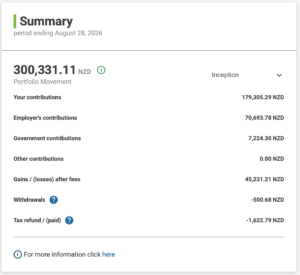
What does the KiwiSaver Summary provide?
It provides a high-level overview of your portfolio, including details such as:
Your contributions – Contributions you have made, from the time you first joined KiwiSaver (includes if you joined KiwiSaver before switching to InvestNow).
Employer’s contributions – Contributions your employer(s) have made, from the time you first joined KiwiSaver (includes if you joined KiwiSaver before switching to InvestNow).
Government contributions – Contributions the government have made, from the time you first joined KiwiSaver (includes if you joined KiwiSaver before switching to InvestNow).
Other contributions – Any other contributions your employer(s) have made, from the time you first joined KiwiSaver (includes if you joined KiwiSaver before switching to InvestNow).
Gains/(losses) after fees – any gains or losses, after management fees, you have made in your KiwiSaver portfolio since joining the InvestNow KiwiSaver Scheme.
Withdrawals – any withdrawals from your KiwiSaver portfolio – for example it would include any refunds to Inland Revenue to correct contributions made via Inland Revenue, since joining the InvestNow KiwiSaver Scheme.
Tax refund/(paid) – any taxes paid/refunded since joining the InvestNow KiwiSaver Scheme. Note that this excludes any Portfolio Investment Entity (PIE) tax that is accrued but not yet paid or refunded.
You can change the period, for data supplied, by clicking the down-arrow in the top righthand corner of the Summary.
You do not need to be an investing expert, but you certainly need to understand some core principles and have the time to do your homework – ensuring that your investing suits your risk appetite, goals, knowledge etc.
We do not provide personal financial advice, but we do provide heaps of content and resources that will help guide/educate you – here are some of the key ones:
- The InvestNow Investing Principles,
- Our Investing Workshops. You will receive invitations, across the year, to attend online. You can also look at recordings of ones we have run in the past,
- Each month we produce the InvestNow Magazine, which will include articles on topics that you may find informative and helpful. As a customer, unless you opt-out, will receive this every month in your inbox, and
- Our website where you will find information about the investment managers, whose funds are available via our Managed Funds and KiwiSaver services.
We also believe it is good practice to get independent financial advice. A list of Authorised Financial Advisers (AFAs) is available on the FMA’s website –
You do not need to be an investing expert, but you certainly need to understand some core principles and have the time to do your homework – ensuring that your investing suits your risk appetite, goals, knowledge etc.
We do not provide personal financial advice, but we do provide heaps of content and resources that will help guide/educate you – here are some of the key ones:
- The InvestNow Investing Principles,
- Our Investing Workshops. You will receive invitations, across the year, to attend online. You can also look at recordings of ones we have run in the past,
- Each month we produce the InvestNow Magazine, which will include articles on topics that you may find informative and helpful. As a customer, unless you opt-out, will receive this every month in your inbox, and
- Our website where you will find information about the investment managers, whose funds are available via our Managed Funds and KiwiSaver services.
We also believe it is good practice to get independent financial advice. A list of Authorised Financial Advisers (AFAs) is available on the FMA’s website (www.fma.govt.nz).
Websites such as sorted.org.nz are also a useful resource. Visit their “Investing & Savings guide” for helpful information.
Websites such as sorted.org.nz are also a useful resource. Visit their “Investing & Savings guide” for helpful information.
Why are ‘My Returns’ different from ‘Investment Returns’?
The two figures can differ because they measure different things.
- ‘Investment Returns’ uses a Time Weighted Return (TWR) methodology, which assumes money was invested throughout the entire period and excludes the impact of deposits and withdrawals.
- ‘My Returns’, on the other hand, utilises the Extended Internal Rate of Return (XIRR) methodology, which reflects the size and timing of when your money was actually invested.
For example, imagine a Fund delivered a return of +20% during the first half of the year and -10% during the second half of the year. Overall, the investment generated a full-year fund-level return of +8%.
- Investor A invests $100 at the start of the year solely into this Fund and remains invested throughout the year. Their investment grows to approximately $108, meaning they experience the full +8% return. For Investor A, both the Fund’s return (‘Investment Returns’) and their personal ‘real world’ returns (‘My Returns’) was 8% for the year.
- Investor B also invests $100 into the same Fund during the year, but splits it into a $20 initial investment at the start of the year and then invests a further $80 halfway through the year. The first $20 benefits from both the strong first half and weaker second half, while the remaining $80 only experiences the second-half return of -10%. For Investor B, while the Fund’s return (‘Investment Returns’) was still 8% for the year, their personal ‘real world’ returns (‘My Returns’) was -6.4%, which reflects that most of their money was invested after the strongest period of performance had already occurred.
How can I update my Multi-Factor Authentication (MFA) preference?
There are now three options available to you, for receiving your unique passcode each time you login:
- SMS/Text
- Authentication App (NEW).
To change your MFA preference and/or switch to the Authentication App, follow these simple steps:
1) Log into your account
2) Click on the email address that appears in the top righthand side of the page:

3) Select “Security Settings“:

4) Select the “Disable MFA” option:
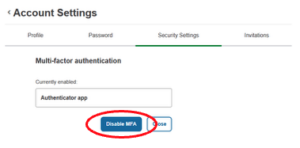
4) Sign out of your account:
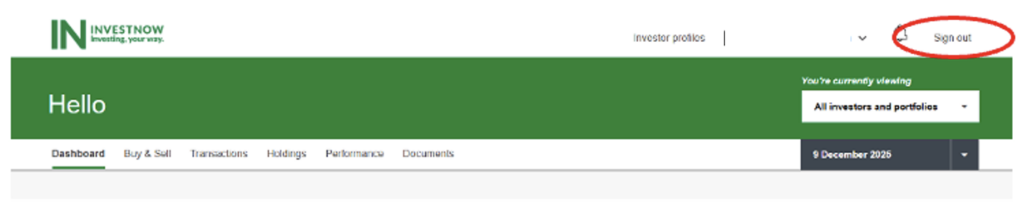
The next time you login you will be presented with the ability to select from the three MFA options available to you.
- Authenticator app – this will work with most common authenticator apps (Google, Microsoft, etc.). You will need to scan the QR code to set this up or alternatively enter in the set-up key to your app.
- Email – you will be sent a code to your email address
- SMS – you will need to enter in your mobile number and you will receive a code via text message
Select the one you want to use and follow the simple instructions:

Note: You can repeat these steps should you wish to change your MFA preference at any time.
How do I find out if I am a member of the InvestNow KiwiSaver Scheme?
You can find out who your KiwiSaver provider is by contacting the Inland Revenue Department (IRD), or by logging in to your MyIR account.
If you have changed your legal name, please send (scan and e-mail, to contact@investnow.co.nz) us a copy of evidence of your change in name. We accept the following documents:
- Marriage certificate
- Updated birth certificate
- Name change certificate
There is no functionality offered on InvestNow to facilitate this. If you want to switch from one fund to another, you have to sell the first one, wait until the sale proceeds are in your Transaction Account and then buy the second fund.